Scrapling
Scraplingは、ウェブスクレイピングをシンプルかつ簡単にするために設計された、検出不能でパワフル、柔軟、かつ高性能なPythonウェブスクレイピングライブラリです。これは、ウェブサイトの変更から学習し、それらと共に進化できる初の適応型スクレイピングライブラリです。他のライブラリがサイト構造の更新時に動作しなくなるのに対し、Scraplingは要素を自動的に再配置し、スクレイパーをスムーズに稼働させ続けます。
主な機能:
- 適応型スクレイピング技術 – ウェブサイトの変更から学習し、自動的に進化する初のライブラリです。サイトの構造が更新された際、Scraplingは要素をインテリジェントに再配置し、継続的な動作を保証します。
- ブラウザフィンガープリント偽装 – TLSフィンガープリントマッチングと実際のブラウザヘッダーエミュレーションをサポートします。
- ステルススクレイピング機能 –
StealthyFetcherは、Cloudflare Turnstileのような高度なアンチボットシステムを回避できます。 - 永続セッションサポート – 信頼性と効率的なスクレイピングのために、
FetcherSession、DynamicSession、StealthySessionを含む複数のセッションタイプを提供します。
詳細については、[公式ドキュメント]をご覧ください。
ScrapelessとScraplingを組み合わせる理由
Scraplingは、適応型スクレイピングとAI連携をサポートし、高性能なウェブデータ抽出に優れています。多様なシナリオに対応するために、Fetcher、DynamicFetcher、StealthyFetcherという複数の組み込みFetcherクラスが付属しています。
しかし、高度なアンチボットメカニズムや大規模な並行スクレイピングに直面した場合、以下のような課題が依然として発生する可能性があります。
- Cloudflare、AWS WAF、reCAPTCHAなどによってローカルブラウザが容易にブロックされる。
- 大規模な並行スクレイピング中にブラウザのリソース消費量が高く、パフォーマンスが制限される。
StealthyFetcherにはステルス機能が含まれているものの、極端なアンチボットシナリオでは、より強力なインフラサポートが依然として必要となる。- 複雑なデバッグプロセスにより、スクレイピング失敗の根本原因を特定することが困難になる。
Scrapeless Cloud Browserは、これらの課題を完璧に解決します。
- ワンクリックでのアンチボット回避: reCAPTCHA、Cloudflare Turnstile/Challenge、AWS WAF、その他の検証を自動的に処理します。Scraplingの適応型抽出機能と組み合わせることで、成功率を劇的に向上させます。
- 無制限の並行スケーリング: 各タスクは数秒以内に50〜1000以上のブラウザインスタンスを起動でき、ローカルのパフォーマンスボトルネックを解消し、Scraplingの高性能な潜在能力を最大限に引き出します。
- コストを40〜80%削減: 同様のクラウドソリューションと比較して、Scrapelessは全体で20〜60%のコストに抑えられ、従量課金制をサポートしているため、小規模なプロジェクトでも手頃な価格で利用できます。
- 視覚的なデバッグツール: Session ReplayとLive URL機能により、Scraplingの実行プロセスをリアルタイムで監視し、スクレイピングの失敗を迅速に特定し、デバッグコストを削減できます。
- 柔軟な連携: Scraplingの
DynamicFetcherとPlayWrightFetcher(Playwright上に構築)は、設定を介してScrapeless Cloud Browserに簡単に接続でき、既存のロジックを書き換える必要はありません。 - エッジサービスノード: グローバルデータセンターにより、Scrapelessは他のクラウドブラウザよりも2〜3倍速い起動速度と安定性を実現し、195カ国以上で9,000万以上の信頼できる住宅IPを提供して、Scraplingの実行速度を向上させます。
- 隔離された環境と永続セッション: 各Scrapelessプロファイルは、永続的なログインサポートを備えた隔離された環境で実行され、セッションの干渉を防ぎ、大規模スクレイピングの安定性を確保します。
- 柔軟なフィンガープリント設定: Scrapelessは、ブラウザフィンガープリントをランダムに生成したり、完全にカスタマイズしたりできます。Scraplingの
StealthyFetcherと組み合わせることで、検出リスクをさらに低減し、スクレイピングの成功率を大幅に向上させます。
はじめに
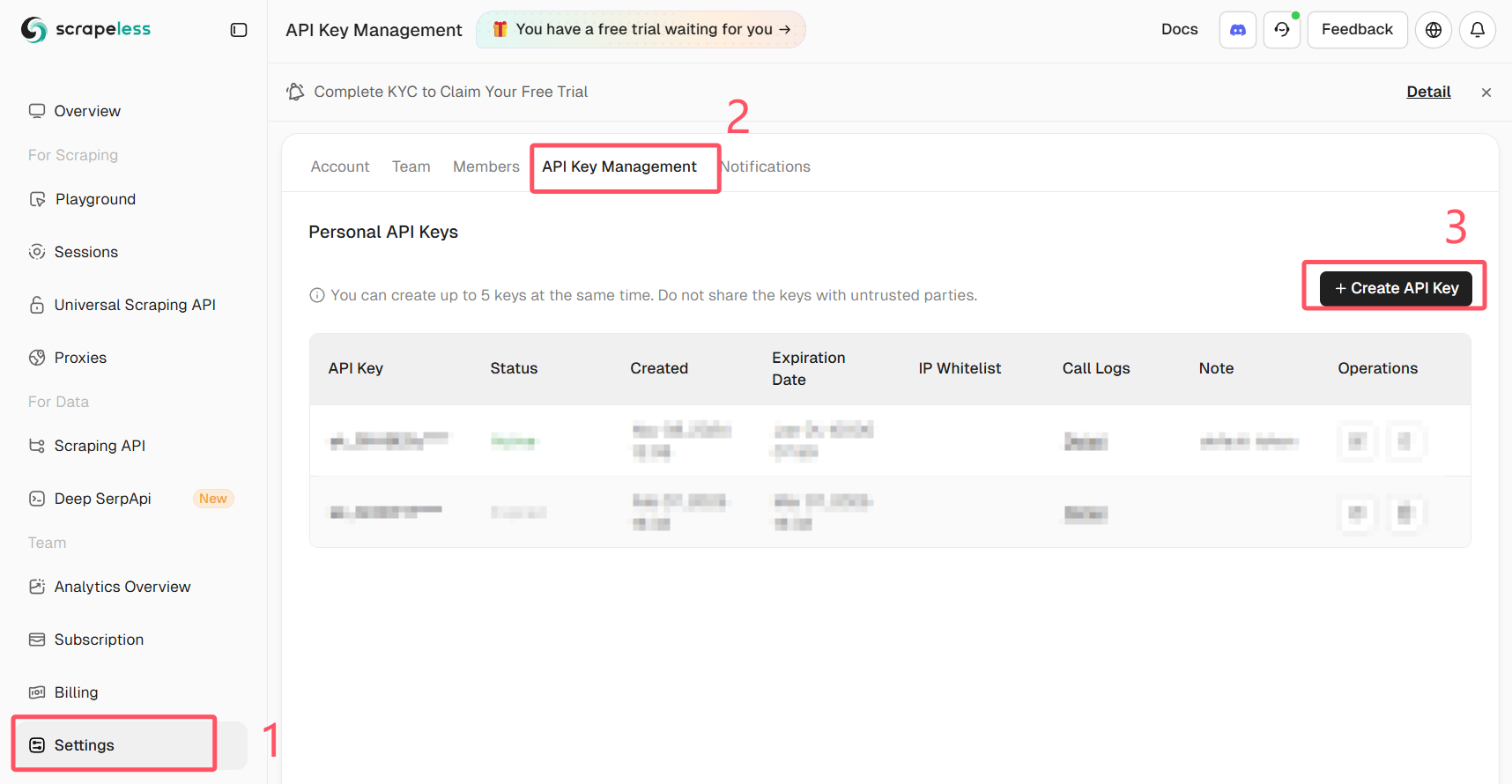
Scrapelessにログインして、APIキーを取得してください。
前提条件
- Python 3.10+
- 有効なAPIキーを持つ登録済みのScrapelessアカウント
- Scraplingがインストールされていること(または公式Dockerイメージを使用)
pip install scrapling
# If you need dynamic or stealth fetchers:
pip install "scrapling[fetchers]"
# Install browser dependencies
scrapling install
または、公式Dockerイメージを使用します。
docker pull pyd4vinci/scrapling
# or
docker pull ghcr.io/d4vinci/scrapling:latest
クイックスタート
ここでは簡単な例として、Scraplingが提供するDynamicSessionを使用して、WebSocketエンドポイント経由でScrapeless Cloud Browserに接続し、ページを取得して応答を出力する方法を示します。
from urllib.parse import urlencode

from scrapling.fetchers import DynamicSession

# Configure your browser session
config = {
    "token": "YOUR_API_KEY",
    "sessionName": "scrapling-session",
    "sessionTTL": "300",  # 5 minutes
    "proxyCountry": "ANY",
    "sessionRecording": "false",
}

# Build WebSocket URL
ws_endpoint = f"wss://browser.scrapeless.com/api/v2/browser?{urlencode(config)}"
print('Connecting to Scrapeless...')

with DynamicSession(cdp_url=ws_endpoint, disable_resources=True) as s:
    print("Connected!")
    page = s.fetch("https://httpbin.org/headers", network_idle=True)
    print(f"Page loaded, content length: {len(page.body)}")
    print(page.json())
注意: Scrapeless Cloud Browserは、プロキシ設定、カスタムフィンガープリント、CAPTCHAソルバーなどの高度なオプションをサポートしています。
詳細については、Scrapeless Browserドキュメントを参照してください。
一般的な使用例(完全な例付き)
開始する前に、以下のことを確認してください。
pip install "scrapling[fetchers]"を実行済みであること- ブラウザの依存関係をダウンロードするために
scrapling installを実行済みであること - 有効なScrapeless APIキーを持っていること
- **Python 3.10+**を使用していること
Scrapling + ScrapelessでAmazonをスクレイピング
以下は、Amazon製品の詳細をスクレイピングする完全な例です。
このスクリプトは、Scrapeless Cloud Browserに自動的に接続し、ターゲットページを読み込み、アンチボットチェックを回避し、タイトル、価格、在庫状況、評価、レビュー数、機能、画像、ASIN、販売元、カテゴリなどの主要な製品情報を抽出します。
# amazon_scraper_response_only.py
from urllib.parse import urlencode
import json
import time
import re
from scrapling.fetchers import DynamicSession

# ---------------- CONFIG ----------------
CONFIG = {
    "token": "YOUR_SCRAPELESS_API_KEY",
    "sessionName": "Data Scraping",
    "sessionTTL": "900",
    "proxyCountry": "ANY",
    "sessionRecording": "true",
}
DISABLE_RESOURCES = True   # False -> load JS/resources (more stable for JS-heavy sites)
WAIT_FOR_SELECTOR_TIMEOUT = 60
MAX_RETRIES = 3

TARGET_URL = "https://www.amazon.com/ESR-Compatible-Military-Grade-Protection-Scratch-Resistant/dp/B0CC1F4V7Q"
WS_ENDPOINT = f"wss://browser.scrapeless.com/api/v2/browser?{urlencode(CONFIG)}"


# ---------------- HELPERS (use response ONLY) ----------------
def retry(func, retries=2, wait=2):
    for i in range(retries + 1):
        try:
            return func()
        except Exception as e:
            print(f"[retry] Attempt {i+1} failed: {e}")
            if i == retries:
                raise
            time.sleep(wait * (i + 1))


def _resp_css_first_text(resp, selector):
    """Try response.css_first('selector::text') or resp.query_selector_text(selector) - return str or None."""
    try:
        if hasattr(resp, "css_first"):
            # prefer unified ::text pseudo API
            val = resp.css_first(f"{selector}::text")
            if val:
                return val.strip()
    except Exception:
        pass
    try:
        if hasattr(resp, "query_selector_text"):
            val = resp.query_selector_text(selector)
            if val:
                return val.strip()
    except Exception:
        pass
    return None


def _resp_css_texts(resp, selector):
    """Return list of text values for selector using response.css('selector::text') or query_selector_all_text."""
    out = []
    try:
        if hasattr(resp, "css"):
            vals = resp.css(f"{selector}::text") or []
            for v in vals:
                if isinstance(v, str) and v.strip():
                    out.append(v.strip())
            if out:
                return out
    except Exception:
        pass
    try:
        if hasattr(resp, "query_selector_all_text"):
            vals = resp.query_selector_all_text(selector) or []
            for v in vals:
                if v and v.strip():
                    out.append(v.strip())
            if out:
                return out
    except Exception:
        pass
    # some fetchers provide query_selector_all and elements with .text() method
    try:
        if hasattr(resp, "query_selector_all"):
            els = resp.query_selector_all(selector) or []
            for el in els:
                try:
                    if hasattr(el, "text") and callable(el.text):
                        t = el.text()
                        if t and t.strip():
                            out.append(t.strip())
                            continue
                except Exception:
                    pass
                try:
                    if hasattr(el, "get_text"):
                        t = el.get_text(strip=True)
                        if t:
                            out.append(t)
                            continue
                except Exception:
                    pass
    except Exception:
        pass
    return out


def _resp_css_first_attr(resp, selector, attr):
    """Try to get attribute via response css pseudo ::attr(...) or query selector element attributes."""
    try:
        if hasattr(resp, "css_first"):
            val = resp.css_first(f"{selector}::attr({attr})")
            if val:
                return val.strip()
    except Exception:
        pass
    try:
        # try element and get_attribute / get
        if hasattr(resp, "query_selector"):
            el = resp.query_selector(selector)
            if el:
                if hasattr(el, "get_attribute"):
                    try:
                        v = el.get_attribute(attr)
                        if v:
                            return v
                    except Exception:
                        pass
                try:
                    v = el.get(attr) if hasattr(el, "get") else None
                    if v:
                        return v
                except Exception:
                    pass
                try:
                    attrs = getattr(el, "attrs", None)
                    if isinstance(attrs, dict) and attr in attrs:
                        return attrs.get(attr)
                except Exception:
                    pass
    except Exception:
        pass
    return None


def detect_bot_via_resp(resp):
    """Detect typical bot/captcha signals using response text selectors only."""
    checks = [
        # body text
        ("body",),
        # some common challenge indicators
        ("#challenge-form",),
        ("#captcha",),
        ("text:contains('are you a human')",),
    ]
    # First try a broad body text
    try:
        body_text = _resp_css_first_text(resp, "body")
        if body_text:
            txt = body_text.lower()
            for k in ("captcha", "are you a human", "verify you are human", "access to this page has been denied", "bot detection", "please enable javascript", "checking your browser"):
                if k in txt:
                    return True
    except Exception:
        pass
    # Try specific selectors
    suspects = [
        "#captcha", "#cf-hcaptcha-container", "#challenge-form", "text:contains('are you a human')"
    ]
    for s in suspects:
        try:
            if _resp_css_first_text(resp, s):
                return True
        except Exception:
            pass
    return False


def parse_price_from_text(price_raw):
    if not price_raw:
        return None, None
    m = re.search(r"([^\d.,\s]+)?\s*([\d,]+\.\d{1,2}|[\d,]+)", price_raw)
    if m:
        currency = m.group(1).strip() if m.group(1) else None
        num = m.group(2).replace(",", "")
        try:
            price = float(num)
        except Exception:
            price = None
        return currency, price
    return None, None


def parse_int_from_text(text):
    if not text:
        return None
    digits = "".join(filter(str.isdigit, text))
    try:
        return int(digits) if digits else None
    except:
        return None


# ---------------- MAIN (use response only) ----------------
def scrape_amazon_using_response_only(url):
    with DynamicSession(cdp_url=WS_ENDPOINT, disable_resources=DISABLE_RESOURCES) as s:
        # fetch with retry
        resp = retry(lambda: s.fetch(url, network_idle=True, timeout=120000), retries=MAX_RETRIES - 1)

        if detect_bot_via_resp(resp):
            print("[warn] Bot/CAPTCHA detected via response selectors.")
            try:
                resp.screenshot(path="captcha_detected.png")
            except Exception:
                pass
            # retry once
            time.sleep(2)
            resp = retry(lambda: s.fetch(url, network_idle=True, timeout=120000), retries=1)

        # Wait for productTitle (polling using resp selectors only)
        title = _resp_css_first_text(resp, "#productTitle") or _resp_css_first_text(resp, "#title")
        waited = 0
        while not title and waited < WAIT_FOR_SELECTOR_TIMEOUT:
            print("[info] Waiting for #productTitle to appear (response selector)...")
            time.sleep(3)
            waited += 3
            resp = s.fetch(url, network_idle=True, timeout=120000)
            title = _resp_css_first_text(resp, "#productTitle") or _resp_css_first_text(resp, "#title")

        title = title.strip() if title else None

        # Extract fields using response-only helpers
        def get_text(selectors, multiple=False):
            if multiple:
                out = []
                for sel in selectors:
                    out.extend(_resp_css_texts(resp, sel) or [])
                return out
            for sel in selectors:
                v = _resp_css_first_text(resp, sel)
                if v:
                    return v
            return None

        price_raw = get_text([
            "#priceblock_ourprice",
            "#priceblock_dealprice",
            "#priceblock_saleprice",
            "#price_inside_buybox",
            ".a-price .a-offscreen"
        ])
        rating_text = get_text(["span.a-icon-alt", "#acrPopover"])
        review_count_text = get_text(["#acrCustomerReviewText", "[data-hook='total-review-count']"])
        availability = get_text([
            "#availability .a-color-state",
            "#availability .a-color-success",
            "#outOfStock",
            "#availability"
        ])
        features = get_text(["#feature-bullets ul li"], multiple=True) or []
        description = get_text([
            "#productDescription",
            "#bookDescription_feature_div .a-expander-content",
            "#productOverview_feature_div"
        ])

        # images (use attribute extraction via response)
        images = []
        seen = set()
        main_src = _resp_css_first_attr(resp, "#imgTagWrapperId img", "data-old-hires") \
                   or _resp_css_first_attr(resp, "#landingImage", "src") \
                   or _resp_css_first_attr(resp, "#imgTagWrapperId img", "src")
        if main_src and main_src not in seen:
            images.append(main_src); seen.add(main_src)

        dyn = _resp_css_first_attr(resp, "#imgTagWrapperId img", "data-a-dynamic-image") \
              or _resp_css_first_attr(resp, "#landingImage", "data-a-dynamic-image")
        if dyn:
            try:
                obj = json.loads(dyn)
                for k in obj.keys():
                    if k not in seen:
                        images.append(k); seen.add(k)
            except Exception:
                pass

        thumbs = _resp_css_texts(resp, "#altImages img::attr(src)") or _resp_css_texts(resp, ".imageThumbnail img::attr(src)") or []
        for src in thumbs:
            if not src:
                continue
            src_clean = re.sub(r"\._[A-Z0-9,]+_\.", ".", src)
            if src_clean not in seen:
                images.append(src_clean); seen.add(src_clean)

        # ASIN (attribute)
        asin = _resp_css_first_attr(resp, "input#ASIN", "value")
        if asin:
            asin = asin.strip()
        else:
            detail_texts = _resp_css_texts(resp, "#detailBullets_feature_div li") or []
            combined = " ".join([t for t in detail_texts if t])
            m = re.search(r"ASIN[:\s]*([A-Z0-9-]+)", combined, re.I)
            if m:
                asin = m.group(1).strip()

        merchant = _resp_css_first_text(resp, "#sellerProfileTriggerId") \
                   or _resp_css_first_text(resp, "#merchant-info") \
                   or _resp_css_first_text(resp, "#bylineInfo")
        categories = _resp_css_texts(resp, "#wayfinding-breadcrumbs_container ul li a") or _resp_css_texts(resp, "#wayfinding-breadcrumbs_feature_div ul li a") or []
        categories = [c.strip() for c in categories if c and c.strip()]

        currency, price = parse_price_from_text(price_raw)
        rating_val = None
        if rating_text:
            try:
                rating_val = float(rating_text.split()[0].replace(",", ""))
            except Exception:
                rating_val = None
        review_count = parse_int_from_text(review_count_text)

        data = {
            "title": title,
            "price_raw": price_raw,
            "price": price,
            "currency": currency,
            "rating": rating_val,
            "review_count": review_count,
            "availability": availability,
            "features": features,
            "description": description,
            "images": images,
            "asin": asin,
            "merchant": merchant,
            "categories": categories,
            "url": url,
            "scrapedAt": time.strftime("%Y-%m-%dT%H:%M:%SZ", time.gmtime()),
        }

        return data


# ---------------- RUN ----------------
if __name__ == "__main__":
    try:
        result = scrape_amazon_using_response_only(TARGET_URL)
        print(json.dumps(result, indent=2, ensure_ascii=False))
        with open("scrapeless-amazon-product.json", "w", encoding="utf-8") as f:
            json.dump(result, f, ensure_ascii=False, indent=2)
    except Exception as e:
        print("[error] scraping failed:", e)
出力例:
{
  "title": "ESR for iPhone 15 Pro Max Case, Compatible with MagSafe, Military-Grade Protection, Yellowing Resistant, Scratch-Resistant Back, Magnetic Phone Case for iPhone 15 Pro Max, Classic Series, Clear",
  "price_raw": "$12.99",
  "price": 12.99,
  "currency": "$",
  "rating": 4.6,
  "review_count": 133714,
  "availability": "In Stock",
  "features": [
    "Compatibility: only for iPhone 15 Pro Max; full functionality maintained via precise speaker and port cutouts and easy-press buttons",
    "Stronger Magnetic Lock: powerful built-in magnets with 1,500 g of holding force enable faster, easier place-and-go wireless charging and a secure lock on any MagSafe accessory",
    "Military-Grade Drop Protection: rigorously tested to ensure total protection on all sides, with specially designed Air Guard corners that absorb shock so your phone doesn\u2019t have to",
    "Raised-Edge Protection: raised screen edges and Camera Guard lens frame provide enhanced scratch protection where it really counts",
    "Stay Original: scratch-resistant, crystal-clear acrylic back lets you show off your iPhone 15 Pro Max\u2019s true style in stunning clarity that lasts",
    "Complete Customer Support: detailed setup videos and FAQs, comprehensive 12-month protection plan, lifetime support, and personalized help."
  ],
  "description": "BrandESRCompatible Phone ModelsiPhone 15 Pro MaxColorA-ClearCompatible DevicesiPhone 15 Pro MaxMaterialAcrylic",
  "images": [
    "https://m.media-amazon.com/images/I/71-ishbNM+L._AC_SL1500_.jpg",
    "https://m.media-amazon.com/images/I/71-ishbNM+L._AC_SX342_.jpg",
    "https://m.media-amazon.com/images/I/71-ishbNM+L._AC_SX679_.jpg",
    "https://m.media-amazon.com/images/I/71-ishbNM+L._AC_SX522_.jpg",
    "https://m.media-amazon.com/images/I/71-ishbNM+L._AC_SX385_.jpg",
    "https://m.media-amazon.com/images/I/71-ishbNM+L._AC_SX466_.jpg",
    "https://m.media-amazon.com/images/I/71-ishbNM+L._AC_SX425_.jpg",
    "https://m.media-amazon.com/images/I/71-ishbNM+L._AC_SX569_.jpg",
    "https://m.media-amazon.com/images/I/41Ajq9jnx9L._AC_SR38,50_.jpg",
    "https://m.media-amazon.com/images/I/51RkuGXBMVL._AC_SR38,50_.jpg",
    "https://m.media-amazon.com/images/I/516RCbMo5tL._AC_SR38,50_.jpg",
    "https://m.media-amazon.com/images/I/51DdOFdiQQL._AC_SR38,50_.jpg",
    "https://m.media-amazon.com/images/I/514qvXYcYOL._AC_SR38,50_.jpg",
    "https://m.media-amazon.com/images/I/518CS81EFXL._AC_SR38,50_.jpg",
    "https://m.media-amazon.com/images/I/413EWAtny9L.SX38_SY50_CR,0,0,38,50_BG85,85,85_BR-120_PKdp-play-icon-overlay__.jpg",
    "https://images-na.ssl-images-amazon.com/images/G/01/x-locale/common/transparent-pixel._V192234675_.gif"
  ],
  "asin": "B0CC1F4V7Q",
  "merchant": "Minghutech-US",
  "categories": [
    "Cell Phones & Accessories",
    "Cases, Holsters & Sleeves",
    "Basic Cases"
  ],
  "url": "https://www.amazon.com/ESR-Compatible-Military-Grade-Protection-Scratch-Resistant/dp/B0CC1F4V7Q",
  "scrapedAt": "2025-10-30T10:20:16Z"
}この例は、DynamicSessionとScrapelessが連携して、安定した再利用可能なロングセッション環境を構築する方法を示しています。
同じセッション内で、ブラウザを再起動することなく複数のページをリクエストでき、ログイン状態、Cookie、ローカルストレージを維持し、プロファイル分離とセッション永続性を実現できます。