GitHub MFA 自动化
简介
自动化 GitHub 登录的最大挑战是双因素认证 (2FA)。无论是认证器应用 (TOTP) 还是电子邮件 OTP,传统的自动化流程通常会在此步骤受阻,原因如下:
- 无法自动检索验证码
- 无法实时同步验证码
- 无法通过自动化自动输入验证码
- 浏览器环境不够真实,触发 GitHub 的安全检查
本文演示了如何使用 Scrapeless 浏览器 + Signal CDP 构建一个完全自动化的 GitHub 2FA 工作流,包括:
- 案例 1: GitHub 2FA(认证器 / TOTP 自动生成)
- 案例 2: GitHub 2FA(电子邮件 OTP 自动监听)
我们将解释每个案例的完整工作流,并展示如何在自动化系统中协调登录脚本与验证码监听器。
案例 1:GitHub 2FA(认证器 OTP 模式)
GitHub 的 **TOTP(基于时间的一次性密码)**机制非常适合自动化场景。使用 Scrapeless 浏览器 + Signal CDP,您可以让浏览器自动:
- 当到达 2FA 页面时触发事件
- 生成 OTP 码
- 自动填写验证码
- 完成登录
与传统的电子邮件/短信 OTP 相比,TOTP 提供了:
- 本地生成的代码,无外部依赖
- 快速稳定的代码生成
- 无需额外的 API
- 无需人工干预即可完全自动化
适用场景:
- 使用 Google Authenticator / Authy / 1Password 的 GitHub 账户
- 2FA 页面路径:
/sessions/two-factor/app或/sessions/two-factor/webauthn
视频
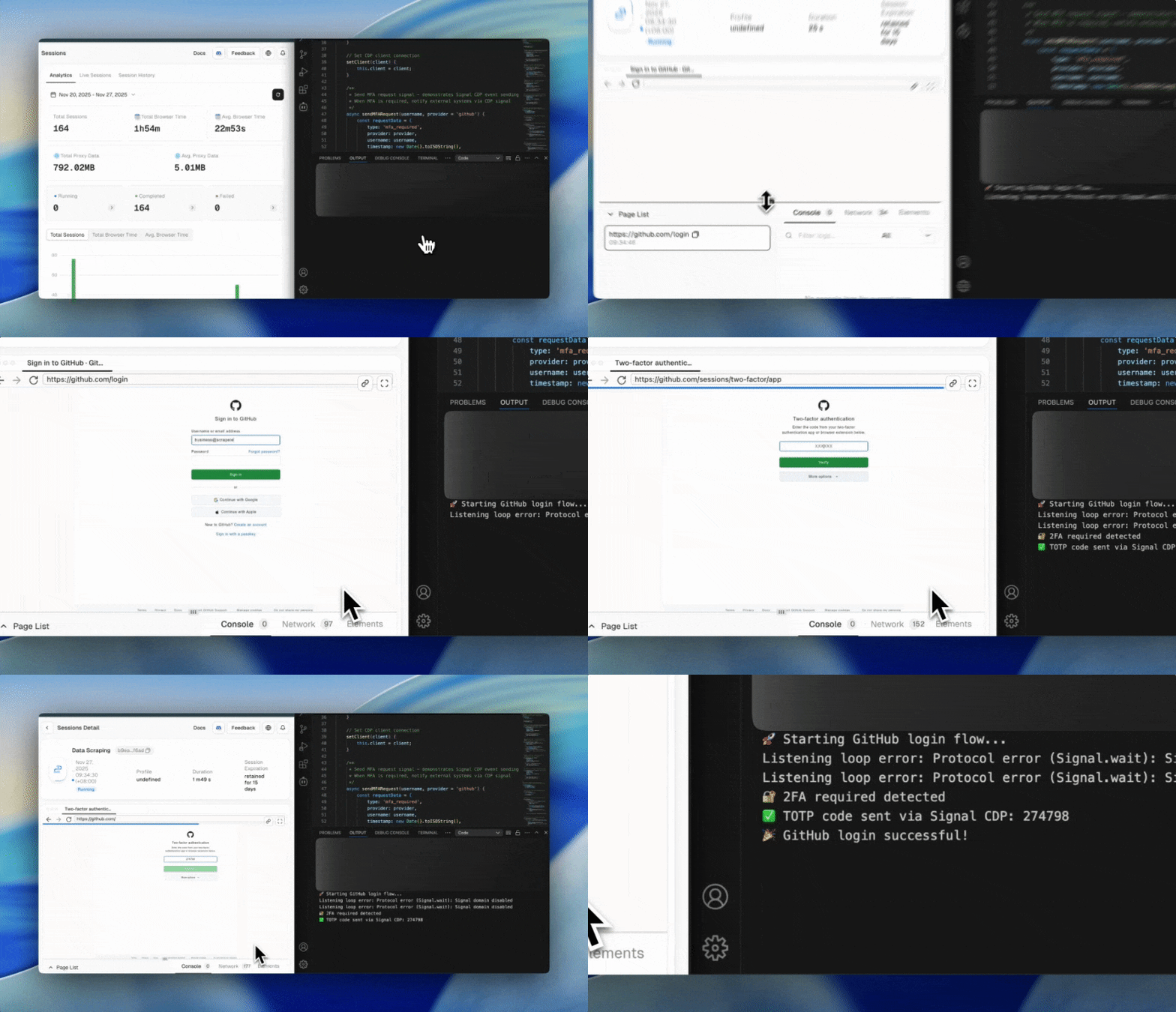
步骤 1:连接到 Scrapeless 浏览器
在此步骤中,我们建立与 Scrapeless 浏览器的全双工 WebSocket 连接:
import puppeteer from 'puppeteer-core';

const query = new URLSearchParams({
  token: "",
  proxyCountry: "ANY",
  sessionRecording: true,
  sessionTTL: 900,
  sessionName: "Data Scraping",
});

const connectionURL = `wss://browser.scrapeless.com/api/v2/browser?${query.toString()}`;
const browserWSEndpoint = connectionURL;

const browser = await puppeteer.connect({ browserWSEndpoint });
console.log("✅ Connected to Scrapeless Browser");
优点:
- 云端真实 Chrome 浏览器,具有强大的反检测能力
- 不消耗本地资源
- 自动代理、持久化和会话记录
- 可靠执行大规模自动化登录工作流
步骤 2:初始化 MFA 管理器 + TOTP 提供程序
MFA 通过 Signal CDP 双向通信处理,它:
- 当检测到 2FA 页面时自动发送
mfa_code_request - 生成 TOTP 码
- 通过
mfa_code_response返回代码 - 发送登录结果事件
import { authenticator } from 'otplib';

const TOTP_SECRETS = {
    'github': 'secret-code',
    'default': 'secret-code'
};

authenticator.options = {
    digits: 6,
    step: 30,
    window: 1
};
步骤 3:创建 MFA 管理器
在这里,我们创建一个集中的 MFA 管理器来处理与 Signal CDP 的通信:
- 触发
mfa_code_request - 等待并接收验证码 (
mfa_code_response) - 将代码返回给 GitHub 登录过程
- 发送最终登录结果事件
class MFAManager {
    constructor() {
        this.client = null;
    }

    setClient(client) {
        this.client = client;
    }

    async sendMFARequest(username, provider = 'github') {
        const requestData = {
            type: 'mfa_required',
            provider,
            username,
            timestamp: new Date().toISOString(),
            service: 'github_2fa'
        };

        return await this.client.send('Signal.send', {
            event: 'mfa_code_request',
            data: JSON.stringify(requestData)
        });
    }

    async waitForMFACode(timeout = 120000) {
        const result = await this.client.send('Signal.wait', {
            event: 'mfa_code_response',
            timeout
        });

        if (result.status === 200 && result.data) {
            return JSON.parse(result.data).code;
        } else if (result.status === 408) {
            throw new Error('Waiting for MFA code timed out');
        } else {
            throw new Error(`Signal wait failed, status: ${result.status}`);
        }
    }

    async sendMFAResponse(code, username) {
        const responseData = {
            code,
            username,
            timestamp: new Date().toISOString(),
            status: 'code_provided'
        };

        return await this.client.send('Signal.send', {
            event: 'mfa_code_response',
            data: JSON.stringify(responseData)
        });
    }

    async sendLoginResult(success, username, url, error = null) {
        const resultData = {
            success,
            username,
            url,
            timestamp: new Date().toISOString(),
            error
        };

        await this.client.send('Signal.send', {
            event: 'github_login_result',
            data: JSON.stringify(resultData)
        });
    }
}
优点:
- 完全自动化的 2FA 工作流(请求 → 等待 → 检索 → 填写)
- 统一管理多种认证方法(TOTP/电子邮件/推送)
- 消除脚本中重复的 2FA 逻辑
步骤 4:启动 TOTP 代码提供程序(处理代码的监听和自动填充)
在此步骤中,我们启动 TOTP 自动代码监听器,它:
- 持续监听
mfa_code_request事件 - 自动生成 TOTP 码(使用
otplib) - 通过 Signal 自动发送代码 (
mfa_code_response) - 完全取代手动代码输入
class TOTPCodeProvider {
    constructor(mfaManager) {
        this.mfaManager = mfaManager;
        this.isListening = false;
        this.secrets = TOTP_SECRETS;
    }

    async startListening() {
        if (this.isListening) return;
        this.isListening = true;
        this.listenLoop();
    }

    async listenLoop() {
        while (this.isListening) {
            try {
                const result = await this.mfaManager.client.send('Signal.wait', {
                    event: 'mfa_code_request',
                    timeout: 5000
                });

                if (result.status === 200 && result.data) {
                    const requestData = JSON.parse(result.data);
                    await this.handleMFARequest(requestData);
                }
            } catch (err) {}

            await new Promise(r => setTimeout(r, 100));
        }
    }

    async handleMFARequest(requestData) {
        const code = this.generateTOTPCode(requestData.provider);
        await this.mfaManager.sendMFAResponse(code, requestData.username);
        console.log(`✅ TOTP code sent via Signal CDP: ${code}`);
    }

    generateTOTPCode(service = 'github') {
        const secret = this.secrets[service] || this.secrets.default;
        return authenticator.generate(secret);
    }
}
优点:
- 无需手动输入即可完全自动化 2FA
- 无需电子邮件或移动应用
- TOTP 生成准确、稳定且可扩展
- 支持 GitHub、AWS、Azure、Google 和任何基于 TOTP 的提供商
步骤 5:访问 GitHub 登录页面并输入凭据
此步骤处理 GitHub 登录流程的第一部分:
打开登录页面 → 输入用户名和密码 → 进入下一步(2FA 或直接登录)
await page.goto('https://github.com/login', { waitUntil: 'networkidle2' });

await page.waitForSelector('#login_field', { timeout: 10000 });

await page.type('#login_field', githubCredentials.username);
await page.type('#password', githubCredentials.password);

await page.click('input[type="submit"][value="Sign in"]');
优点:
- 使用 Scrapeless 浏览器确保真实、稳定的浏览器环境
- 自动输入模拟真实用户行为,避免触发 GitHub 安全标志
- 保证导航到正确的 2FA 页面
步骤 6:检测 2FA 页面并自动提交 TOTP
if (currentUrl.includes('/sessions/two-factor')) {
    console.log('🔐 Detected 2FA required');

    await mfaManager.sendMFARequest(githubCredentials.username, 'github');

    const mfaCode = await mfaManager.waitForMFACode(120000);

    await page.waitForSelector('#app_totp');
    await page.type('#app_totp', mfaCode);

    await new Promise(resolve => setTimeout(resolve, 5000));
}
优点:
- 无需任何人工干预即可完成 GitHub 2FA
- TOTP 自动生成,避免电子邮件代码的延迟
- Signal CDP 双向通信确保代码准确交付
- 企业级稳定性和可靠性
步骤 7:通过 Signal CDP 发送登录结果
GitHub 登录 + 2FA 完成后,最终登录结果通过 CDP (Signal.send) 发送到您的自动化工作流。这使您的后端、机器人或 CI/CD 系统能够实时了解登录是否成功。
const isLoggedIn = !finalUrl.includes('/sessions/two-factor')
                && !finalUrl.includes('/login');

await mfaManager.sendLoginResult(isLoggedIn, githubCredentials.username, finalUrl);
完整代码
import puppeteer from 'puppeteer-core';
import {authenticator} from 'otplib';

const query = new URLSearchParams({
    token: "api-key",
    proxyCountry: "ANY",
    sessionRecording: true,
    sessionTTL: 900,
    sessionName: "GithubLogin",
});

const browserWSEndpoint = `wss://browser.scrapeless.com/api/v2/browser?${query.toString()}`;

// TOTP secrets
const TOTP_SECRETS = {
    'github': 'secret-code',
    'default': 'secret-code'
};

// Configure TOTP
authenticator.options = {digits: 6, step: 30, window: 1};

// MFA Manager
class MFAManager {
    constructor() {
        this.client = null;
    }

    setClient(client) {
        this.client = client;
    }

    async sendMFARequest(username, provider = 'github') {
        return await this.client.send('Signal.send', {
            event: 'mfa_code_request',
            data: JSON.stringify({
                type: 'mfa_required',
                provider,
                username,
                timestamp: new Date().toISOString(),
                service: 'github_2fa'
            })
        });
    }

    async waitForMFACode(timeout = 120000) {
        const result = await this.client.send('Signal.wait', {
            event: 'mfa_code_response',
            timeout
        });

        if (result.status === 200 && result.data) {
            return JSON.parse(result.data).code;
        } else if (result.status === 408) {
            throw new Error('Timeout waiting for MFA code');
        } else {
            throw new Error(`Signal wait failed, status: ${result.status}`);
        }
    }

    async sendMFAResponse(code, username) {
        return await this.client.send('Signal.send', {
            event: 'mfa_code_response',
            data: JSON.stringify({code, username, timestamp: new Date().toISOString(), status: 'code_provided'})
        });
    }

    async sendLoginResult(success, username, url, error = null) {
        await this.client.send('Signal.send', {
            event: 'github_login_result',
            data: JSON.stringify({success, username, url, timestamp: new Date().toISOString(), error})
        });
    }
}

// TOTP provider
class TOTPCodeProvider {
    constructor(mfaManager) {
        this.mfaManager = mfaManager;
        this.isListening = false;
        this.secrets = TOTP_SECRETS;
    }

    async startListening() {
        if (this.isListening) return;
        this.isListening = true;
        this.listenLoop();
    }

    async listenLoop() {
        while (this.isListening) {
            try {
                const result = await this.mfaManager.client.send('Signal.wait', {
                    event: 'mfa_code_request',
                    timeout: 5000
                });

                if (result.status === 200 && result.data) {
                    const requestData = JSON.parse(result.data);
                    await this.handleMFARequest(requestData);
                }
            } catch (error) {
            }

            await new Promise(resolve => setTimeout(resolve, 100));
        }
    }

    async handleMFARequest(requestData) {
        try {
            const code = this.generateTOTPCode(requestData.provider);
            if (code) {
                await this.mfaManager.sendMFAResponse(code, requestData.username);
                console.log(`✅ TOTP code sent via Signal CDP: ${code}`);
            } else {
                await this.sendErrorResponse(requestData.username, 'Unable to generate TOTP code');
            }
        } catch (error) {
            await this.sendErrorResponse(requestData.username, error.message);
        }
    }

    generateTOTPCode(service = 'github') {
        const secret = this.getSecretForService(service);
        if (!secret) throw new Error(`No TOTP secret found for ${service}`);

        const token = authenticator.generate(secret);
        if (!token || token.length !== 6 || isNaN(token)) {
            throw new Error(`Invalid TOTP token generated: ${token}`);
        }

        return token;
    }

    getSecretForService(service) {
        if (this.secrets[service]) return this.secrets[service];
        const lower = service.toLowerCase();
        if (this.secrets[lower]) return this.secrets[lower];
        if (this.secrets.default) return this.secrets.default;
        return null;
    }

    async sendErrorResponse(username, errorMessage) {
        await this.mfaManager.client.send('Signal.send', {
            event: 'mfa_code_error',
            data: JSON.stringify({username, error: errorMessage, timestamp: new Date().toISOString()})
        });
    }

    stopListening() {
        this.isListening = false;
    }
}

// GitHub credentials
const githubCredentials = {
    username: "***@gmail.com",
    password: "****"
};

// Main login flow
async function githubLoginWithAutoMFA() {
    let browser, page, codeProvider;

    try {
        console.log("🚀 Starting GitHub login flow...");
        browser = await puppeteer.connect({browserWSEndpoint});

        const pages = await browser.pages();
        page = pages.length > 0 ? pages[0] : await browser.newPage();

        const client = await page.target().createCDPSession();
        const mfaManager = new MFAManager();
        mfaManager.setClient(client);

        codeProvider = new TOTPCodeProvider(mfaManager);
        await codeProvider.startListening();

        page.setDefaultTimeout(30000);
        page.setDefaultNavigationTimeout(30000);

        await page.goto('https://github.com/login', {waitUntil: 'networkidle2'});
        await page.waitForSelector('#login_field, input[name="login"]', {timeout: 10000});

        await page.type('#login_field', githubCredentials.username);
        await page.type('#password', githubCredentials.password);
        await page.click('input[type="submit"][value="Sign in"]');

        await new Promise(resolve => setTimeout(resolve, 3000));

        const currentUrl = page.url();

        if (currentUrl.includes('/sessions/two-factor')) {
            console.log('🔐 2FA required detected');
            await mfaManager.sendMFARequest(githubCredentials.username, 'github');

            if (currentUrl.includes('/sessions/two-factor/webauthn')) {
                const moreOptionsButton = await page.$('.more-options-two-factor');
                if (moreOptionsButton) {
                    await moreOptionsButton.click();
                    await new Promise(resolve => setTimeout(resolve, 1000));
                }

                const authAppLink = await page.$('a[href="/sessions/two-factor/app"]');
                if (authAppLink) {
                    await authAppLink.click();
                    await page.waitForNavigation({waitUntil: 'networkidle2'});
                }
            }

            if (page.url().includes('/sessions/two-factor/app')) {
                const mfaCode = await mfaManager.waitForMFACode(120000);

                await page.waitForSelector('#app_totp', {timeout: 10000});
                await page.click('#app_totp', {clickCount: 3});
                await page.type('#app_totp', mfaCode);

                await new Promise(resolve => setTimeout(resolve, 5000));

                const finalUrl = page.url();
                const isLoggedIn = !finalUrl.includes('/sessions/two-factor') &&
                    !finalUrl.includes('/login') &&
                    (finalUrl.includes('github.com') || finalUrl === 'https://github.com/');

                await mfaManager.sendLoginResult(isLoggedIn, githubCredentials.username, finalUrl);

                if (isLoggedIn) {
                    console.log('🎉 GitHub login successful!');
                    await page.goto('https://github.com/', {waitUntil: 'networkidle2', timeout: 10000});
                } else {
                    console.log('❌ Login failed');
                }
            }
        } else if (currentUrl.includes('github.com') && !currentUrl.includes('/login')) {
            console.log('✅ Login successful (no 2FA)');
            await mfaManager.sendLoginResult(true, githubCredentials.username, currentUrl);
        } else {
            console.log('❌ Login failed, still on login page');
            await mfaManager.sendLoginResult(false, githubCredentials.username, currentUrl, 'Login failed');
        }

    } catch (error) {
        console.error('❌ GitHub login flow failed:', error);

        try {
            if (page) {
                const client = await page.target().createCDPSession();
                const mfaManager = new MFAManager();
                mfaManager.setClient(client);
                await mfaManager.sendLoginResult(false, githubCredentials.username, page.url() || 'unknown', error.message);
            }
        } catch (signalError) {
            console.error('❌ Failed to send error signal:', signalError);
        }

    } finally {
        if (codeProvider) codeProvider.stopListening();
        if (browser) await browser.close();
        console.log('🔚 GitHub login script finished');
    }
}

githubLoginWithAutoMFA().catch(console.error);
案例 2:GitHub 2FA(电子邮件 OTP 模式)
企业环境中最常见的 2FA 类型是通过电子邮件 OTP 进行多因素认证 (MFA)。
适用于:
- 启用 MFA 并绑定电子邮件验证的 GitHub
- 需要电子邮件验证的 GitHub 安全策略
视频
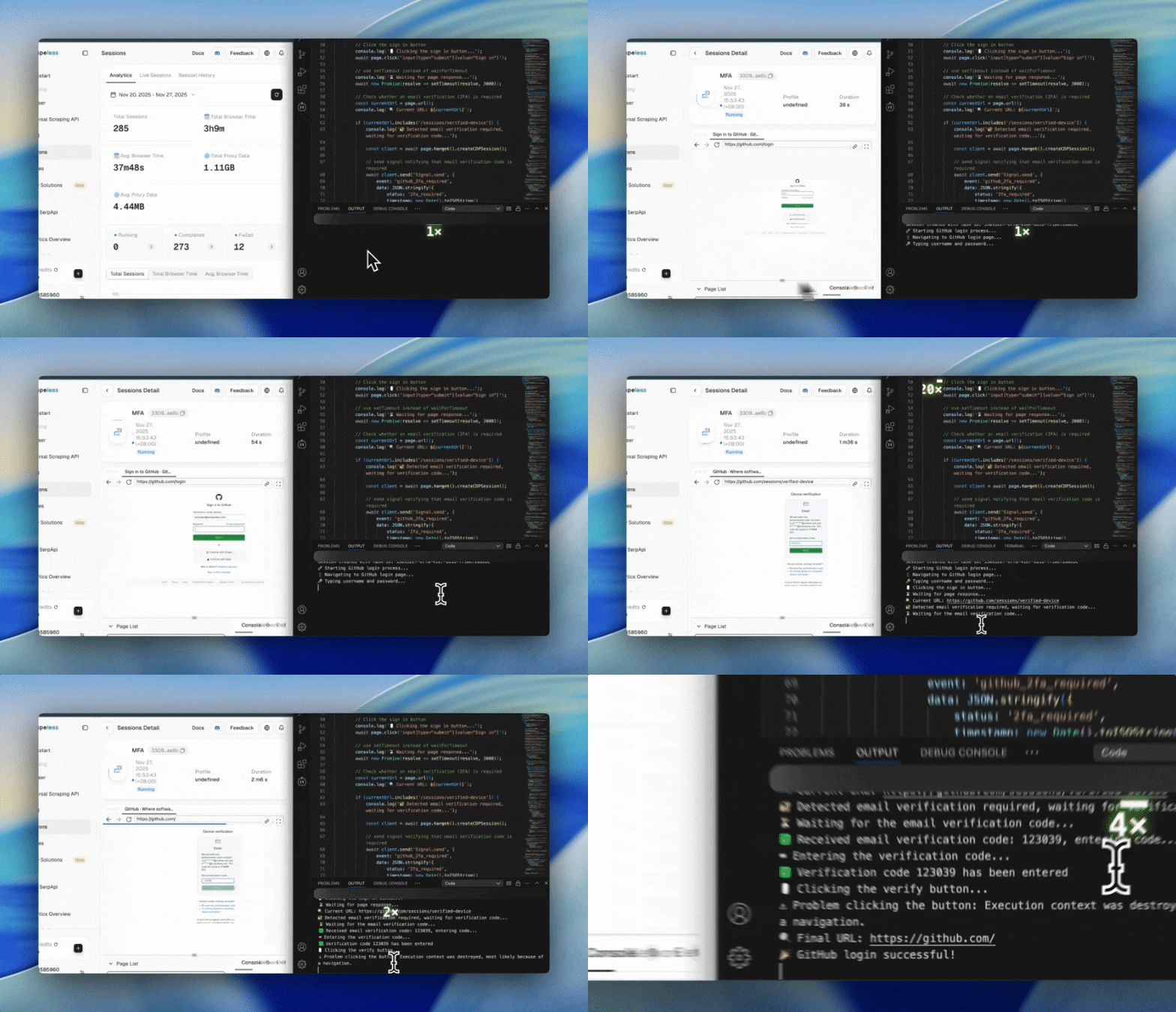
步骤 1:连接到 Scrapeless 浏览器
import puppeteer from 'puppeteer-core';

const query = new URLSearchParams({
  token: "",
  proxyCountry: "ANY",
  sessionRecording: true,
  sessionTTL: 900,
  sessionName: "Data Scraping",
});

const connectionURL = `wss://browser.scrapeless.com/api/v2/browser?${query.toString()}`;
const browserWSEndpoint = connectionURL;
优点:
- 远程浏览器执行,不消耗本地资源
sessionRecording便于回放和审计- 支持与 Signal 的双向实时通信
步骤 2:打开 GitHub 并输入凭据
const githubCredentials = {
    username: "1040111453@qq.com",
    password: "shijee1218",
    twoFactorCode: null
};

const browser = await puppeteer.connect({ browserWSEndpoint });
const pages = await browser.pages();
const page = pages.length > 0 ? pages[0] : await browser.newPage();

page.setDefaultTimeout(30000);
page.setDefaultNavigationTimeout(30000);

await page.goto('https://github.com/login', { waitUntil: 'networkidle2' });
await page.waitForSelector('#login_field', { timeout: 10000 });
优点:
- 精确模拟真实用户输入,避免触发 GitHub 安全检查
- 自动等待页面渲染,提高脚本稳定性
- 支持长超时设置,以处理网络波动
步骤 3:检测是否加载了电子邮件 2FA 页面
const currentUrl = page.url();

if (currentUrl.includes('/sessions/verified-device')) {
    const client = await page.target().createCDPSession();

    // Send Signal notification to email listener to prepare for OTP
    await client.send('Signal.send', {
        event: 'github_2fa_required',
        data: JSON.stringify({ status: '2fa_required', timestamp: new Date().toISOString() })
    });

    // Wait for email listener to return OTP
    const twoFactorResult = await client.send('Signal.wait', {
        event: 'github_2fa_code',
        timeout: 120000
    });
优点:
- 精确识别
/sessions/verified-device页面 - 主动通知电子邮件监听器准备 OTP
- 支持实时等待电子邮件 OTP,提高自动化成功率
步骤 4:电子邮件监听器发送 OTP
Signal 示例:
{
  "event": "github_2fa_code",
  "data": { "code": "123456" }
}
优点:
- 自动读取电子邮件
- 自动提取 GitHub OTP(6 位代码)
- 实时向 Scrapeless 浏览器发送 Signal,无需手动操作
步骤 5:输入 OTP 并提交
if (twoFactorResult.status === 200 && twoFactorResult.data) {
    const twoFactorData = JSON.parse(twoFactorResult.data);
    githubCredentials.twoFactorCode = twoFactorData.code;

    if (!page.url().includes('/sessions/verified-device')) return;

    await page.$eval('#otp', (input) => { input.value = ''; });
    await page.type('#otp', githubCredentials.twoFactorCode);

    await page.evaluate(() => {
        const button = document.querySelector('button[type="submit"]');
        if (button) button.click();
    });
    await new Promise(resolve => setTimeout(resolve, 5000));
}
优点:
- 自动填充 OTP,提高自动化效率
- 确保页面仍处于 2FA 状态,防止导航错误
- 模拟真实点击操作,降低触发安全检查的风险
步骤 6:检查最终登录结果并发送 Signal
const finalUrl = page.url();
const isLoggedIn =
    !finalUrl.includes('/sessions/verified-device') &&
    !finalUrl.includes('/login') &&
    (finalUrl.includes('github.com') || finalUrl === 'https://github.com/');

await client.send('Signal.send', {
    event: 'github_login_result',
    data: JSON.stringify({
        success: isLoggedIn,
        username: githubCredentials.username,
        url: finalUrl,
        twoFactorCode: githubCredentials.twoFactorCode,
        timestamp: new Date().toISOString()
    })
});

if (isLoggedIn) await page.goto('https://github.com/', { waitUntil: 'networkidle2' });
优点:
- 避免误判,确保页面已成功登录
- 自动导航到 GitHub 主页进行验证,提高可靠性
- 登录结果可以实时报告给 CI/CD 或机器人系统
步骤 7:保持会话并关闭浏览器
await new Promise(resolve => setTimeout(resolve, 5000));
await browser.close();
优点:
- 确保所有 Signal 事件都已发送
- 保持会话足够长时间以进行后续操作
- 关闭浏览器以防止资源泄漏
完整代码
- 首先,您需要使用此脚本执行 GitHub 登录页面的用户名和密码填写和登录逻辑,并等待电子邮件验证窗口上的 OTP 输入。
当浏览器会话任务创建时,您将获得一个 taskId,请记住它,因为您在下一步中需要它。
import puppeteer from 'puppeteer-core';

const token = "api-key";

const query = new URLSearchParams({
    token,
    proxyCountry: "ANY",
    sessionRecording: true,
    sessionTTL: 900,
    sessionName: "Data Scraping",
});

const createBrowserSessionURL = `https://browser.scrapeless.com/api/v2/browser?${query.toString()}`;

// Get session taskId via HTTP API
const sessionResponse = await fetch(createBrowserSessionURL);
const {taskId} = await sessionResponse.json();
console.log('Session created with task ID:', taskId);

const browserWSEndpoint = `wss://api.scrapeless.com/browser/${taskId}?x-api-key=${token}`;

async function githubLoginWith2FA() {
    const browser = await puppeteer.connect({browserWSEndpoint});
    let page;

try {console.log("🚀 Starting GitHub login process...");
const githubCredentials = {
username: "****@gmail.com",
password: "******",
twoFactorCode: null
};
const pages = await browser.pages();
page = pages.length > 0 ? pages[0] : await browser.newPage();
page.setDefaultTimeout(30000);
page.setDefaultNavigationTimeout(30000);
console.log('📱 Navigating to GitHub login page...');
await page.goto('https://github.com/login', {waitUntil: 'networkidle2'});
// Wait for the login form to load
await page.waitForSelector('#login_field', {timeout: 10000});
console.log('🔑 Typing username and password...');
await page.type('#login_field', githubCredentials.username);
await page.type('#password', githubCredentials.password);
// Click the sign in button
console.log('🖱️ Clicking the sign in button...');
await page.click('input[type="submit"][value="Sign in"]');
// use setTimeout instead of waitForTimeout
console.log('⏳ Waiting for page response...');
await new Promise(resolve => setTimeout(resolve, 3000));
// Check whether an email verification (2FA) is required
const currentUrl = page.url();
console.log(`🔍 Current URL: ${currentUrl}`);
if (currentUrl.includes('/sessions/verified-device')) {
console.log('🔐 Detected email verification required, waiting for verification code...');
const client = await page.target().createCDPSession();
// send signal notifying that email verification code is required
await client.send('Signal.send', {
event: 'github_2fa_required',
data: JSON.stringify({
status: '2fa_required',
timestamp: new Date().toISOString()
})
});
// Wait to receive the email verification code
console.log('⏳ Waiting for the email verification code...');
const twoFactorResult = await client.send('Signal.wait', {
event: 'github_2fa_code',
timeout: 120000
});
if (twoFactorResult.status === 200 && twoFactorResult.data) {
const twoFactorData = JSON.parse(twoFactorResult.data);
githubCredentials.twoFactorCode = twoFactorData.code;
console.log(`✅ Received email verification code: ${githubCredentials.twoFactorCode}, entering code...`);
// Ensure we are still on the verification page
if (!page.url().includes('/sessions/verified-device')) {
console.log('⚠️ The page has navigated away, verification may no longer be required');
return;
}
// Enter the verification code
console.log('⌨️ Entering the verification code...');
await page.$eval('#otp', (input, code) => {
input.value = '';
}, githubCredentials.twoFactorCode);
await page.type('#otp', githubCredentials.twoFactorCode);
console.log(`✅ Verification code ${githubCredentials.twoFactorCode} has been entered`);
// Click the verify button
console.log('🖱️ Clicking the verify button...');
try {
await page.evaluate(() => {
const button = document.querySelector('button[type="submit"]');
if (button) button.click();
});
console.log('✅ Verify button clicked, waiting for page response...');
await new Promise(resolve => setTimeout(resolve, 5000));
} catch (clickError) {
console.log('⚠️ Problem clicking the button:', clickError.message);
}
// Check login result
await new Promise(resolve => setTimeout(resolve, 3000));
const finalUrl = page.url();
console.log(`🔍 Final URL: ${finalUrl}`);
const isLoggedIn = !finalUrl.includes('/sessions/verified-device') &&
!finalUrl.includes('/login') &&
(finalUrl.includes('github.com') || finalUrl === 'https://github.com/');
// send login result signal
if (client) {
await client.send('Signal.send', {
event: 'github_login_result',
data: JSON.stringify({
success: isLoggedIn,
username: githubCredentials.username,
url: finalUrl,
twoFactorCode: githubCredentials.twoFactorCode,
timestamp: new Date().toISOString()
})
});
}
if (isLoggedIn) {
console.log('🎉 GitHub login successful!');
try {
await page.goto('https://github.com/', {
waitUntil: 'networkidle2',
timeout: 10000
});
console.log('✅ Successfully accessed GitHub homepage');
} catch (profileError) {
console.log('⚠️ Problem accessing homepage:', profileError.message);
}
} else {
console.log('❌ Email verification failed, login unsuccessful');
console.log('🔍 Current page title:', await page.title());
}
} else {
console.log('❌ Timed out waiting for the email verification code');
}
} else if (currentUrl.includes('github.com') && !currentUrl.includes('/login')) {
// No email verification required
console.log('✅ Login successful (no email verification required)');
const client = await page.target().createCDPSession();
await client.send('Signal.send', {
event: 'github_login_result',
data: JSON.stringify({
success: true,
username: githubCredentials.username,
url: currentUrl,
timestamp: new Date().toISOString()
})
});
} else {
console.log('❌ Login failed, still on the login page');
console.log('🔍 Current page title:', await page.title());
}
// Keep the session for a short time
console.log('⏳ Keeping connection for 5 seconds...');
await new Promise(resolve => setTimeout(resolve, 5000));
} catch (error) {
console.error('❌ GitHub login process failed:', error);
try {
const pages = await browser.pages();
const currentPage = pages.length > 0 ? pages[0] : page;
if (currentPage) {
const errorClient = await currentPage.target().createCDPSession();
await errorClient.send('Signal.send', {
event: 'github_login_error',
data: JSON.stringify({
error: error.message,
timestamp: new Date().toISOString()
})
});
}
} catch (signalError) {
console.error('❌ Failed to send error signal as well:', signalError);
}
} finally {
if (browser) await browser.close();
console.log('🔚 GitHub login script finished');
}
}
// Run the script
githubLoginWith2FA().catch(console.error);
- 当上述脚本到达等待验证码的页面时,立即运行此电子邮件监听器脚本,它将把最新的验证码发送到主脚本以完成验证。
import Imap from 'imap';
import {simpleParser} from 'mailparser';

const CONFIG = {
    imap: {
        user: "****@gmail.com",
        password: "****",
        host: "mail.privateemail.com",
        port: 993,
        tls: true,
        tlsOptions: {rejectUnauthorized: false}
    },

    signal: {
        baseUrl: "https://browser.scrapeless.com",
        apiKey: "api-key"
    },

    checkInterval: 5000,
    maxWaitTime: 120000
};

class EmailListener {
    constructor() {
        this.imap = null;
        this.isListening = false;
        this.sessionId = null;
    }

    async start(sessionId) {
        console.log('Starting email listener...');
        this.sessionId = sessionId;

        try {
            await this.connectIMAP();
            const code = await this.listenForCode();

            if (code) {
                console.log(`Found code: ${code}`);
                await this.sendSignal('github_2fa_code', {code});
                console.log('Code sent to browser');
            } else {
                console.log('No code found (timeout)');
                await this.sendSignal('email_listener_timeout', {status: 'timeout'});
            }
        } catch (error) {
            console.error('Listener error:', error.message || error);
        } finally {
            await this.cleanup();
        }
    }

    connectIMAP() {
        return new Promise((resolve, reject) => {
            this.imap = new Imap(CONFIG.imap);

            this.imap.once('ready', () => {
                console.log('IMAP connected');
                resolve();
            });

            this.imap.once('error', reject);
            this.imap.connect();
        });
    }

    async listenForCode() {
        console.log('Listening for GitHub verification code...');
        this.isListening = true;
        const startTime = Date.now();

        while (this.isListening && (Date.now() - startTime) < CONFIG.maxWaitTime) {
            try {
                const code = await this.checkEmails();
                if (code) return code;
                await new Promise(resolve => setTimeout(resolve, CONFIG.checkInterval));
            } catch (error) {
                console.error('checkEmails failed:', error.message || error);
                await new Promise(resolve => setTimeout(resolve, 10000));
            }
        }
        return null;
    }

    checkEmails() {
        return new Promise((resolve, reject) => {
            this.imap.openBox('INBOX', false, (err, box) => {
                if (err) return reject(err);

                const criteria = ['UNSEEN', ['FROM', '****@github.com']];

                this.imap.search(criteria, (err, results) => {
                    if (err) return reject(err);
                    if (!results || results.length === 0) return resolve(null);

                    this.processEmails(results, resolve, reject);
                });
            });
        });
    }

    processEmails(results, resolve, reject) {
        const fetcher = this.imap.fetch(results, {
            bodies: ['TEXT'],
            markSeen: true
        });

        let processed = 0;
        let foundCode = null;

        fetcher.on('message', (msg) => {
            let buffer = '';

            msg.on('body', (stream) => {
                stream.on('data', (chunk) => buffer += chunk.toString('utf8'));
            });

            msg.once('end', async () => {
                try {
                    const mail = await simpleParser(buffer);
                    const code = this.extractCode(mail.text || '');
                    if (code) foundCode = code;
                } catch (error) {
                    console.error('Failed to parse mail:', error);
                }

                processed++;
                if (processed === results.length) resolve(foundCode);
            });
        });

        fetcher.once('error', reject);
    }

    extractCode(text) {
        const patterns = [
            /verification code:?\s*(\d{6})/i,
            /verification code:?\s*(\d{6})/i,
            /code:?\s*(\d{6})/i,
            /GitHub verification code:?\s*(\d{6})/i
        ];

        for (const pattern of patterns) {
            const match = text.match(pattern);
            if (match) return match[1];
        }

        const digitMatch = text.match(/\b\d{6}\b/);
        return digitMatch ? digitMatch[0] : null;
    }

    // Send signal via HTTP, sessionId as parameter
    async sendSignal(event, data, sessionId = this.sessionId) {
        if (!sessionId) throw new Error('Session ID not available');

        try {
            const url = `${CONFIG.signal.baseUrl}/browser/${sessionId}/signal/send`;
            const response = await fetch(url, {
                method: 'POST',
                headers: {
                    'content-type': 'application/json',
                    'token': CONFIG.signal.apiKey
                },
                body: JSON.stringify({event, data})
            });

            if (!response.ok) {
                throw new Error(`HTTP ${response.status}: ${response.statusText}`);
            }

            const result = await response.json();
            console.log('Signal sent successfully:', result);
            return result;
        } catch (err) {
            console.error('Failed to send signal via HTTP:', err);
            throw err;
        }
    }

    async cleanup() {
        this.isListening = false;
        if (this.imap) {
            try {
                this.imap.end();
                console.log('IMAP connection closed');
            } catch (e) {
                console.error('Error closing IMAP:', e);
            }
        }
        this.sessionId = null;
    }
}

const listener = new EmailListener();
listener.start({taskId}).then(); // Replace with taskId from the first step
通过上述两个 GitHub 登录示例,我们演示了如何在企业环境中实现高效稳定的自动化登录,涵盖了 TOTP 和电子邮件验证码这两种常见的 2FA 模式。利用 Scrapeless Browser + Signal CDP,您可以执行真实的浏览器操作,准确模拟用户行为,并与 MFA 系统和电子邮件监听器进行实时交互,自动获取并提交验证码。无论是用于开发自动化登录工作流、集成到 CI/CD 系统,还是管理企业内部账户,此解决方案都能显著提高登录成功率,减少人工干预,并提供完整的操作审计和监控。