Scrapling
Scrapling 是一个无法检测、功能强大、灵活且高性能的 Python 网页抓取库,旨在让网页抓取变得简单轻松。它是第一个能够从网站变化中学习并随之进化的自适应抓取库。当其他库在网站结构更新时失效时,Scrapling 会自动重新定位元素,并使您的抓取工具平稳运行。
主要功能:
- 自适应抓取技术 – 第一个能够从网站变化中学习并自动进化的库。当网站结构更新时,Scrapling 会智能地重新定位元素,确保持续运行。
- 浏览器指纹伪装 – 支持 TLS 指纹匹配和真实浏览器头模拟。
- 隐身抓取能力 –
StealthyFetcher可以绕过像 Cloudflare Turnstile 这样的高级反机器人系统。 - 持久会话支持 – 提供多种会话类型,包括
FetcherSession、DynamicSession和StealthySession,实现可靠高效的抓取。
在 [官方文档] 中了解更多。
为什么要结合使用 Scrapeless 和 Scrapling?
Scrapling 在高性能网页数据提取、自适应抓取和 AI 集成方面表现出色。它内置了多种 Fetcher 类——Fetcher、DynamicFetcher 和 StealthyFetcher——以应对各种场景。
然而,在面对高级反机器人机制或大规模并发抓取时,仍然可能出现一些挑战,例如:
- 本地浏览器容易被 Cloudflare、AWS WAF 或 reCAPTCHA 阻挡。
- 大规模并发抓取期间浏览器资源消耗高,性能受限。
- 尽管
StealthyFetcher包含隐身功能,但在极端反机器人场景下仍然需要更强大的基础设施支持。 - 复杂的调试过程使得难以查明抓取失败的根本原因。
Scrapeless 云浏览器完美解决了这些痛点:
- 一键绕过反机器人机制: 自动处理 reCAPTCHA、Cloudflare Turnstile/Challenge、AWS WAF 和其他验证。结合 Scrapling 的自适应提取能力,大幅提高成功率。
- 无限并发扩展: 每个任务可在几秒钟内启动 50–1000+ 个浏览器实例,消除本地性能瓶颈,最大化发挥 Scrapling 的高性能潜力。
- 成本降低 40–80%: 与同类云解决方案相比,Scrapeless 总体成本仅为 20–60%,并支持按使用量付费——即使是小型项目也能负担得起。
- 可视化调试工具: 借助 Session Replay 和 Live URL 功能,您可以实时监控 Scrapling 的执行过程,快速识别抓取失败,降低调试成本。
- 灵活集成: Scrapling 的
DynamicFetcher和PlayWrightFetcher(基于 Playwright)可以通过配置轻松连接到 Scrapeless 云浏览器——无需重写现有逻辑。 - 边缘服务节点: 凭借全球数据中心,Scrapeless 实现的启动速度和稳定性比其他云浏览器快 2-3 倍,提供超过 195 个国家/地区 9000 万个可信住宅 IP,以提升 Scrapling 的执行速度。
- 隔离环境和持久会话: 每个 Scrapeless 配置文件都在隔离环境中运行,支持持久登录,防止会话干扰,确保大规模抓取的稳定性。
- 灵活的指纹配置: Scrapeless 可以随机生成或完全自定义浏览器指纹。与 Scrapling 的
StealthyFetcher配合使用时,进一步降低检测风险,显著提高抓取成功率。
入门
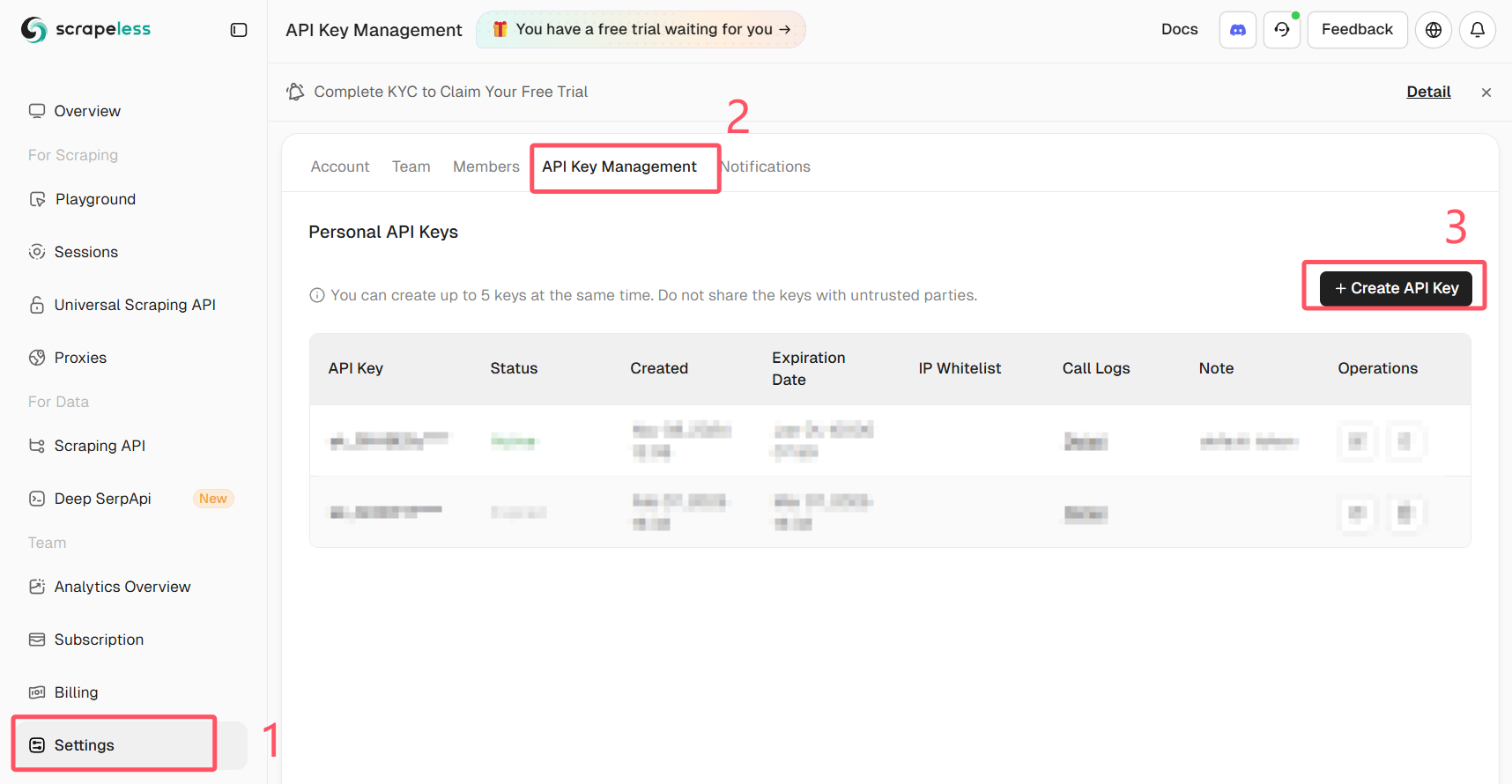
登录 Scrapeless 并获取您的 API 密钥。
先决条件
- Python 3.10+
- 一个已注册的 Scrapeless 账户,具有有效的 API 密钥
- 已安装 Scrapling(或使用官方 Docker 镜像)
pip install scrapling
# 如果您需要动态或隐身抓取器:
pip install "scrapling[fetchers]"
# 安装浏览器依赖项
scrapling install
或者使用官方 Docker 镜像:
docker pull pyd4vinci/scrapling
# 或者
docker pull ghcr.io/d4vinci/scrapling:latest
快速入门
这是一个简单的示例:使用 DynamicSession(由 Scrapling 提供)通过其 WebSocket 端点连接到 Scrapeless 云浏览器,抓取页面,并打印响应。
from urllib.parse import urlencode

from scrapling.fetchers import DynamicSession

# 配置您的浏览器会话
config = {
    "token": "YOUR_API_KEY",
    "sessionName": "scrapling-session",
    "sessionTTL": "300",  # 5 分钟
    "proxyCountry": "ANY",
    "sessionRecording": "false",
}

# 构建 WebSocket URL
ws_endpoint = f"wss://browser.scrapeless.com/api/v2/browser?{urlencode(config)}"
print('Connecting to Scrapeless...')

with DynamicSession(cdp_url=ws_endpoint, disable_resources=True) as s:
    print("Connected!")
    page = s.fetch("https://httpbin.org/headers", network_idle=True)
    print(f"Page loaded, content length: {len(page.body)}")
    print(page.json())
注意: Scrapeless 云浏览器支持高级选项,例如代理配置、自定义指纹和 CAPTCHA 验证码解决。
有关更多详细信息,请参阅 Scrapeless 浏览器文档。
常见用例(含完整示例)
在开始之前,请确保:
- 您已运行
pip install "scrapling[fetchers]" - 您已执行
scrapling install以下载浏览器依赖项 - 您拥有有效的 Scrapeless API 密钥
- 您正在使用 Python 3.10+
使用 Scrapling + Scrapeless 抓取 Amazon
下面是抓取 Amazon 产品详情 的完整示例。
该脚本自动连接到 Scrapeless 云浏览器,加载目标页面,绕过反机器人检查,并提取关键产品信息——例如标题、价格、库存状态、评分、评论数量、功能、图片、ASIN、商家和类别。
# amazon_scraper_response_only.py
from urllib.parse import urlencode
import json
import time
import re
from scrapling.fetchers import DynamicSession

# ---------------- 配置 ----------------
CONFIG = {
    "token": "YOUR_SCRAPELESS_API_KEY",
    "sessionName": "Data Scraping",
    "sessionTTL": "900",
    "proxyCountry": "ANY",
    "sessionRecording": "true",
}
DISABLE_RESOURCES = True   # False -> load JS/resources (more stable for JS-heavy sites)
WAIT_FOR_SELECTOR_TIMEOUT = 60
MAX_RETRIES = 3

TARGET_URL = "https://www.amazon.com/ESR-Compatible-Military-Grade-Protection-Scratch-Resistant/dp/B0CC1F4V7Q"
WS_ENDPOINT = f"wss://browser.scrapeless.com/api/v2/browser?{urlencode(CONFIG)}"


# ---------------- 辅助函数 (仅使用响应) ----------------
def retry(func, retries=2, wait=2):
    for i in range(retries + 1):
        try:
            return func()
        except Exception as e:
            print(f"[retry] Attempt {i+1} failed: {e}")
            if i == retries:
                raise
            time.sleep(wait * (i + 1))


def _resp_css_first_text(resp, selector):
    """尝试 response.css_first('selector::text') 或 resp.query_selector_text(selector) - 返回字符串或 None。"""
    try:
        if hasattr(resp, "css_first"):
            # prefer unified ::text pseudo API
            val = resp.css_first(f"{selector}::text")
            if val:
                return val.strip()
    except Exception:
        pass
    try:
        if hasattr(resp, "query_selector_text"):
            val = resp.query_selector_text(selector)
            if val:
                return val.strip()
    except Exception:
        pass
    return None


def _resp_css_texts(resp, selector):
    """使用 response.css('selector::text') 或 query_selector_all_text 返回选择器的文本值列表。"""
    out = []
    try:
        if hasattr(resp, "css"):
            vals = resp.css(f"{selector}::text") or []
            for v in vals:
                if isinstance(v, str) and v.strip():
                    out.append(v.strip())
            if out:
                return out
    except Exception:
        pass
    try:
        if hasattr(resp, "query_selector_all_text"):
            vals = resp.query_selector_all_text(selector) or []
            for v in vals:
                if v and v.strip():
                    out.append(v.strip())
            if out:
                return out
    except Exception:
        pass
    # some fetchers provide query_selector_all and elements with .text() method
    try:
        if hasattr(resp, "query_selector_all"):
            els = resp.query_selector_all(selector) or []
            for el in els:
                try:
                    if hasattr(el, "text") and callable(el.text):
                        t = el.text()
                        if t and t.strip():
                            out.append(t.strip())
                            continue
                except Exception:
                    pass
                try:
                    if hasattr(el, "get_text"):
                        t = el.get_text(strip=True)
                        if t:
                            out.append(t)
                            continue
                except Exception:
                    pass
    except Exception:
        pass
    return out


def _resp_css_first_attr(resp, selector, attr):
    """尝试通过响应 css 伪类 ::attr(...) 或查询选择器元素属性获取属性。"""
    try:
        if hasattr(resp, "css_first"):
            val = resp.css_first(f"{selector}::attr({attr})")
            if val:
                return val.strip()
    except Exception:
        pass
    try:
        # try element and get_attribute / get
        if hasattr(resp, "query_selector"):
            el = resp.query_selector(selector)
            if el:
                if hasattr(el, "get_attribute"):
                    try:
                        v = el.get_attribute(attr)
                        if v:
                            return v
                    except Exception:
                        pass
                try:
                    v = el.get(attr) if hasattr(el, "get") else None
                    if v:
                        return v
                except Exception:
                    pass
                try:
                    attrs = getattr(el, "attrs", None)
                    if isinstance(attrs, dict) and attr in attrs:
                        return attrs.get(attr)
                except Exception:
                    pass
    except Exception:
        pass
    return None


def detect_bot_via_resp(resp):
    """仅使用响应文本选择器检测典型的机器人/验证码信号。"""
    checks = [
        # body text
        ("body",),
        # some common challenge indicators
        ("#challenge-form",),
        ("#captcha",),
        ("text:contains('are you a human')",),
    ]
    # 首先尝试大范围的 body 文本
    try:
        body_text = _resp_css_first_text(resp, "body")
        if body_text:
            txt = body_text.lower()
            for k in ("captcha", "are you a human", "verify you are human", "access to this page has been denied", "bot detection", "please enable javascript", "checking your browser"):
                if k in txt:
                    return True
    except Exception:
        pass
    # 尝试特定的选择器
    suspects = [
        "#captcha", "#cf-hcaptcha-container", "#challenge-form", "text:contains('are you a human')"
    ]
    for s in suspects:
        try:
            if _resp_css_first_text(resp, s):
                return True
        except Exception:
            pass
    return False


def parse_price_from_text(price_raw):
    if not price_raw:
        return None, None
    m = re.search(r"([^\d.,\s]+)?\s*([\d,]+\.\d{1,2}|[\d,]+)", price_raw)
    if m:
        currency = m.group(1).strip() if m.group(1) else None
        num = m.group(2).replace(",", "")
        try:
            price = float(num)
        except Exception:
            price = None
        return currency, price
    return None, None


def parse_int_from_text(text):
    if not text:
        return None
    digits = "".join(filter(str.isdigit, text))
    try:
        return int(digits) if digits else None
    except:
        return None


# ---------------- 主函数 (仅使用响应) ----------------
def scrape_amazon_using_response_only(url):
    with DynamicSession(cdp_url=WS_ENDPOINT, disable_resources=DISABLE_RESOURCES) as s:
        # 带有重试的抓取
        resp = retry(lambda: s.fetch(url, network_idle=True, timeout=120000), retries=MAX_RETRIES - 1)

        if detect_bot_via_resp(resp):
            print("[warn] 通过响应选择器检测到机器人/验证码。")
            try:
                resp.screenshot(path="captcha_detected.png")
            except Exception:
                pass
            # 再次重试
            time.sleep(2)
            resp = retry(lambda: s.fetch(url, network_idle=True, timeout=120000), retries=1)

        # 等待 productTitle 出现 (仅使用响应选择器轮询)
        title = _resp_css_first_text(resp, "#productTitle") or _resp_css_first_text(resp, "#title")
        waited = 0
        while not title and waited < WAIT_FOR_SELECTOR_TIMEOUT:
            print("[info] 正在等待 #productTitle 出现 (响应选择器)...")
            time.sleep(3)
            waited += 3
            resp = s.fetch(url, network_idle=True, timeout=120000)
            title = _resp_css_first_text(resp, "#productTitle") or _resp_css_first_text(resp, "#title")

        title = title.strip() if title else None

        # 使用仅响应的辅助函数提取字段
        def get_text(selectors, multiple=False):
            if multiple:
                out = []
                for sel in selectors:
                    out.extend(_resp_css_texts(resp, sel) or [])
                return out
            for sel in selectors:
                v = _resp_css_first_text(resp, sel)
                if v:
                    return v
            return None

        price_raw = get_text([
            "#priceblock_ourprice",
            "#priceblock_dealprice",
            "#priceblock_saleprice",
            "#price_inside_buybox",
            ".a-price .a-offscreen"
        ])
        rating_text = get_text(["span.a-icon-alt", "#acrPopover"])
        review_count_text = get_text(["#acrCustomerReviewText", "[data-hook='total-review-count']"])
        availability = get_text([
            "#availability .a-color-state",
            "#availability .a-color-success",
            "#outOfStock",
            "#availability"
        ])
        features = get_text(["#feature-bullets ul li"], multiple=True) or []
        description = get_text([
            "#productDescription",
            "#bookDescription_feature_div .a-expander-content",
            "#productOverview_feature_div"
        ])

        # 图片 (使用响应进行属性提取)
        images = []
        seen = set()
        main_src = _resp_css_first_attr(resp, "#imgTagWrapperId img", "data-old-hires") \
                   or _resp_css_first_attr(resp, "#landingImage", "src") \
                   or _resp_css_first_attr(resp, "#imgTagWrapperId img", "src")
        if main_src and main_src not in seen:
            images.append(main_src); seen.add(main_src)

        dyn = _resp_css_first_attr(resp, "#imgTagWrapperId img", "data-a-dynamic-image") \
              or _resp_css_first_attr(resp, "#landingImage", "data-a-dynamic-image")
        if dyn:
            try:
                obj = json.loads(dyn)
                for k in obj.keys():
                    if k not in seen:
                        images.append(k); seen.add(k)
            except Exception:
                pass

        thumbs = _resp_css_texts(resp, "#altImages img::attr(src)") or _resp_css_texts(resp, ".imageThumbnail img::attr(src)") or []
        for src in thumbs:
            if not src:
                continue
            src_clean = re.sub(r"\._[A-Z0-9,]+_\.", ".", src)
            if src_clean not in seen:
                images.append(src_clean); seen.add(src_clean)

        # ASIN (属性)
        asin = _resp_css_first_attr(resp, "input#ASIN", "value")
        if asin:
            asin = asin.strip()
        else:
            detail_texts = _resp_css_texts(resp, "#detailBullets_feature_div li") or []
            combined = " ".join([t for t in detail_texts if t])
            m = re.search(r"ASIN[:\s]*([A-Z0-9-]+)", combined, re.I)
            if m:
                asin = m.group(1).strip()

        merchant = _resp_css_first_text(resp, "#sellerProfileTriggerId") \
                   or _resp_css_first_text(resp, "#merchant-info") \
                   or _resp_css_first_text(resp, "#bylineInfo")
        categories = _resp_css_texts(resp, "#wayfinding-breadcrumbs_container ul li a") or _resp_css_texts(resp, "#wayfinding-breadcrumbs_feature_div ul li a") or []
        categories = [c.strip() for c in categories if c and c.strip()]

        currency, price = parse_price_from_text(price_raw)
        rating_val = None
        if rating_text:
            try:
                rating_val = float(rating_text.split()[0].replace(",", ""))
            except Exception:
                rating_val = None
        review_count = parse_int_from_text(review_count_text)

        data = {
            "title": title,
            "price_raw": price_raw,
            "price": price,
            "currency": currency,
            "rating": rating_val,
            "review_count": review_count,
            "availability": availability,
            "features": features,
            "description": description,
            "images": images,
            "asin": asin,
            "merchant": merchant,
            "categories": categories,
            "url": url,
            "scrapedAt": time.strftime("%Y-%m-%dT%H:%M:%SZ", time.gmtime()),
        }

        return data


# ---------------- 运行 ----------------
if __name__ == "__main__":
    try:
        result = scrape_amazon_using_response_only(TARGET_URL)
        print(json.dumps(result, indent=2, ensure_ascii=False))
        with open("scrapeless-amazon-product.json", "w", encoding="utf-8") as f:
            json.dump(result, f, ensure_ascii=False, indent=2)
    except Exception as e:
        print("[error] 抓取失败:", e)
示例输出:
{
  "title": "ESR for iPhone 15 Pro Max Case, Compatible with MagSafe, Military-Grade Protection, Yellowing Resistant, Scratch-Resistant Back, Magnetic Phone Case for iPhone 15 Pro Max, Classic Series, Clear",
  "price_raw": "$12.99",
  "price": 12.99,
  "currency": "$",
  "rating": 4.6,
  "review_count": 133714,
  "availability": "In Stock",
  "features": [
    "Compatibility: only for iPhone 15 Pro Max; full functionality maintained via precise speaker and port cutouts and easy-press buttons",
    "Stronger Magnetic Lock: powerful built-in magnets with 1,500 g of holding force enable faster, easier place-and-go wireless charging and a secure lock on any MagSafe accessory",
    "Military-Grade Drop Protection: rigorously tested to ensure total protection on all sides, with specially designed Air Guard corners that absorb shock so your phone doesn\u2019t have to",
    "Raised-Edge Protection: raised screen edges and Camera Guard lens frame provide enhanced scratch protection where it really counts",
    "Stay Original: scratch-resistant, crystal-clear acrylic back lets you show off your iPhone 15 Pro Max\u2019s true style in stunning clarity that lasts",
    "Complete Customer Support: detailed setup videos and FAQs, comprehensive 12-month protection plan, lifetime support, and personalized help."
  ],
  "description": "BrandESRCompatible Phone ModelsiPhone 15 Pro MaxColorA-ClearCompatible DevicesiPhone 15 Pro MaxMaterialAcrylic",
  "images": [
    "https://m.media-amazon.com/images/I/71-ishbNM+L._AC_SL1500_.jpg",
    "https://m.media-amazon.com/images/I/71-ishbNM+L._AC_SX342_.jpg",
    "https://m.media-amazon.com/images/I/71-ishbNM+L._AC_SX679_.jpg",
    "https://m.media-amazon.com/images/I/71-ishbNM+L._AC_SX522_.jpg",
    "https://m.media-amazon.com/images/I/71-ishbNM+L._AC_SX385_.jpg",
    "https://m.media-amazon.com/images/I/71-ishbNM+L._AC_SX466_.jpg",
    "https://m.media-amazon.com/images/I/71-ishbNM+L._AC_SX425_.jpg",
    "https://m.media-amazon.com/images/I/71-ishbNM+L._AC_SX569_.jpg",
    "https://m.media-amazon.com/images/I/41Ajq9jnx9L._AC_SR38,50_.jpg",
    "https://m.media-amazon.com/images/I/51RkuGXBMVL._AC_SR38,50_.jpg",
    "https://m.media-amazon.com/images/I/516RCbMo5tL._AC_SR38,50_.jpg",
    "https://m.media-amazon.com/images/I/51DdOFdiQQL._AC_SR38,50_.jpg",
    "https://m.media-amazon.com/images/I/514qvXYcYOL._AC_SR38,50_.jpg",
    "https://m.media-amazon.com/images/I/518CS81EFXL._AC_SR38,50_.jpg",
    "https://m.media-amazon.com/images/I/413EWAtny9L.SX38_SY50_CR,0,0,38,50_BG85,85,85_BR-120_PKdp-play-icon-overlay__.jpg",
    "https://images-na.ssl-images-amazon.com/images/G/01/x-locale/common/transparent-pixel._V192234675_.gif"
  ],
  "asin": "B0CC1F4V7Q",
  "merchant": "Minghutech-US",
  "categories": [
    "Cell Phones & Accessories",
    "Cases, Holsters & Sleeves",
    "Basic Cases"
  ],
  "url": "https://www.amazon.com/ESR-Compatible-Military-Grade-Protection-Scratch-Resistant/dp/B0CC1F4V7Q",
  "scrapedAt": "2025-10-30T10:20:16Z"
}
此示例展示了 DynamicSession 和 Scrapeless 如何协同工作,以创建一个稳定、可重用的长会话环境。
在同一会话中,您可以无需重启浏览器即可请求多个页面,维护登录状态、Cookie 和本地存储,并实现配置文件隔离和会话持久性。