Scrapling
Scrapling là một thư viện web scraping Python không thể bị phát hiện, mạnh mẽ, linh hoạt và hiệu năng cao, được thiết kế để giúp việc web scraping trở nên đơn giản và dễ dàng. Đây là thư viện scraping thích ứng đầu tiên có khả năng học hỏi từ những thay đổi của website và tiến hóa cùng với chúng. Trong khi các thư viện khác gặp lỗi khi cấu trúc trang web cập nhật, Scrapling tự động định vị lại các phần tử và giữ cho scraper của bạn chạy trơn tru.
Tính năng chính:
- Công nghệ Scraping thích ứng – Thư viện đầu tiên học hỏi từ những thay đổi của website và tự động tiến hóa. Khi cấu trúc của một trang web cập nhật, Scrapling định vị lại các phần tử một cách thông minh để đảm bảo hoạt động liên tục.
- Giả mạo dấu vân tay trình duyệt – Hỗ trợ khớp dấu vân tay TLS và mô phỏng header trình duyệt thật.
- Khả năng Scraping ẩn danh –
StealthyFetchercó thể vượt qua các hệ thống chống bot nâng cao như Cloudflare Turnstile. - Hỗ trợ Session bền vững – Cung cấp nhiều loại session, bao gồm
FetcherSession,DynamicSession, vàStealthySession, để scraping đáng tin cậy và hiệu quả.
Tìm hiểu thêm trong [tài liệu chính thức].
Tại sao nên kết hợp Scrapeless và Scrapling?
Scrapling vượt trội trong việc trích xuất dữ liệu web hiệu năng cao, hỗ trợ scraping thích ứng và tích hợp AI. Nó đi kèm với nhiều lớp Fetcher tích hợp sẵn — Fetcher, DynamicFetcher, và StealthyFetcher — để xử lý nhiều tình huống khác nhau.
Tuy nhiên, khi đối mặt với các cơ chế chống bot nâng cao hoặc scraping đồng thời quy mô lớn, vẫn có thể phát sinh một số thách thức, chẳng hạn như:
- Trình duyệt cục bộ dễ bị chặn bởi Cloudflare, AWS WAF, hoặc reCAPTCHA.
- Mức tiêu thụ tài nguyên trình duyệt cao và hiệu năng hạn chế trong quá trình scraping đồng thời quy mô lớn.
- Mặc dù
StealthyFetcherbao gồm khả năng ẩn danh, nhưng các tình huống chống bot cực đoan vẫn cần hỗ trợ hạ tầng mạnh mẽ hơn. - Quy trình gỡ lỗi phức tạp khiến việc xác định nguyên nhân gốc rễ của các lỗi scraping trở nên khó khăn.
Scrapeless Cloud Browser giải quyết hoàn hảo những điểm khó khăn này:
- Vượt qua chống bot chỉ với một cú nhấp chuột: Tự động xử lý reCAPTCHA, Cloudflare Turnstile/Challenge, AWS WAF, và các loại xác minh khác. Kết hợp với khả năng trích xuất thích ứng của Scrapling, nó cải thiện đáng kể tỷ lệ thành công.
- Mở rộng đồng thời không giới hạn: Mỗi tác vụ có thể khởi chạy 50–1000+ phiên bản trình duyệt trong vài giây, loại bỏ các nút thắt hiệu năng cục bộ và tối đa hóa tiềm năng hiệu năng cao của Scrapling.
- Giảm chi phí 40–80%: So với các giải pháp cloud tương tự, Scrapeless chỉ tốn 20–60% chi phí tổng thể và hỗ trợ thanh toán theo mức sử dụng — khiến nó phù hợp với túi tiền ngay cả với các dự án nhỏ.
- Công cụ gỡ lỗi trực quan: Với các tính năng Session Replay và Live URL, bạn có thể theo dõi quá trình thực thi của Scrapling theo thời gian thực, nhanh chóng phát hiện các lỗi scraping, và giảm chi phí gỡ lỗi.
- Tích hợp linh hoạt:
DynamicFetchervàPlayWrightFetchercủa Scrapling (được xây dựng trên Playwright) có thể dễ dàng kết nối với Scrapeless Cloud Browser thông qua cấu hình — không cần viết lại logic hiện có. - Nút dịch vụ biên (Edge Service Nodes): Với các trung tâm dữ liệu toàn cầu, Scrapeless đạt tốc độ khởi động và độ ổn định nhanh gấp 2–3 lần so với các cloud browser khác, cung cấp hơn 90 triệu IP dân cư đáng tin cậy tại 195+ quốc gia để tăng tốc độ thực thi của Scrapling.
- Môi trường cô lập & Session bền vững: Mỗi profile Scrapeless chạy trong một môi trường cô lập với hỗ trợ đăng nhập bền vững, ngăn chặn sự can thiệp giữa các session và đảm bảo độ ổn định trong scraping quy mô lớn.
- Cấu hình dấu vân tay linh hoạt: Scrapeless có thể tạo ngẫu nhiên hoặc tùy chỉnh hoàn toàn dấu vân tay trình duyệt. Khi kết hợp với
StealthyFetchercủa Scrapling, nó còn giảm thêm rủi ro bị phát hiện và tăng đáng kể tỷ lệ thành công của scraping.
Bắt đầu
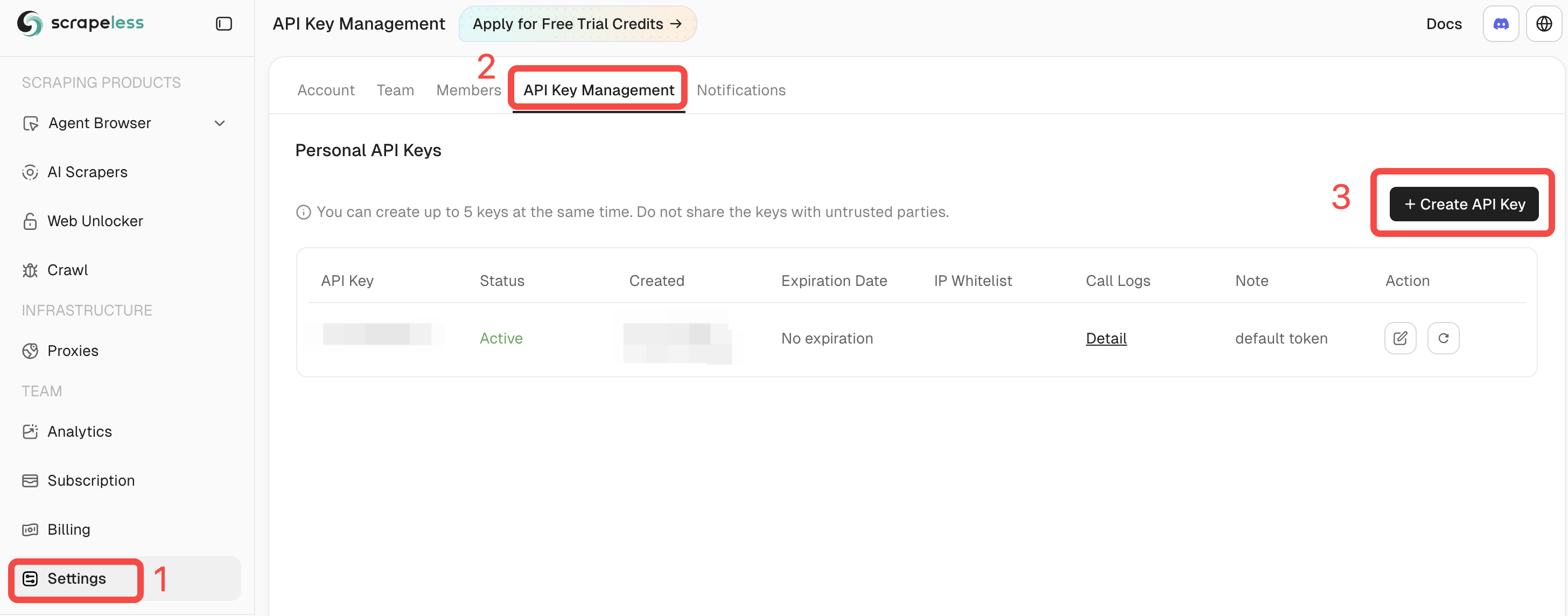
Đăng nhập vào Scrapeless và lấy API Key của bạn.
Điều kiện tiên quyết
- Python 3.10+
- Một tài khoản Scrapeless đã đăng ký với API Key hợp lệ
- Scrapling đã được cài đặt (hoặc sử dụng Docker image chính thức)
pip install scrapling
# If you need dynamic or stealth fetchers:
pip install "scrapling[fetchers]"
# Install browser dependencies
scrapling install
Hoặc sử dụng Docker image chính thức:
docker pull pyd4vinci/scrapling
# or
docker pull ghcr.io/d4vinci/scrapling:latest
Bắt đầu nhanh
Đây là một ví dụ đơn giản: sử dụng DynamicSession (do Scrapling cung cấp) để kết nối với Scrapeless Cloud Browser thông qua endpoint WebSocket của nó, tải một trang, và in ra phản hồi.
from urllib.parse import urlencode

from scrapling.fetchers import DynamicSession

# Configure your browser session
config = {
    "token": "YOUR_API_KEY",
    "sessionName": "scrapling-session",
    "sessionTTL": "300",  # 5 minutes
    "proxyCountry": "ANY",
    "sessionRecording": "false",
}

# Build WebSocket URL
ws_endpoint = f"wss://browser.scrapeless.com/api/v2/browser?{urlencode(config)}"
print('Connecting to Scrapeless...')

with DynamicSession(cdp_url=ws_endpoint, disable_resources=True) as s:
    print("Connected!")
    page = s.fetch("https://httpbin.org/headers", network_idle=True)
    print(f"Page loaded, content length: {len(page.body)}")
    print(page.json())
Lưu ý: Scrapeless Cloud Browser hỗ trợ các tùy chọn nâng cao như cấu hình proxy, dấu vân tay tùy chỉnh, và CAPTCHA solver.
Tham khảo Tài liệu Scrapeless Browser để biết thêm chi tiết.
Các trường hợp sử dụng phổ biến (kèm ví dụ đầy đủ)
Trước khi bắt đầu, hãy đảm bảo:
- Bạn đã chạy
pip install "scrapling[fetchers]" - Bạn đã thực thi
scrapling installđể tải xuống các phụ thuộc trình duyệt - Bạn có một Scrapeless API Key hợp lệ
- Bạn đang sử dụng Python 3.10+
Scraping Amazon với Scrapling + Scrapeless
Dưới đây là một ví dụ hoàn chỉnh về việc scraping chi tiết sản phẩm Amazon.
Script tự động kết nối với Scrapeless Cloud Browser, tải trang mục tiêu, vượt qua các kiểm tra chống bot, và trích xuất thông tin sản phẩm quan trọng — chẳng hạn như tiêu đề, giá, tình trạng kho, đánh giá, số lượng nhận xét, tính năng, hình ảnh, ASIN, người bán, và danh mục.
# amazon_scraper_response_only.py
from urllib.parse import urlencode
import json
import time
import re
from scrapling.fetchers import DynamicSession

# ---------------- CONFIG ----------------
CONFIG = {
    "token": "YOUR_SCRAPELESS_API_KEY",
    "sessionName": "Data Scraping",
    "sessionTTL": "900",
    "proxyCountry": "ANY",
    "sessionRecording": "true",
}
DISABLE_RESOURCES = True   # False -> load JS/resources (more stable for JS-heavy sites)
WAIT_FOR_SELECTOR_TIMEOUT = 60
MAX_RETRIES = 3

TARGET_URL = "https://www.amazon.com/ESR-Compatible-Military-Grade-Protection-Scratch-Resistant/dp/B0CC1F4V7Q"
WS_ENDPOINT = f"wss://browser.scrapeless.com/api/v2/browser?{urlencode(CONFIG)}"


# ---------------- HELPERS (use response ONLY) ----------------
def retry(func, retries=2, wait=2):
    for i in range(retries + 1):
        try:
            return func()
        except Exception as e:
            print(f"[retry] Attempt {i+1} failed: {e}")
            if i == retries:
                raise
            time.sleep(wait * (i + 1))


def _resp_css_first_text(resp, selector):
    """Try response.css_first('selector::text') or resp.query_selector_text(selector) - return str or None."""
    try:
        if hasattr(resp, "css_first"):
            # prefer unified ::text pseudo API
            val = resp.css_first(f"{selector}::text")
            if val:
                return val.strip()
    except Exception:
        pass
    try:
        if hasattr(resp, "query_selector_text"):
            val = resp.query_selector_text(selector)
            if val:
                return val.strip()
    except Exception:
        pass
    return None


def _resp_css_texts(resp, selector):
    """Return list of text values for selector using response.css('selector::text') or query_selector_all_text."""
    out = []
    try:
        if hasattr(resp, "css"):
            vals = resp.css(f"{selector}::text") or []
            for v in vals:
                if isinstance(v, str) and v.strip():
                    out.append(v.strip())
            if out:
                return out
    except Exception:
        pass
    try:
        if hasattr(resp, "query_selector_all_text"):
            vals = resp.query_selector_all_text(selector) or []
            for v in vals:
                if v and v.strip():
                    out.append(v.strip())
            if out:
                return out
    except Exception:
        pass
    # some fetchers provide query_selector_all and elements with .text() method
    try:
        if hasattr(resp, "query_selector_all"):
            els = resp.query_selector_all(selector) or []
            for el in els:
                try:
                    if hasattr(el, "text") and callable(el.text):
                        t = el.text()
                        if t and t.strip():
                            out.append(t.strip())
                            continue
                except Exception:
                    pass
                try:
                    if hasattr(el, "get_text"):
                        t = el.get_text(strip=True)
                        if t:
                            out.append(t)
                            continue
                except Exception:
                    pass
    except Exception:
        pass
    return out


def _resp_css_first_attr(resp, selector, attr):
    """Try to get attribute via response css pseudo ::attr(...) or query selector element attributes."""
    try:
        if hasattr(resp, "css_first"):
            val = resp.css_first(f"{selector}::attr({attr})")
            if val:
                return val.strip()
    except Exception:
        pass
    try:
        # try element and get_attribute / get
        if hasattr(resp, "query_selector"):
            el = resp.query_selector(selector)
            if el:
                if hasattr(el, "get_attribute"):
                    try:
                        v = el.get_attribute(attr)
                        if v:
                            return v
                    except Exception:
                        pass
                try:
                    v = el.get(attr) if hasattr(el, "get") else None
                    if v:
                        return v
                except Exception:
                    pass
                try:
                    attrs = getattr(el, "attrs", None)
                    if isinstance(attrs, dict) and attr in attrs:
                        return attrs.get(attr)
                except Exception:
                    pass
    except Exception:
        pass
    return None


def detect_bot_via_resp(resp):
    """Detect typical bot/captcha signals using response text selectors only."""
    checks = [
        # body text
        ("body",),
        # some common challenge indicators
        ("#challenge-form",),
        ("#captcha",),
        ("text:contains('are you a human')",),
    ]
    # First try a broad body text
    try:
        body_text = _resp_css_first_text(resp, "body")
        if body_text:
            txt = body_text.lower()
            for k in ("captcha", "are you a human", "verify you are human", "access to this page has been denied", "bot detection", "please enable javascript", "checking your browser"):
                if k in txt:
                    return True
    except Exception:
        pass
    # Try specific selectors
    suspects = [
        "#captcha", "#cf-hcaptcha-container", "#challenge-form", "text:contains('are you a human')"
    ]
    for s in suspects:
        try:
            if _resp_css_first_text(resp, s):
                return True
        except Exception:
            pass
    return False


def parse_price_from_text(price_raw):
    if not price_raw:
        return None, None
    m = re.search(r"([^\d.,\s]+)?\s*([\d,]+\.\d{1,2}|[\d,]+)", price_raw)
    if m:
        currency = m.group(1).strip() if m.group(1) else None
        num = m.group(2).replace(",", "")
        try:
            price = float(num)
        except Exception:
            price = None
        return currency, price
    return None, None


def parse_int_from_text(text):
    if not text:
        return None
    digits = "".join(filter(str.isdigit, text))
    try:
        return int(digits) if digits else None
    except:
        return None


# ---------------- MAIN (use response only) ----------------
def scrape_amazon_using_response_only(url):
    with DynamicSession(cdp_url=WS_ENDPOINT, disable_resources=DISABLE_RESOURCES) as s:
        # fetch with retry
        resp = retry(lambda: s.fetch(url, network_idle=True, timeout=120000), retries=MAX_RETRIES - 1)

        if detect_bot_via_resp(resp):
            print("[warn] Bot/CAPTCHA detected via response selectors.")
            try:
                resp.screenshot(path="captcha_detected.png")
            except Exception:
                pass
            # retry once
            time.sleep(2)
            resp = retry(lambda: s.fetch(url, network_idle=True, timeout=120000), retries=1)

        # Wait for productTitle (polling using resp selectors only)
        title = _resp_css_first_text(resp, "#productTitle") or _resp_css_first_text(resp, "#title")
        waited = 0
        while not title and waited < WAIT_FOR_SELECTOR_TIMEOUT:
            print("[info] Waiting for #productTitle to appear (response selector)...")
            time.sleep(3)
            waited += 3
            resp = s.fetch(url, network_idle=True, timeout=120000)
            title = _resp_css_first_text(resp, "#productTitle") or _resp_css_first_text(resp, "#title")

        title = title.strip() if title else None

        # Extract fields using response-only helpers
        def get_text(selectors, multiple=False):
            if multiple:
                out = []
                for sel in selectors:
                    out.extend(_resp_css_texts(resp, sel) or [])
                return out
            for sel in selectors:
                v = _resp_css_first_text(resp, sel)
                if v:
                    return v
            return None

        price_raw = get_text([
            "#priceblock_ourprice",
            "#priceblock_dealprice",
            "#priceblock_saleprice",
            "#price_inside_buybox",
            ".a-price .a-offscreen"
        ])
        rating_text = get_text(["span.a-icon-alt", "#acrPopover"])
        review_count_text = get_text(["#acrCustomerReviewText", "[data-hook='total-review-count']"])
        availability = get_text([
            "#availability .a-color-state",
            "#availability .a-color-success",
            "#outOfStock",
            "#availability"
        ])
        features = get_text(["#feature-bullets ul li"], multiple=True) or []
        description = get_text([
            "#productDescription",
            "#bookDescription_feature_div .a-expander-content",
            "#productOverview_feature_div"
        ])

        # images (use attribute extraction via response)
        images = []
        seen = set()
        main_src = _resp_css_first_attr(resp, "#imgTagWrapperId img", "data-old-hires") \
                   or _resp_css_first_attr(resp, "#landingImage", "src") \
                   or _resp_css_first_attr(resp, "#imgTagWrapperId img", "src")
        if main_src and main_src not in seen:
            images.append(main_src); seen.add(main_src)

        dyn = _resp_css_first_attr(resp, "#imgTagWrapperId img", "data-a-dynamic-image") \
              or _resp_css_first_attr(resp, "#landingImage", "data-a-dynamic-image")
        if dyn:
            try:
                obj = json.loads(dyn)
                for k in obj.keys():
                    if k not in seen:
                        images.append(k); seen.add(k)
            except Exception:
                pass

        thumbs = _resp_css_texts(resp, "#altImages img::attr(src)") or _resp_css_texts(resp, ".imageThumbnail img::attr(src)") or []
        for src in thumbs:
            if not src:
                continue
            src_clean = re.sub(r"\._[A-Z0-9,]+_\.", ".", src)
            if src_clean not in seen:
                images.append(src_clean); seen.add(src_clean)

        # ASIN (attribute)
        asin = _resp_css_first_attr(resp, "input#ASIN", "value")
        if asin:
            asin = asin.strip()
        else:
            detail_texts = _resp_css_texts(resp, "#detailBullets_feature_div li") or []
            combined = " ".join([t for t in detail_texts if t])
            m = re.search(r"ASIN[:\s]*([A-Z0-9-]+)", combined, re.I)
            if m:
                asin = m.group(1).strip()

        merchant = _resp_css_first_text(resp, "#sellerProfileTriggerId") \
                   or _resp_css_first_text(resp, "#merchant-info") \
                   or _resp_css_first_text(resp, "#bylineInfo")
        categories = _resp_css_texts(resp, "#wayfinding-breadcrumbs_container ul li a") or _resp_css_texts(resp, "#wayfinding-breadcrumbs_feature_div ul li a") or []
        categories = [c.strip() for c in categories if c and c.strip()]

        currency, price = parse_price_from_text(price_raw)
        rating_val = None
        if rating_text:
            try:
                rating_val = float(rating_text.split()[0].replace(",", ""))
            except Exception:
                rating_val = None
        review_count = parse_int_from_text(review_count_text)

        data = {
            "title": title,
            "price_raw": price_raw,
            "price": price,
            "currency": currency,
            "rating": rating_val,
            "review_count": review_count,
            "availability": availability,
            "features": features,
            "description": description,
            "images": images,
            "asin": asin,
            "merchant": merchant,
            "categories": categories,
            "url": url,
            "scrapedAt": time.strftime("%Y-%m-%dT%H:%M:%SZ", time.gmtime()),
        }

        return data


# ---------------- RUN ----------------
if __name__ == "__main__":
    try:
        result = scrape_amazon_using_response_only(TARGET_URL)
        print(json.dumps(result, indent=2, ensure_ascii=False))
        with open("scrapeless-amazon-product.json", "w", encoding="utf-8") as f:
            json.dump(result, f, ensure_ascii=False, indent=2)
    except Exception as e:
        print("[error] scraping failed:", e)
Kết quả mẫu:
{
  "title": "ESR for iPhone 15 Pro Max Case, Compatible with MagSafe, Military-Grade Protection, Yellowing Resistant, Scratch-Resistant Back, Magnetic Phone Case for iPhone 15 Pro Max, Classic Series, Clear",
  "price_raw": "$12.99",
  "price": 12.99,
  "currency": "$",
  "rating": 4.6,
  "review_count": 133714,
  "availability": "In Stock",
  "features": [
    "Compatibility: only for iPhone 15 Pro Max; full functionality maintained via precise speaker and port cutouts and easy-press buttons",
    "Stronger Magnetic Lock: powerful built-in magnets with 1,500 g of holding force enable faster, easier place-and-go wireless charging and a secure lock on any MagSafe accessory",
    "Military-Grade Drop Protection: rigorously tested to ensure total protection on all sides, with specially designed Air Guard corners that absorb shock so your phone doesn’t have to",
    "Raised-Edge Protection: raised screen edges and Camera Guard lens frame provide enhanced scratch protection where it really counts",
    "Stay Original: scratch-resistant, crystal-clear acrylic back lets you show off your iPhone 15 Pro Max’s true style in stunning clarity that lasts",
    "Complete Customer Support: detailed setup videos and FAQs, comprehensive 12-month protection plan, lifetime support, and personalized help."
  ],
  "description": "BrandESRCompatible Phone ModelsiPhone 15 Pro MaxColorA-ClearCompatible DevicesiPhone 15 Pro MaxMaterialAcrylic",
  "images": [
    "https://m.media-amazon.com/images/I/71-ishbNM+L._AC_SL1500_.jpg",
    "https://m.media-amazon.com/images/I/71-ishbNM+L._AC_SX342_.jpg",
    "https://m.media-amazon.com/images/I/71-ishbNM+L._AC_SX679_.jpg",
    "https://m.media-amazon.com/images/I/71-ishbNM+L._AC_SX522_.jpg",
    "https://m.media-amazon.com/images/I/71-ishbNM+L._AC_SX385_.jpg",
    "https://m.media-amazon.com/images/I/71-ishbNM+L._AC_SX466_.jpg",
    "https://m.media-amazon.com/images/I/71-ishbNM+L._AC_SX425_.jpg",
    "https://m.media-amazon.com/images/I/71-ishbNM+L._AC_SX569_.jpg",
    "https://m.media-amazon.com/images/I/41Ajq9jnx9L._AC_SR38,50_.jpg",
    "https://m.media-amazon.com/images/I/51RkuGXBMVL._AC_SR38,50_.jpg",
    "https://m.media-amazon.com/images/I/516RCbMo5tL._AC_SR38,50_.jpg",
    "https://m.media-amazon.com/images/I/51DdOFdiQQL._AC_SR38,50_.jpg",
    "https://m.media-amazon.com/images/I/514qvXYcYOL._AC_SR38,50_.jpg",
    "https://m.media-amazon.com/images/I/518CS81EFXL._AC_SR38,50_.jpg",
    "https://m.media-amazon.com/images/I/413EWAtny9L.SX38_SY50_CR,0,0,38,50_BG85,85,85_BR-120_PKdp-play-icon-overlay__.jpg",
    "https://images-na.ssl-images-amazon.com/images/G/01/x-locale/common/transparent-pixel._V192234675_.gif"
  ],
  "asin": "B0CC1F4V7Q",
  "merchant": "Minghutech-US",
  "categories": [
    "Cell Phones & Accessories",
    "Cases, Holsters & Sleeves",
    "Basic Cases"
  ],
  "url": "https://www.amazon.com/ESR-Compatible-Military-Grade-Protection-Scratch-Resistant/dp/B0CC1F4V7Q",
  "scrapedAt": "2025-10-30T10:20:16Z"
}
Ví dụ này minh họa cách DynamicSession và Scrapeless có thể phối hợp với nhau để tạo ra một môi trường session dài, ổn định và có thể tái sử dụng.
Trong cùng một session, bạn có thể yêu cầu nhiều trang mà không cần khởi động lại trình duyệt, duy trì trạng thái đăng nhập, cookie và local storage, và đạt được sự cô lập profile và tính bền vững của session.