Quickstart
Connect any MCP-compatible client to Scrapeless in three steps.
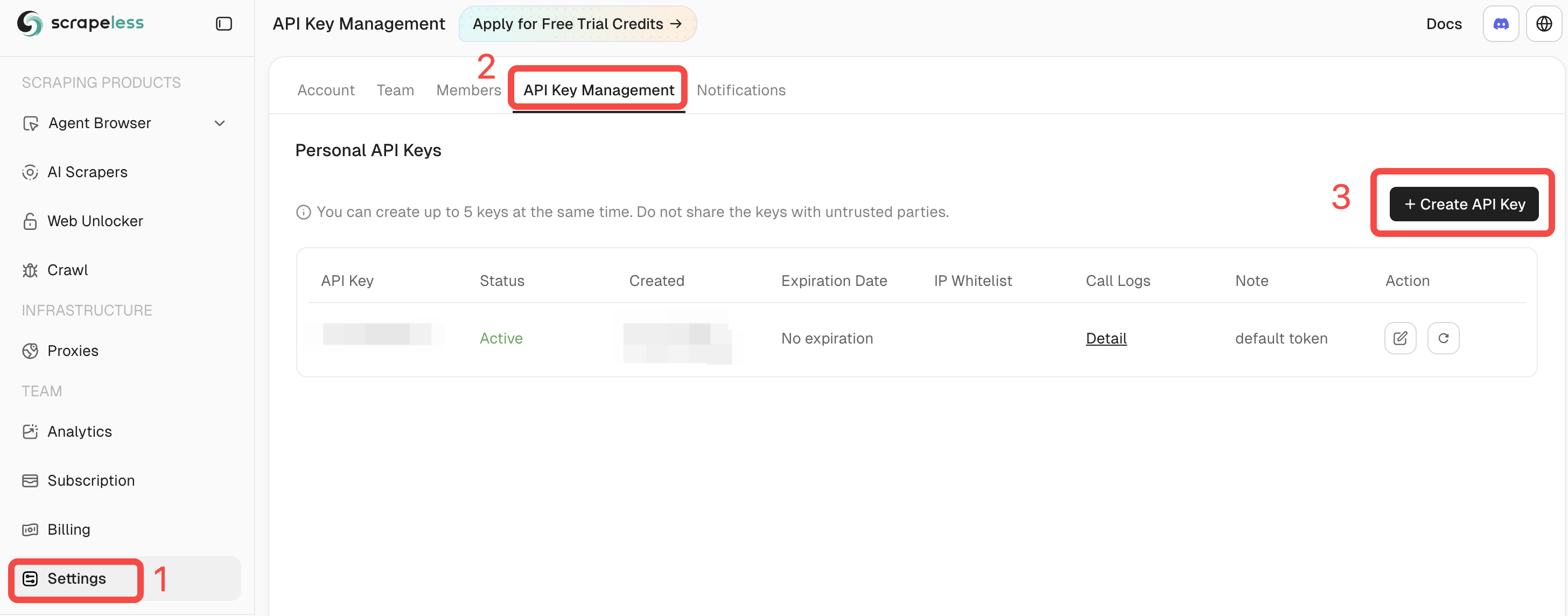
1. Get your Scrapeless API key
Log in to Scrapeless and copy your API Token from the dashboard.
2. Add the server to your client
Scrapeless MCP supports two transport modes. Pick whichever your client prefers — see Authentication and Transports for the full comparison.
Stdio (local execution) — the server runs locally via npx:
{
  "mcpServers": {
    "Scrapeless MCP Server": {
      "command": "npx",
      "args": ["-y", "scrapeless-mcp-server"],
      "env": {
        "SCRAPELESS_API_KEY": "YOUR_SCRAPELESS_API_KEY"
      }
    }
  }
}
Streamable HTTP (hosted API mode) — no local process; the client talks to the hosted endpoint:
{
  "mcpServers": {
    "Scrapeless MCP Server": {
      "type": "streamable-http",
      "url": "https://api.scrapeless.com/mcp",
      "headers": {
        "x-api-token": "YOUR_SCRAPELESS_API_KEY"
      },
      "disabled": false,
      "alwaysAllow": []
    }
  }
}
Replace YOUR_SCRAPELESS_API_KEY with the token from step 1.
3. Start using it
Reload your client and ask it to do something on the web — for example:
- “Search Google for the top 10 results on ‘best cloud browsers 2026’.”
- “Scrape this page and return it as Markdown.”
- “Open example.com, click the login button, and take a screenshot.”
The client will route these requests through Scrapeless automatically.
Next steps
- Browse the full Tools by Product catalog.
- Follow a client-specific guide under Client Setup.
- Tune session behavior in Configuration.