Scrapling
Scrapling es una biblioteca de Python potente, flexible, de alto rendimiento y indetectable para web scraping, diseñada para simplificar y facilitar el proceso de extracción de datos. Es la primera biblioteca de scraping adaptativa capaz de aprender de los cambios en los sitios web y evolucionar junto con ellos. Mientras que otras bibliotecas fallan cuando cambia la estructura del sitio, Scrapling reubica automáticamente los elementos y mantiene sus herramientas de extracción funcionando sin interrupciones.
Características clave:
- Tecnología de scraping adaptativo – La primera biblioteca que aprende de los cambios en los sitios web y evoluciona automáticamente. Cuando cambia la estructura de un sitio, Scrapling reubica inteligentemente los elementos para garantizar un funcionamiento continuo.
- Suplantación de huellas digitales del navegador – Soporta coincidencia de huellas digitales TLS y emulación de encabezados de navegadores reales.
- Capacidades de scraping sigiloso – La
StealthyFetcherpuede eludir sistemas avanzados anti-bot como Cloudflare Turnstile. - Soporte de sesión persistente – Ofrece múltiples tipos de sesión, incluyendo
FetcherSession,DynamicSessionyStealthySession, para un scraping confiable y eficiente.
Más información en la [documentación oficial].
¿Por qué combinar Scrapeless y Scrapling?
Scrapling destaca en la extracción de datos web de alto rendimiento, con soporte para scraping adaptativo e integración con IA. Incluye varias clases integradas de Fetcher — Fetcher, DynamicFetcher y StealthyFetcher — para manejar diversos escenarios.
Sin embargo, al enfrentar mecanismos anti-bot avanzados o scraping concurrente a gran escala, aún pueden surgir varios desafíos, tales como:
- Los navegadores locales son bloqueados fácilmente por Cloudflare, AWS WAF o reCAPTCHA.
- El alto consumo de recursos del navegador y el rendimiento limitado durante la extracción de datos masiva y concurrente.
- Aunque
StealthyFetcherincluye capacidades de sigilo, escenarios extremos contra bots aún requieren un soporte de infraestructura más robusto. - Los procesos complejos de depuración dificultan identificar la causa raíz de los fallos en la extracción de datos.
Scrapeless Cloud Browser aborda perfectamente estos problemas:
- Bypass de anti-bot en un solo clic: Maneja automáticamente reCAPTCHA, Cloudflare Turnstile/Challenge, AWS WAF y otras verificaciones. Combinado con la capacidad de extracción adaptativa de Scrapling, mejora drásticamente las tasas de éxito.
- Escalado concurrente ilimitado: Cada tarea puede lanzar entre 50 y más de 1000 instancias de navegador en segundos, eliminando cuellos de botella de rendimiento local y maximizando el potencial de alto rendimiento de Scrapling.
- Reducción de costos del 40 al 80 %: En comparación con soluciones en la nube similares, Scrapeless tiene un costo total del 20 al 60 % y admite facturación por uso, lo que lo hace asequible incluso para proyectos pequeños.
- Herramientas visuales de depuración: Con las funciones de Reproducción de sesión y URL en vivo , puede supervisar en tiempo real el proceso de ejecución de Scrapling, identificar rápidamente fallos en la extracción de datos y reducir los costos de depuración.
- Integración flexible: Los componentes de Scrapling
DynamicFetcheryPlayWrightFetcher(basados en Playwright) pueden conectarse fácilmente a Scrapeless Cloud Browser mediante configuración, sin necesidad de reescribir la lógica existente. - Nodos de servicio Edge: Con centros de datos globales, Scrapeless logra velocidades de inicio y estabilidad 2–3 veces más rápidas que otros navegadores en la nube, ofreciendo más de 90 millones de IPs residenciales confiables en más de 195 países para aumentar la velocidad de ejecución de Scrapling.
- Entornos aislados y sesiones persistentes: Cada perfil de Scrapeless se ejecuta en un entorno aislado con soporte de inicio de sesión persistente, evitando interferencias entre sesiones y garantizando estabilidad en extracciones a gran escala.
- Configuración flexible de huellas digitales: Scrapeless puede generar aleatoriamente o personalizar por completo las huellas digitales del navegador. Al combinarlo con
StealthyFetcherde Scrapling, reduce aún más el riesgo de detección y aumenta significativamente las tasas de éxito en la extracción de datos.
Inicio rápido
Inicie sesión en Scrapeless y obtenga su Clave de API.
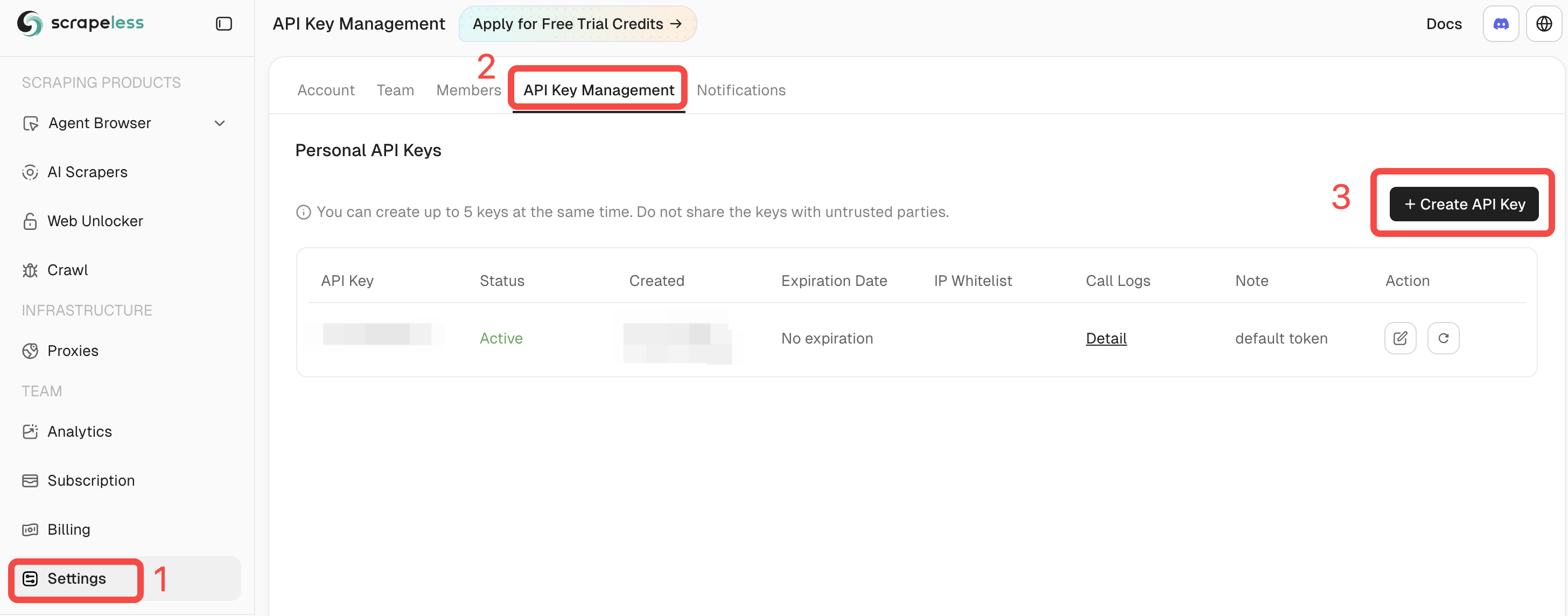
Requisitos previos
- Python 3.10+
- Una cuenta registrada de Scrapeless con una clave de API válida
- Scrapling instalado (o use la imagen oficial de Docker)
pip install scrapling
# If you need dynamic or stealth fetchers:
pip install "scrapling[fetchers]"
# Install browser dependencies
scrapling install
O use la imagen oficial de Docker:
docker pull pyd4vinci/scrapling
# or
docker pull ghcr.io/d4vinci/scrapling:latest
Inicio rápido
Este es un ejemplo sencillo: usar DynamicSession (provisto por Scrapling) para conectarse al Scrapeless Cloud Browser a través de su endpoint WebSocket, obtener una página e imprimir la respuesta.
from urllib.parse import urlencode

from scrapling.fetchers import DynamicSession

# Configure your browser session
config = {
    "token": "YOUR_API_KEY",
    "sessionName": "scrapling-session",
    "sessionTTL": "300",  # 5 minutes
    "proxyCountry": "ANY",
    "sessionRecording": "false",
}

# Build WebSocket URL
ws_endpoint = f"wss://browser.scrapeless.com/api/v2/browser?{urlencode(config)}"
print('Connecting to Scrapeless...')

with DynamicSession(cdp_url=ws_endpoint, disable_resources=True) as s:
    print("Connected!")
    page = s.fetch("https://httpbin.org/headers", network_idle=True)
    print(f"Page loaded, content length: {len(page.body)}")
    print(page.json())
Nota: Scrapeless Cloud Browser admite opciones avanzadas como configuración de proxy, huellas digitales personalizadas y solucionador de CAPTCHA.
Consulte la Documentación del Navegador Scrapeless para más detalles.
Casos de uso comunes (con ejemplos completos)
Antes de comenzar, asegúrese de:
- Ha ejecutado
pip install "scrapling[fetchers]" - Ha ejecutado
scrapling installpara descargar las dependencias del navegador - Tiene una Clave de API de Scrapelessválida
- Está utilizando Python 3.10+
Extracción de datos de Amazon con Scrapling + Scrapeless
A continuación se muestra un ejemplo completo de extracción de detalles de productos de Amazon.
El script se conecta automáticamente al Scrapeless Cloud Browser, carga la página de destino, evita las verificaciones anti-bot y extrae información clave del producto, como título, precio, estado de inventario, calificación, cantidad de reseñas, características, imágenes, ASIN, vendedor y categorías.
# amazon_scraper_response_only.py
from urllib.parse import urlencode
import json
import time
import re
from scrapling.fetchers import DynamicSession

# ---------------- CONFIG ----------------
CONFIG = {
    "token": "YOUR_SCRAPELESS_API_KEY",
    "sessionName": "Data Scraping",
    "sessionTTL": "900",
    "proxyCountry": "ANY",
    "sessionRecording": "true",
}
DISABLE_RESOURCES = True   # False -> load JS/resources (more stable for JS-heavy sites)
WAIT_FOR_SELECTOR_TIMEOUT = 60
MAX_RETRIES = 3

TARGET_URL = "https://www.amazon.com/ESR-Compatible-Military-Grade-Protection-Scratch-Resistant/dp/B0CC1F4V7Q"
WS_ENDPOINT = f"wss://browser.scrapeless.com/api/v2/browser?{urlencode(CONFIG)}"


# ---------------- HELPERS (use response ONLY) ----------------
def retry(func, retries=2, wait=2):
    for i in range(retries + 1):
        try:
            return func()
        except Exception as e:
            print(f"[retry] Attempt {i+1} failed: {e}")
            if i == retries:
                raise
            time.sleep(wait * (i + 1))


def _resp_css_first_text(resp, selector):
    """Try response.css_first('selector::text') or resp.query_selector_text(selector) - return str or None."""
    try:
        if hasattr(resp, "css_first"):
            # prefer unified ::text pseudo API
            val = resp.css_first(f"{selector}::text")
            if val:
                return val.strip()
    except Exception:
        pass
    try:
        if hasattr(resp, "query_selector_text"):
            val = resp.query_selector_text(selector)
            if val:
                return val.strip()
    except Exception:
        pass
    return None


def _resp_css_texts(resp, selector):
    """Return list of text values for selector using response.css('selector::text') or query_selector_all_text."""
    out = []
    try:
        if hasattr(resp, "css"):
            vals = resp.css(f"{selector}::text") or []
            for v in vals:
                if isinstance(v, str) and v.strip():
                    out.append(v.strip())
            if out:
                return out
    except Exception:
        pass
    try:
        if hasattr(resp, "query_selector_all_text"):
            vals = resp.query_selector_all_text(selector) or []
            for v in vals:
                if v and v.strip():
                    out.append(v.strip())
            if out:
                return out
    except Exception:
        pass
    # some fetchers provide query_selector_all and elements with .text() method
    try:
        if hasattr(resp, "query_selector_all"):
            els = resp.query_selector_all(selector) or []
            for el in els:
                try:
                    if hasattr(el, "text") and callable(el.text):
                        t = el.text()
                        if t and t.strip():
                            out.append(t.strip())
                            continue
                except Exception:
                    pass
                try:
                    if hasattr(el, "get_text"):
                        t = el.get_text(strip=True)
                        if t:
                            out.append(t)
                            continue
                except Exception:
                    pass
    except Exception:
        pass
    return out


def _resp_css_first_attr(resp, selector, attr):
    """Try to get attribute via response css pseudo ::attr(...) or query selector element attributes."""
    try:
        if hasattr(resp, "css_first"):
            val = resp.css_first(f"{selector}::attr({attr})")
            if val:
                return val.strip()
    except Exception:
        pass
    try:
        # try element and get_attribute / get
        if hasattr(resp, "query_selector"):
            el = resp.query_selector(selector)
            if el:
                if hasattr(el, "get_attribute"):
                    try:
                        v = el.get_attribute(attr)
                        if v:
                            return v
                    except Exception:
                        pass
                try:
                    v = el.get(attr) if hasattr(el, "get") else None
                    if v:
                        return v
                except Exception:
                    pass
                try:
                    attrs = getattr(el, "attrs", None)
                    if isinstance(attrs, dict) and attr in attrs:
                        return attrs.get(attr)
                except Exception:
                    pass
    except Exception:
        pass
    return None


def detect_bot_via_resp(resp):
    """Detect typical bot/captcha signals using response text selectors only."""
    checks = [
        # body text
        ("body",),
        # some common challenge indicators
        ("#challenge-form",),
        ("#captcha",),
        ("text:contains('are you a human')",),
    ]
    # First try a broad body text
    try:
        body_text = _resp_css_first_text(resp, "body")
        if body_text:
            txt = body_text.lower()
            for k in ("captcha", "are you a human", "verify you are human", "access to this page has been denied", "bot detection", "please enable javascript", "checking your browser"):
                if k in txt:
                    return True
    except Exception:
        pass
    # Try specific selectors
    suspects = [
        "#captcha", "#cf-hcaptcha-container", "#challenge-form", "text:contains('are you a human')"
    ]
    for s in suspects:
        try:
            if _resp_css_first_text(resp, s):
                return True
        except Exception:
            pass
    return False


def parse_price_from_text(price_raw):
    if not price_raw:
        return None, None
    m = re.search(r"([^\d.,\s]+)?\s*([\d,]+\.\d{1,2}|[\d,]+)", price_raw)
    if m:
        currency = m.group(1).strip() if m.group(1) else None
        num = m.group(2).replace(",", "")
        try:
            price = float(num)
        except Exception:
            price = None
        return currency, price
    return None, None


def parse_int_from_text(text):
    if not text:
        return None
    digits = "".join(filter(str.isdigit, text))
    try:
        return int(digits) if digits else None
    except:
        return None


# ---------------- MAIN (use response only) ----------------
def scrape_amazon_using_response_only(url):
    with DynamicSession(cdp_url=WS_ENDPOINT, disable_resources=DISABLE_RESOURCES) as s:
        # fetch with retry
        resp = retry(lambda: s.fetch(url, network_idle=True, timeout=120000), retries=MAX_RETRIES - 1)

        if detect_bot_via_resp(resp):
            print("[warn] Bot/CAPTCHA detected via response selectors.")
            try:
                resp.screenshot(path="captcha_detected.png")
            except Exception:
                pass
            # retry once
            time.sleep(2)
            resp = retry(lambda: s.fetch(url, network_idle=True, timeout=120000), retries=1)

        # Wait for productTitle (polling using resp selectors only)
        title = _resp_css_first_text(resp, "#productTitle") or _resp_css_first_text(resp, "#title")
        waited = 0
        while not title and waited < WAIT_FOR_SELECTOR_TIMEOUT:
            print("[info] Waiting for #productTitle to appear (response selector)...")
            time.sleep(3)
            waited += 3
            resp = s.fetch(url, network_idle=True, timeout=120000)
            title = _resp_css_first_text(resp, "#productTitle") or _resp_css_first_text(resp, "#title")

        title = title.strip() if title else None

        # Extract fields using response-only helpers
        def get_text(selectors, multiple=False):
            if multiple:
                out = []
                for sel in selectors:
                    out.extend(_resp_css_texts(resp, sel) or [])
                return out
            for sel in selectors:
                v = _resp_css_first_text(resp, sel)
                if v:
                    return v
            return None

        price_raw = get_text([
            "#priceblock_ourprice",
            "#priceblock_dealprice",
            "#priceblock_saleprice",
            "#price_inside_buybox",
            ".a-price .a-offscreen"
        ])
        rating_text = get_text(["span.a-icon-alt", "#acrPopover"])
        review_count_text = get_text(["#acrCustomerReviewText", "[data-hook='total-review-count']"])
        availability = get_text([
            "#availability .a-color-state",
            "#availability .a-color-success",
            "#outOfStock",
            "#availability"
        ])
        features = get_text(["#feature-bullets ul li"], multiple=True) or []
        description = get_text([
            "#productDescription",
            "#bookDescription_feature_div .a-expander-content",
            "#productOverview_feature_div"
        ])

        # images (use attribute extraction via response)
        images = []
        seen = set()
        main_src = _resp_css_first_attr(resp, "#imgTagWrapperId img", "data-old-hires") \
                   or _resp_css_first_attr(resp, "#landingImage", "src") \
                   or _resp_css_first_attr(resp, "#imgTagWrapperId img", "src")
        if main_src and main_src not in seen:
            images.append(main_src); seen.add(main_src)

        dyn = _resp_css_first_attr(resp, "#imgTagWrapperId img", "data-a-dynamic-image") \
              or _resp_css_first_attr(resp, "#landingImage", "data-a-dynamic-image")
        if dyn:
            try:
                obj = json.loads(dyn)
                for k in obj.keys():
                    if k not in seen:
                        images.append(k); seen.add(k)
            except Exception:
                pass

        thumbs = _resp_css_texts(resp, "#altImages img::attr(src)") or _resp_css_texts(resp, ".imageThumbnail img::attr(src)") or []
        for src in thumbs:
            if not src:
                continue
            src_clean = re.sub(r"\._[A-Z0-9,]+_\.", ".", src)
            if src_clean not in seen:
                images.append(src_clean); seen.add(src_clean)

        # ASIN (attribute)
        asin = _resp_css_first_attr(resp, "input#ASIN", "value")
        if asin:
            asin = asin.strip()
        else:
            detail_texts = _resp_css_texts(resp, "#detailBullets_feature_div li") or []
            combined = " ".join([t for t in detail_texts if t])
            m = re.search(r"ASIN[:\s]*([A-Z0-9-]+)", combined, re.I)
            if m:
                asin = m.group(1).strip()

        merchant = _resp_css_first_text(resp, "#sellerProfileTriggerId") \
                   or _resp_css_first_text(resp, "#merchant-info") \
                   or _resp_css_first_text(resp, "#bylineInfo")
        categories = _resp_css_texts(resp, "#wayfinding-breadcrumbs_container ul li a") or _resp_css_texts(resp, "#wayfinding-breadcrumbs_feature_div ul li a") or []
        categories = [c.strip() for c in categories if c and c.strip()]

        currency, price = parse_price_from_text(price_raw)
        rating_val = None
        if rating_text:
            try:
                rating_val = float(rating_text.split()[0].replace(",", ""))
            except Exception:
                rating_val = None
        review_count = parse_int_from_text(review_count_text)

        data = {
            "title": title,
            "price_raw": price_raw,
            "price": price,
            "currency": currency,
            "rating": rating_val,
            "review_count": review_count,
            "availability": availability,
            "features": features,
            "description": description,
            "images": images,
            "asin": asin,
            "merchant": merchant,
            "categories": categories,
            "url": url,
            "scrapedAt": time.strftime("%Y-%m-%dT%H:%M:%SZ", time.gmtime()),
        }

        return data


# ---------------- RUN ----------------
if __name__ == "__main__":
    try:
        result = scrape_amazon_using_response_only(TARGET_URL)
        print(json.dumps(result, indent=2, ensure_ascii=False))
        with open("scrapeless-amazon-product.json", "w", encoding="utf-8") as f:
            json.dump(result, f, ensure_ascii=False, indent=2)
    except Exception as e:
        print("[error] scraping failed:", e)
Salida de ejemplo:
{
  "title": "ESR for iPhone 15 Pro Max Case, Compatible with MagSafe, Military-Grade Protection, Yellowing Resistant, Scratch-Resistant Back, Magnetic Phone Case for iPhone 15 Pro Max, Classic Series, Clear",
  "price_raw": "$12.99",
  "price": 12.99,
  "currency": "$",
  "rating": 4.6,
  "review_count": 133714,
  "availability": "In Stock",
  "features": [
    "Compatibility: only for iPhone 15 Pro Max; full functionality maintained via precise speaker and port cutouts and easy-press buttons",
    "Stronger Magnetic Lock: powerful built-in magnets with 1,500 g of holding force enable faster, easier place-and-go wireless charging and a secure lock on any MagSafe accessory",
    "Military-Grade Drop Protection: rigorously tested to ensure total protection on all sides, with specially designed Air Guard corners that absorb shock so your phone doesn\u2019t have to",
    "Raised-Edge Protection: raised screen edges and Camera Guard lens frame provide enhanced scratch protection where it really counts",
    "Stay Original: scratch-resistant, crystal-clear acrylic back lets you show off your iPhone 15 Pro Max\u2019s true style in stunning clarity that lasts",
    "Complete Customer Support: detailed setup videos and FAQs, comprehensive 12-month protection plan, lifetime support, and personalized help."
  ],
  "description": "BrandESRCompatible Phone ModelsiPhone 15 Pro MaxColorA-ClearCompatible DevicesiPhone 15 Pro MaxMaterialAcrylic",
  "images": [
    "https://m.media-amazon.com/images/I/71-ishbNM+L._AC_SL1500_.jpg",
    "https://m.media-amazon.com/images/I/71-ishbNM+L._AC_SX342_.jpg",
    "https://m.media-amazon.com/images/I/71-ishbNM+L._AC_SX679_.jpg",
    "https://m.media-amazon.com/images/I/71-ishbNM+L._AC_SX522_.jpg",
    "https://m.media-amazon.com/images/I/71-ishbNM+L._AC_SX385_.jpg",
    "https://m.media-amazon.com/images/I/71-ishbNM+L._AC_SX466_.jpg",
    "https://m.media-amazon.com/images/I/71-ishbNM+L._AC_SX425_.jpg",
    "https://m.media-amazon.com/images/I/71-ishbNM+L._AC_SX569_.jpg",
    "https://m.media-amazon.com/images/I/41Ajq9jnx9L._AC_SR38,50_.jpg",
    "https://m.media-amazon.com/images/I/51RkuGXBMVL._AC_SR38,50_.jpg",
    "https://m.media-amazon.com/images/I/516RCbMo5tL._AC_SR38,50_.jpg",
    "https://m.media-amazon.com/images/I/51DdOFdiQQL._AC_SR38,50_.jpg",
    "https://m.media-amazon.com/images/I/514qvXYcYOL._AC_SR38,50_.jpg",
    "https://m.media-amazon.com/images/I/518CS81EFXL._AC_SR38,50_.jpg",
    "https://m.media-amazon.com/images/I/413EWAtny9L.SX38_SY50_CR,0,0,38,50_BG85,85,85_BR-120_PKdp-play-icon-overlay__.jpg",
    "https://images-na.ssl-images-amazon.com/images/G/01/x-locale/common/transparent-pixel._V192234675_.gif"
  ],
  "asin": "B0CC1F4V7Q",
  "merchant": "Minghutech-US",
  "categories": [
    "Cell Phones & Accessories",
    "Cases, Holsters & Sleeves",
    "Basic Cases"
  ],
  "url": "https://www.amazon.com/ESR-Compatible-Military-Grade-Protection-Scratch-Resistant/dp/B0CC1F4V7Q",
  "scrapedAt": "2025-10-30T10:20:16Z"
}
Este ejemplo demuestra cómo DynamicSession y Scrapeless pueden trabajar juntos para crear un entorno estable y reutilizable de larga sesión.
Dentro de la misma sesión, puede solicitar múltiples páginas sin reiniciar el navegador, mantener estados de inicio de sesión, cookies y almacenamiento local, y lograr aislamiento de perfiles y persistencia de sesión.