Scrapling
Scrapling एक अनडिटेक्टेबल, शक्तिशाली, लचीली और उच्च-प्रदर्शन वाली Python वेब स्क्रैपिंग लाइब्रेरी है, जिसे वेब स्क्रैपिंग को सरल और सहज बनाने के लिए डिज़ाइन किया गया है। यह पहली अनुकूलनशील (adaptive) स्क्रैपिंग लाइब्रेरी है जो वेबसाइट में हुए बदलावों से सीख सकती है और उनके साथ विकसित होती जाती है। जहाँ अन्य लाइब्रेरी साइट संरचना अपडेट होने पर टूट जाती हैं, वहीं Scrapling स्वचालित रूप से एलिमेंट्स को पुनर्स्थापित कर देती है और आपके स्क्रैपर्स को सुचारू रूप से चालू रखती है।
मुख्य विशेषताएँ:
- अनुकूलनशील स्क्रैपिंग तकनीक – पहली लाइब्रेरी जो वेबसाइट के बदलावों से सीखती है और स्वचालित रूप से विकसित होती है। जब किसी साइट की संरचना अपडेट होती है, तो Scrapling बुद्धिमानी से एलिमेंट्स को पुनर्स्थापित करके निरंतर संचालन सुनिश्चित करती है।
- ब्राउज़र फ़िंगरप्रिंट स्पूफ़िंग – TLS फ़िंगरप्रिंट मैचिंग और वास्तविक ब्राउज़र हेडर एम्युलेशन का समर्थन करती है।
- स्टेल्थ स्क्रैपिंग क्षमताएँ –
StealthyFetcherCloudflare Turnstile जैसी उन्नत एंटी-बॉट प्रणालियों को बायपास कर सकता है। - स्थायी सत्र समर्थन – विश्वसनीय और कुशल स्क्रैपिंग के लिए
FetcherSession,DynamicSession, औरStealthySessionसहित कई सत्र प्रकार प्रदान करता है।
अधिक जानकारी के लिए देखें [आधिकारिक दस्तावेज़]।
Scrapeless और Scrapling को क्यों संयोजित करें?
Scrapling उच्च-प्रदर्शन वाले वेब डेटा निष्कर्षण में उत्कृष्ट है, जो अनुकूलनशील स्क्रैपिंग और AI इंटीग्रेशन का समर्थन करता है। इसमें कई बिल्ट-इन Fetcher क्लासेज़ आती हैं — Fetcher, DynamicFetcher, और StealthyFetcher — जो विभिन्न परिदृश्यों को संभालती हैं।
हालाँकि, उन्नत एंटी-बॉट तंत्रों या बड़े पैमाने पर समवर्ती स्क्रैपिंग का सामना करते समय, कई चुनौतियाँ अब भी उत्पन्न हो सकती हैं, जैसे:
- स्थानीय ब्राउज़र Cloudflare, AWS WAF, या reCAPTCHA द्वारा आसानी से ब्लॉक हो जाते हैं।
- बड़े पैमाने पर समवर्ती स्क्रैपिंग के दौरान ब्राउज़र का उच्च संसाधन उपभोग और सीमित प्रदर्शन।
- हालाँकि
StealthyFetcherमें स्टेल्थ क्षमताएँ शामिल हैं, फिर भी अत्यधिक एंटी-बॉट परिदृश्यों के लिए मजबूत इंफ्रास्ट्रक्चर समर्थन की आवश्यकता होती है। - जटिल डिबगिंग प्रक्रियाएँ स्क्रैपिंग विफलताओं के मूल कारण को पहचानना कठिन बना देती हैं।
Scrapeless Cloud Browser इन समस्याओं का बेहतरीन समाधान करता है:
- वन-क्लिक एंटी-बॉट बायपास: reCAPTCHA, Cloudflare Turnstile/Challenge, AWS WAF, और अन्य सत्यापनों को स्वचालित रूप से संभालता है। Scrapling की अनुकूलनशील निष्कर्षण क्षमता के साथ मिलकर, यह सफलता दर को नाटकीय रूप से बढ़ाता है।
- असीमित समवर्ती स्केलिंग: प्रत्येक टास्क कुछ ही सेकंड में 50–1000+ ब्राउज़र इंस्टेंस लॉन्च कर सकता है, जिससे स्थानीय प्रदर्शन बाधाएँ समाप्त होती हैं और Scrapling की उच्च-प्रदर्शन क्षमता अधिकतम होती है।
- 40–80% तक लागत में कमी: समान क्लाउड समाधानों की तुलना में, Scrapeless की कुल लागत केवल 20–60% है और यह पे-एज़-यू-गो बिलिंग का समर्थन करता है — जिससे यह छोटे प्रोजेक्ट्स के लिए भी किफ़ायती बन जाता है।
- दृश्य डीबगिंग उपकरण: सत्र पुनर्प्रस्तुति और लाइव URL सुविधाओं के साथ, आप वास्तविक समय में Scrapling के निष्पादन प्रक्रिया की निगरानी कर सकते हैं, जल्दी से स्क्रैपिंग विफलताओं की पहचान कर सकते हैं और डीबगिंग लागत को कम कर सकते हैं।
- लचीला इंटीग्रेशन: Scrapling के
DynamicFetcherऔरPlayWrightFetcher(Playwright पर आधारित) कॉन्फ़िगरेशन के माध्यम से आसानी से Scrapeless Cloud Browser से कनेक्ट हो सकते हैं — मौजूदा लॉजिक को दोबारा लिखने की कोई आवश्यकता नहीं। - एज सर्विस नोड्स: वैश्विक डेटा सेंटर्स के साथ, Scrapeless अन्य क्लाउड ब्राउज़र्स की तुलना में 2–3× तेज़ स्टार्टअप गति और स्थिरता प्राप्त करता है, तथा Scrapling की निष्पादन गति बढ़ाने के लिए 195+ देशों में 9 करोड़ से अधिक विश्वसनीय रेजिडेंशियल IP प्रदान करता है।
- आइसोलेटेड एनवायरनमेंट और परसिस्टेंट सेशन: प्रत्येक Scrapeless प्रोफ़ाइल परसिस्टेंट लॉगिन समर्थन के साथ एक आइसोलेटेड एनवायरनमेंट में चलती है, जिससे सेशन में हस्तक्षेप रुकता है और बड़े पैमाने की स्क्रैपिंग में स्थिरता सुनिश्चित होती है।
- लचीला फिंगरप्रिंट कॉन्फ़िगरेशन: Scrapeless ब्राउज़र फिंगरप्रिंट को यादृच्छिक रूप से उत्पन्न कर सकता है या पूरी तरह से कस्टमाइज़ कर सकता है। जब इसे Scrapling के साथ जोड़ा जाता है
StealthyFetcher, तो यह डिटेक्शन के जोखिम को और कम कर देता है और स्क्रेपिंग सफलता दर में काफी वृद्धि करता है।
शुरुआत करना
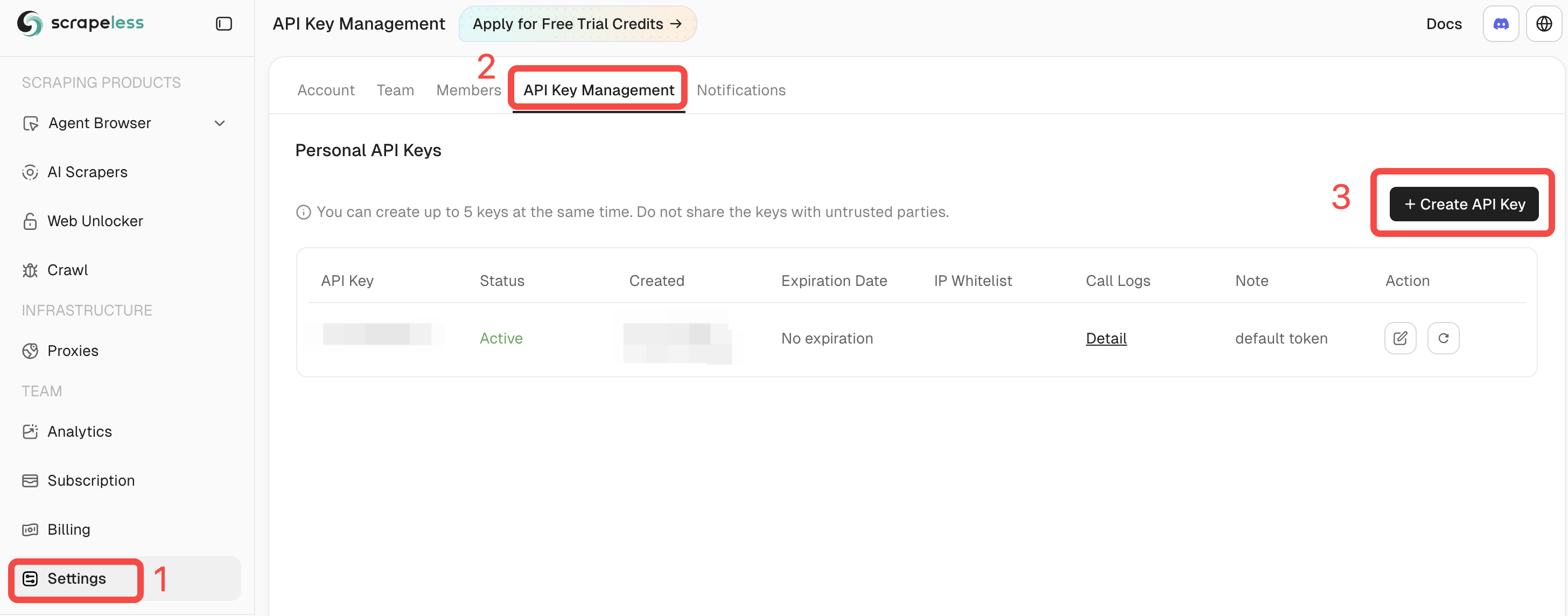
Scrapeless में लॉग इन करें और अपनी API कुंजीप्राप्त करें।
पूर्वापेक्षाएँ
- Python 3.10+
- एक मान्य API कुंजी के साथ एक पंजीकृत Scrapelessखाता
- Scrapling इंस्टॉल किया हुआ (या आधिकारिक Docker image का उपयोग करें)
pip install scrapling
# If you need dynamic or stealth fetchers:
pip install "scrapling[fetchers]"
# Install browser dependencies
scrapling install
या आधिकारिक Docker image का उपयोग करें:
docker pull pyd4vinci/scrapling
# or
docker pull ghcr.io/d4vinci/scrapling:latest
त्वरित शुरुआत
यहाँ एक सरल उदाहरण है: DynamicSession (Scrapling द्वारा प्रदान) का उपयोग करके WebSocket एंडपॉइंट के माध्यम से Scrapeless Cloud Browser से कनेक्ट करना, एक पेज fetch करना, और response प्रिंट करना।
from urllib.parse import urlencode

from scrapling.fetchers import DynamicSession

# Configure your browser session
config = {
    "token": "YOUR_API_KEY",
    "sessionName": "scrapling-session",
    "sessionTTL": "300",  # 5 minutes
    "proxyCountry": "ANY",
    "sessionRecording": "false",
}

# Build WebSocket URL
ws_endpoint = f"wss://browser.scrapeless.com/api/v2/browser?{urlencode(config)}"
print('Connecting to Scrapeless...')

with DynamicSession(cdp_url=ws_endpoint, disable_resources=True) as s:
    print("Connected!")
    page = s.fetch("https://httpbin.org/headers", network_idle=True)
    print(f"Page loaded, content length: {len(page.body)}")
    print(page.json())
नोट: Scrapeless Cloud Browser उन्नत विकल्पों का समर्थन करता है जैसे प्रॉक्सी कॉन्फ़िगरेशन, कस्टम फ़िंगरप्रिंट, और CAPTCHA solver।
अधिक विवरण के लिए Scrapeless Browser दस्तावेज़ देखें।
सामान्य उपयोग परिदृश्य (पूर्ण उदाहरणों के साथ)
शुरू करने से पहले, सुनिश्चित करें कि:
- आपने चलाया है
pip install "scrapling[fetchers]" - आपने ब्राउज़र डिपेंडेंसीज़ डाउनलोड करने के लिए
scrapling installनिष्पादित कर लिया है - आपके पास एक मान्य Scrapeless API कुंजीहै
- आप उपयोग कर रहे हैं पायथन 3.10+
Scrapling + Scrapeless के साथ Amazon स्क्रैप करना
नीचे एक पूर्ण उदाहरण दिया गया है जिसमें अमेज़न उत्पाद विवरणों की स्क्रैपिंगकी गई है।
स्क्रिप्ट स्वचालित रूप से Scrapeless क्लाउड ब्राउज़रसे जुड़ती है, लक्ष्य पृष्ठ लोड करती है, एंटी-बॉट जांच से बचती है, और महत्वपूर्ण उत्पाद जानकारी जैसे कि शीर्षक, मूल्य, स्टॉक स्थिति, रेटिंग, समीक्षा संख्या, विशेषताएं, छवियां, ASIN, विक्रेता और श्रेणियांनिकालती है।
# amazon_scraper_response_only.py
from urllib.parse import urlencode
import json
import time
import re
from scrapling.fetchers import DynamicSession

# ---------------- CONFIG ----------------
CONFIG = {
    "token": "YOUR_SCRAPELESS_API_KEY",
    "sessionName": "Data Scraping",
    "sessionTTL": "900",
    "proxyCountry": "ANY",
    "sessionRecording": "true",
}
DISABLE_RESOURCES = True   # False -> load JS/resources (more stable for JS-heavy sites)
WAIT_FOR_SELECTOR_TIMEOUT = 60
MAX_RETRIES = 3

TARGET_URL = "https://www.amazon.com/ESR-Compatible-Military-Grade-Protection-Scratch-Resistant/dp/B0CC1F4V7Q"
WS_ENDPOINT = f"wss://browser.scrapeless.com/api/v2/browser?{urlencode(CONFIG)}"


# ---------------- HELPERS (use response ONLY) ----------------
def retry(func, retries=2, wait=2):
    for i in range(retries + 1):
        try:
            return func()
        except Exception as e:
            print(f"[retry] Attempt {i+1} failed: {e}")
            if i == retries:
                raise
            time.sleep(wait * (i + 1))


def _resp_css_first_text(resp, selector):
    """Try response.css_first('selector::text') or resp.query_selector_text(selector) - return str or None."""
    try:
        if hasattr(resp, "css_first"):
            # prefer unified ::text pseudo API
            val = resp.css_first(f"{selector}::text")
            if val:
                return val.strip()
    except Exception:
        pass
    try:
        if hasattr(resp, "query_selector_text"):
            val = resp.query_selector_text(selector)
            if val:
                return val.strip()
    except Exception:
        pass
    return None


def _resp_css_texts(resp, selector):
    """Return list of text values for selector using response.css('selector::text') or query_selector_all_text."""
    out = []
    try:
        if hasattr(resp, "css"):
            vals = resp.css(f"{selector}::text") or []
            for v in vals:
                if isinstance(v, str) and v.strip():
                    out.append(v.strip())
            if out:
                return out
    except Exception:
        pass
    try:
        if hasattr(resp, "query_selector_all_text"):
            vals = resp.query_selector_all_text(selector) or []
            for v in vals:
                if v and v.strip():
                    out.append(v.strip())
            if out:
                return out
    except Exception:
        pass
    # some fetchers provide query_selector_all and elements with .text() method
    try:
        if hasattr(resp, "query_selector_all"):
            els = resp.query_selector_all(selector) or []
            for el in els:
                try:
                    if hasattr(el, "text") and callable(el.text):
                        t = el.text()
                        if t and t.strip():
                            out.append(t.strip())
                            continue
                except Exception:
                    pass
                try:
                    if hasattr(el, "get_text"):
                        t = el.get_text(strip=True)
                        if t:
                            out.append(t)
                            continue
                except Exception:
                    pass
    except Exception:
        pass
    return out


def _resp_css_first_attr(resp, selector, attr):
    """Try to get attribute via response css pseudo ::attr(...) or query selector element attributes."""
    try:
        if hasattr(resp, "css_first"):
            val = resp.css_first(f"{selector}::attr({attr})")
            if val:
                return val.strip()
    except Exception:
        pass
    try:
        # try element and get_attribute / get
        if hasattr(resp, "query_selector"):
            el = resp.query_selector(selector)
            if el:
                if hasattr(el, "get_attribute"):
                    try:
                        v = el.get_attribute(attr)
                        if v:
                            return v
                    except Exception:
                        pass
                try:
                    v = el.get(attr) if hasattr(el, "get") else None
                    if v:
                        return v
                except Exception:
                    pass
                try:
                    attrs = getattr(el, "attrs", None)
                    if isinstance(attrs, dict) and attr in attrs:
                        return attrs.get(attr)
                except Exception:
                    pass
    except Exception:
        pass
    return None


def detect_bot_via_resp(resp):
    """Detect typical bot/captcha signals using response text selectors only."""
    checks = [
        # body text
        ("body",),
        # some common challenge indicators
        ("#challenge-form",),
        ("#captcha",),
        ("text:contains('are you a human')",),
    ]
    # First try a broad body text
    try:
        body_text = _resp_css_first_text(resp, "body")
        if body_text:
            txt = body_text.lower()
            for k in ("captcha", "are you a human", "verify you are human", "access to this page has been denied", "bot detection", "please enable javascript", "checking your browser"):
                if k in txt:
                    return True
    except Exception:
        pass
    # Try specific selectors
    suspects = [
        "#captcha", "#cf-hcaptcha-container", "#challenge-form", "text:contains('are you a human')"
    ]
    for s in suspects:
        try:
            if _resp_css_first_text(resp, s):
                return True
        except Exception:
            pass
    return False


def parse_price_from_text(price_raw):
    if not price_raw:
        return None, None
    m = re.search(r"([^\d.,\s]+)?\s*([\d,]+\.\d{1,2}|[\d,]+)", price_raw)
    if m:
        currency = m.group(1).strip() if m.group(1) else None
        num = m.group(2).replace(",", "")
        try:
            price = float(num)
        except Exception:
            price = None
        return currency, price
    return None, None


def parse_int_from_text(text):
    if not text:
        return None
    digits = "".join(filter(str.isdigit, text))
    try:
        return int(digits) if digits else None
    except:
        return None


# ---------------- MAIN (use response only) ----------------
def scrape_amazon_using_response_only(url):
    with DynamicSession(cdp_url=WS_ENDPOINT, disable_resources=DISABLE_RESOURCES) as s:
        # fetch with retry
        resp = retry(lambda: s.fetch(url, network_idle=True, timeout=120000), retries=MAX_RETRIES - 1)

        if detect_bot_via_resp(resp):
            print("[warn] Bot/CAPTCHA detected via response selectors.")
            try:
                resp.screenshot(path="captcha_detected.png")
            except Exception:
                pass
            # retry once
            time.sleep(2)
            resp = retry(lambda: s.fetch(url, network_idle=True, timeout=120000), retries=1)

        # Wait for productTitle (polling using resp selectors only)
        title = _resp_css_first_text(resp, "#productTitle") or _resp_css_first_text(resp, "#title")
        waited = 0
        while not title and waited < WAIT_FOR_SELECTOR_TIMEOUT:
            print("[info] Waiting for #productTitle to appear (response selector)...")
            time.sleep(3)
            waited += 3
            resp = s.fetch(url, network_idle=True, timeout=120000)
            title = _resp_css_first_text(resp, "#productTitle") or _resp_css_first_text(resp, "#title")

        title = title.strip() if title else None

        # Extract fields using response-only helpers
        def get_text(selectors, multiple=False):
            if multiple:
                out = []
                for sel in selectors:
                    out.extend(_resp_css_texts(resp, sel) or [])
                return out
            for sel in selectors:
                v = _resp_css_first_text(resp, sel)
                if v:
                    return v
            return None

        price_raw = get_text([
            "#priceblock_ourprice",
            "#priceblock_dealprice",
            "#priceblock_saleprice",
            "#price_inside_buybox",
            ".a-price .a-offscreen"
        ])
        rating_text = get_text(["span.a-icon-alt", "#acrPopover"])
        review_count_text = get_text(["#acrCustomerReviewText", "[data-hook='total-review-count']"])
        availability = get_text([
            "#availability .a-color-state",
            "#availability .a-color-success",
            "#outOfStock",
            "#availability"
        ])
        features = get_text(["#feature-bullets ul li"], multiple=True) or []
        description = get_text([
            "#productDescription",
            "#bookDescription_feature_div .a-expander-content",
            "#productOverview_feature_div"
        ])

        # images (use attribute extraction via response)
        images = []
        seen = set()
        main_src = _resp_css_first_attr(resp, "#imgTagWrapperId img", "data-old-hires") \
                   or _resp_css_first_attr(resp, "#landingImage", "src") \
                   or _resp_css_first_attr(resp, "#imgTagWrapperId img", "src")
        if main_src and main_src not in seen:
            images.append(main_src); seen.add(main_src)

        dyn = _resp_css_first_attr(resp, "#imgTagWrapperId img", "data-a-dynamic-image") \
              or _resp_css_first_attr(resp, "#landingImage", "data-a-dynamic-image")
        if dyn:
            try:
                obj = json.loads(dyn)
                for k in obj.keys():
                    if k not in seen:
                        images.append(k); seen.add(k)
            except Exception:
                pass

        thumbs = _resp_css_texts(resp, "#altImages img::attr(src)") or _resp_css_texts(resp, ".imageThumbnail img::attr(src)") or []
        for src in thumbs:
            if not src:
                continue
            src_clean = re.sub(r"\._[A-Z0-9,]+_\.", ".", src)
            if src_clean not in seen:
                images.append(src_clean); seen.add(src_clean)

        # ASIN (attribute)
        asin = _resp_css_first_attr(resp, "input#ASIN", "value")
        if asin:
            asin = asin.strip()
        else:
            detail_texts = _resp_css_texts(resp, "#detailBullets_feature_div li") or []
            combined = " ".join([t for t in detail_texts if t])
            m = re.search(r"ASIN[:\s]*([A-Z0-9-]+)", combined, re.I)
            if m:
                asin = m.group(1).strip()

        merchant = _resp_css_first_text(resp, "#sellerProfileTriggerId") \
                   or _resp_css_first_text(resp, "#merchant-info") \
                   or _resp_css_first_text(resp, "#bylineInfo")
        categories = _resp_css_texts(resp, "#wayfinding-breadcrumbs_container ul li a") or _resp_css_texts(resp, "#wayfinding-breadcrumbs_feature_div ul li a") or []
        categories = [c.strip() for c in categories if c and c.strip()]

        currency, price = parse_price_from_text(price_raw)
        rating_val = None
        if rating_text:
            try:
                rating_val = float(rating_text.split()[0].replace(",", ""))
            except Exception:
                rating_val = None
        review_count = parse_int_from_text(review_count_text)

        data = {
            "title": title,
            "price_raw": price_raw,
            "price": price,
            "currency": currency,
            "rating": rating_val,
            "review_count": review_count,
            "availability": availability,
            "features": features,
            "description": description,
            "images": images,
            "asin": asin,
            "merchant": merchant,
            "categories": categories,
            "url": url,
            "scrapedAt": time.strftime("%Y-%m-%dT%H:%M:%SZ", time.gmtime()),
        }

        return data


# ---------------- RUN ----------------
if __name__ == "__main__":
    try:
        result = scrape_amazon_using_response_only(TARGET_URL)
        print(json.dumps(result, indent=2, ensure_ascii=False))
        with open("scrapeless-amazon-product.json", "w", encoding="utf-8") as f:
            json.dump(result, f, ensure_ascii=False, indent=2)
    except Exception as e:
        print("[error] scraping failed:", e)
नमूना आउटपुट:
{
  "title": "ESR for iPhone 15 Pro Max Case, Compatible with MagSafe, Military-Grade Protection, Yellowing Resistant, Scratch-Resistant Back, Magnetic Phone Case for iPhone 15 Pro Max, Classic Series, Clear",
  "price_raw": "$12.99",
  "price": 12.99,
  "currency": "$",
  "rating": 4.6,
  "review_count": 133714,
  "availability": "In Stock",
  "features": [
    "Compatibility: only for iPhone 15 Pro Max; full functionality maintained via precise speaker and port cutouts and easy-press buttons",
    "Stronger Magnetic Lock: powerful built-in magnets with 1,500 g of holding force enable faster, easier place-and-go wireless charging and a secure lock on any MagSafe accessory",
    "Military-Grade Drop Protection: rigorously tested to ensure total protection on all sides, with specially designed Air Guard corners that absorb shock so your phone doesn\u2019t have to",
    "Raised-Edge Protection: raised screen edges and Camera Guard lens frame provide enhanced scratch protection where it really counts",
    "Stay Original: scratch-resistant, crystal-clear acrylic back lets you show off your iPhone 15 Pro Max\u2019s true style in stunning clarity that lasts",
    "Complete Customer Support: detailed setup videos and FAQs, comprehensive 12-month protection plan, lifetime support, and personalized help."
  ],
  "description": "BrandESRCompatible Phone ModelsiPhone 15 Pro MaxColorA-ClearCompatible DevicesiPhone 15 Pro MaxMaterialAcrylic",
  "images": [
    "https://m.media-amazon.com/images/I/71-ishbNM+L._AC_SL1500_.jpg",
    "https://m.media-amazon.com/images/I/71-ishbNM+L._AC_SX342_.jpg",
    "https://m.media-amazon.com/images/I/71-ishbNM+L._AC_SX679_.jpg",
    "https://m.media-amazon.com/images/I/71-ishbNM+L._AC_SX522_.jpg",
    "https://m.media-amazon.com/images/I/71-ishbNM+L._AC_SX385_.jpg",
    "https://m.media-amazon.com/images/I/71-ishbNM+L._AC_SX466_.jpg",
    "https://m.media-amazon.com/images/I/71-ishbNM+L._AC_SX425_.jpg",
    "https://m.media-amazon.com/images/I/71-ishbNM+L._AC_SX569_.jpg",
    "https://m.media-amazon.com/images/I/41Ajq9jnx9L._AC_SR38,50_.jpg",
    "https://m.media-amazon.com/images/I/51RkuGXBMVL._AC_SR38,50_.jpg",
    "https://m.media-amazon.com/images/I/516RCbMo5tL._AC_SR38,50_.jpg",
    "https://m.media-amazon.com/images/I/51DdOFdiQQL._AC_SR38,50_.jpg",
    "https://m.media-amazon.com/images/I/514qvXYcYOL._AC_SR38,50_.jpg",
    "https://m.media-amazon.com/images/I/518CS81EFXL._AC_SR38,50_.jpg",
    "https://m.media-amazon.com/images/I/413EWAtny9L.SX38_SY50_CR,0,0,38,50_BG85,85,85_BR-120_PKdp-play-icon-overlay__.jpg",
    "https://images-na.ssl-images-amazon.com/images/G/01/x-locale/common/transparent-pixel._V192234675_.gif"
  ],
  "asin": "B0CC1F4V7Q",
  "merchant": "Minghutech-US",
  "categories": [
    "Cell Phones & Accessories",
    "Cases, Holsters & Sleeves",
    "Basic Cases"
  ],
  "url": "https://www.amazon.com/ESR-Compatible-Military-Grade-Protection-Scratch-Resistant/dp/B0CC1F4V7Q",
  "scrapedAt": "2025-10-30T10:20:16Z"
}
यह उदाहरण दर्शाता है कि कैसे डायनामिकसेशन और Scrapeless मिलकर एक स्थिर, पुन: उपयोग योग्य लंबे सत्र के वातावरणका निर्माण कर सकते हैं।
एक ही सत्र के भीतर, आप ब्राउज़र को पुनः आरंभ किए बिना कई पृष्ठों का अनुरोध कर सकते हैं, लॉगिन स्थिति, कुकीज़ और स्थानीय भंडारणको बनाए रख सकते हैं, और प्रोफ़ाइल अलगाव और सत्र स्थायित्वप्राप्त कर सकते हैं।