Tự động hóa GitHub MFA
Giới thiệu
Thách thức lớn nhất khi tự động hóa quá trình đăng nhập GitHub chính là Xác thực hai yếu tố (2FA). Dù là ứng dụng Authenticator (TOTP) hay Email OTP, các luồng tự động hóa truyền thống thường bị kẹt ở bước này vì:
- Không thể tự động lấy mã xác thực
- Không thể đồng bộ mã theo thời gian thực
- Không thể tự động nhập mã thông qua tự động hóa
- Môi trường trình duyệt chưa đủ chân thực, kích hoạt các kiểm tra bảo mật của GitHub
Bài viết này minh họa cách xây dựng một quy trình 2FA của GitHub hoàn toàn tự động bằng Scrapeless Browser + Signal CDP, bao gồm:
- Trường hợp 1: GitHub 2FA (tự động tạo Authenticator / TOTP)
- Trường hợp 2: GitHub 2FA (tự động lắng nghe Email OTP)
Chúng tôi sẽ giải thích toàn bộ quy trình cho từng trường hợp và trình bày cách phối hợp script đăng nhập với trình lắng nghe mã xác thực trong một hệ thống tự động.
Trường hợp 1: GitHub 2FA (Chế độ Authenticator OTP)
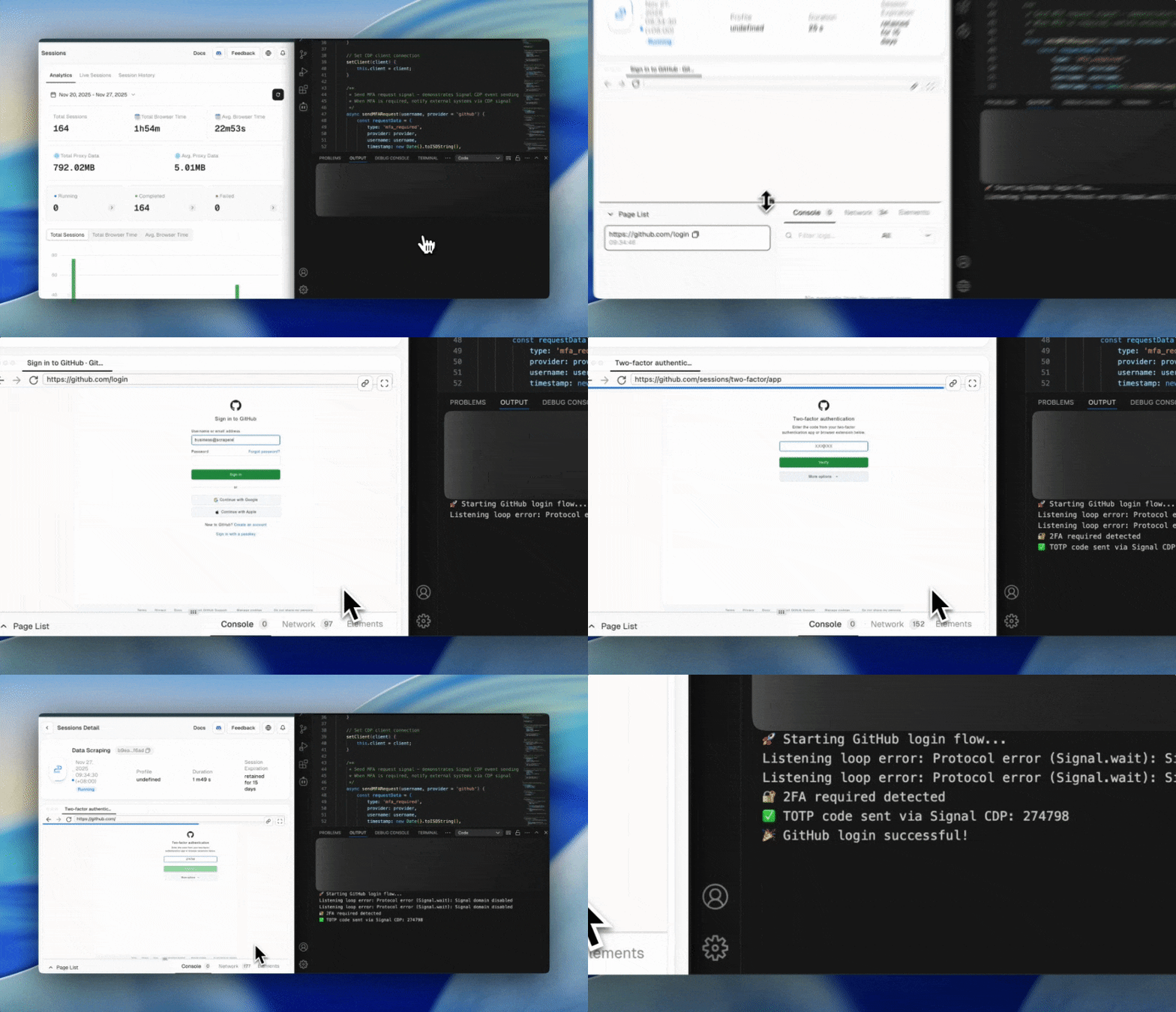
Cơ chế TOTP (Time-based One-Time Password) của GitHub rất phù hợp cho các kịch bản tự động hóa. Sử dụng Scrapeless Browser + Signal CDP, bạn có thể để trình duyệt tự động:
- Kích hoạt một sự kiện khi đến trang 2FA
- Tạo mã OTP
- Tự động điền mã
- Hoàn tất đăng nhập
So với Email/SMS OTP truyền thống, TOTP mang lại:
- Mã được tạo cục bộ, không phụ thuộc vào bên ngoài
- Tạo mã nhanh và ổn định
- Không cần API bổ sung
- Hoàn toàn có thể tự động hóa mà không cần can thiệp thủ công
Các kịch bản áp dụng:
- Tài khoản GitHub sử dụng Google Authenticator / Authy / 1Password
- Đường dẫn trang 2FA:
/sessions/two-factor/apphoặc/sessions/two-factor/webauthn
Video
Bước 1: Kết nối tới Scrapeless Browser
Ở bước này, chúng ta thiết lập một kết nối WebSocket song công (full-duplex) tới Scrapeless Browser:
import puppeteer from 'puppeteer-core';

const query = new URLSearchParams({
  token: "",
  proxyCountry: "ANY",
  sessionRecording: true,
  sessionTTL: 900,
  sessionName: "Data Scraping",
});

const connectionURL = `wss://browser.scrapeless.com/api/v2/browser?${query.toString()}`;
const browserWSEndpoint = connectionURL;

const browser = await puppeteer.connect({ browserWSEndpoint });
console.log("✅ Connected to Scrapeless Browser");
Ưu điểm:
- Chrome thực trên cloud với khả năng chống phát hiện mạnh mẽ
- Không tiêu tốn tài nguyên cục bộ
- Tự động proxy, lưu trữ bền vững và ghi lại phiên
- Thực thi đáng tin cậy các quy trình đăng nhập tự động quy mô lớn
Bước 2: Khởi tạo MFA Manager + TOTP Provider
MFA được xử lý thông qua giao tiếp hai chiều của Signal CDP, giúp:
- Tự động gửi
mfa_code_requestkhi phát hiện một trang 2FA - Tạo mã TOTP
- Trả về mã qua
mfa_code_response - Gửi các sự kiện kết quả đăng nhập
import { authenticator } from 'otplib';

const TOTP_SECRETS = {
    'github': 'secret-code',
    'default': 'secret-code'
};

authenticator.options = {
    digits: 6,
    step: 30,
    window: 1
};
Bước 3: Tạo MFA Manager
Ở đây, chúng ta tạo một trình quản lý MFA tập trung để xử lý giao tiếp với Signal CDP:
- Kích hoạt
mfa_code_request - Chờ và nhận mã xác thực (
mfa_code_response) - Trả mã về cho quá trình đăng nhập GitHub
- Gửi các sự kiện kết quả đăng nhập cuối cùng
class MFAManager {
    constructor() {
        this.client = null;
    }

    setClient(client) {
        this.client = client;
    }

    async sendMFARequest(username, provider = 'github') {
        const requestData = {
            type: 'mfa_required',
            provider,
            username,
            timestamp: new Date().toISOString(),
            service: 'github_2fa'
        };

        return await this.client.send('Signal.send', {
            event: 'mfa_code_request',
            data: JSON.stringify(requestData)
        });
    }

    async waitForMFACode(timeout = 120000) {
        const result = await this.client.send('Signal.wait', {
            event: 'mfa_code_response',
            timeout
        });

        if (result.status === 200 && result.data) {
            return JSON.parse(result.data).code;
        } else if (result.status === 408) {
            throw new Error('Waiting for MFA code timed out');
        } else {
            throw new Error(`Signal wait failed, status: ${result.status}`);
        }
    }

    async sendMFAResponse(code, username) {
        const responseData = {
            code,
            username,
            timestamp: new Date().toISOString(),
            status: 'code_provided'
        };

        return await this.client.send('Signal.send', {
            event: 'mfa_code_response',
            data: JSON.stringify(responseData)
        });
    }

    async sendLoginResult(success, username, url, error = null) {
        const resultData = {
            success,
            username,
            url,
            timestamp: new Date().toISOString(),
            error
        };

        await this.client.send('Signal.send', {
            event: 'github_login_result',
            data: JSON.stringify(resultData)
        });
    }
}
Ưu điểm:
- Quy trình 2FA hoàn toàn tự động (yêu cầu → chờ → lấy → điền)
- Quản lý thống nhất nhiều phương thức xác thực (TOTP/Email/Push)
- Loại bỏ logic 2FA lặp lại trong các script
Bước 4: Khởi động TOTP Code Provider (Xử lý lắng nghe & tự động điền mã)
Ở bước này, chúng ta khởi chạy trình lắng nghe tự động tạo mã TOTP, giúp:
- Liên tục lắng nghe các sự kiện
mfa_code_request - Tự động tạo mã TOTP (bằng
otplib) - Tự động gửi mã trở lại qua Signal (
mfa_code_response) - Thay thế hoàn toàn việc nhập mã thủ công
class TOTPCodeProvider {
    constructor(mfaManager) {
        this.mfaManager = mfaManager;
        this.isListening = false;
        this.secrets = TOTP_SECRETS;
    }

    async startListening() {
        if (this.isListening) return;
        this.isListening = true;
        this.listenLoop();
    }

    async listenLoop() {
        while (this.isListening) {
            try {
                const result = await this.mfaManager.client.send('Signal.wait', {
                    event: 'mfa_code_request',
                    timeout: 5000
                });

                if (result.status === 200 && result.data) {
                    const requestData = JSON.parse(result.data);
                    await this.handleMFARequest(requestData);
                }
            } catch (err) {}

            await new Promise(r => setTimeout(r, 100));
        }
    }

    async handleMFARequest(requestData) {
        const code = this.generateTOTPCode(requestData.provider);
        await this.mfaManager.sendMFAResponse(code, requestData.username);
        console.log(`✅ TOTP code sent via Signal CDP: ${code}`);
    }

    generateTOTPCode(service = 'github') {
        const secret = this.secrets[service] || this.secrets.default;
        return authenticator.generate(secret);
    }
}
Ưu điểm:
- Tự động hóa hoàn toàn 2FA mà không cần nhập thủ công
- Không cần email hay ứng dụng di động
- Việc tạo TOTP chính xác, ổn định và có thể mở rộng
- Hỗ trợ GitHub, AWS, Azure, Google và bất kỳ nhà cung cấp nào dựa trên TOTP
Bước 5: Truy cập trang đăng nhập GitHub và nhập thông tin đăng nhập
Bước này xử lý phần đầu tiên của luồng đăng nhập GitHub:
Mở trang đăng nhập → Nhập tên người dùng & mật khẩu → Tiến tới bước tiếp theo (2FA hoặc đăng nhập trực tiếp)
await page.goto('https://github.com/login', { waitUntil: 'networkidle2' });

await page.waitForSelector('#login_field', { timeout: 10000 });

await page.type('#login_field', githubCredentials.username);
await page.type('#password', githubCredentials.password);

await page.click('input[type="submit"][value="Sign in"]');
Ưu điểm:
- Sử dụng Scrapeless Browser đảm bảo môi trường trình duyệt chân thực, ổn định
- Việc gõ phím tự động mô phỏng hành vi người dùng thực, tránh bị GitHub gắn cờ bảo mật
- Đảm bảo điều hướng đến đúng trang 2FA
Bước 6: Phát hiện trang 2FA và tự động gửi TOTP
if (currentUrl.includes('/sessions/two-factor')) {
    console.log('🔐 Detected 2FA required');

    await mfaManager.sendMFARequest(githubCredentials.username, 'github');

    const mfaCode = await mfaManager.waitForMFACode(120000);

    await page.waitForSelector('#app_totp');
    await page.type('#app_totp', mfaCode);

    await new Promise(resolve => setTimeout(resolve, 5000));
}
Ưu điểm:
- Hoàn tất 2FA của GitHub mà không cần bất kỳ can thiệp thủ công nào
- TOTP được tạo tự động, tránh độ trễ từ mã email
- Giao tiếp hai chiều của Signal CDP đảm bảo phân phối mã chính xác
- Độ ổn định và tin cậy ở mức doanh nghiệp
Bước 7: Gửi kết quả đăng nhập qua Signal CDP
Sau khi hoàn tất đăng nhập GitHub + 2FA, kết quả đăng nhập cuối cùng được gửi qua CDP (Signal.send) đến quy trình tự động hóa của bạn. Điều này cho phép backend, bot hoặc hệ thống CI/CD của bạn biết theo thời gian thực liệu việc đăng nhập có thành công hay không.
const isLoggedIn = !finalUrl.includes('/sessions/two-factor')
                && !finalUrl.includes('/login');

await mfaManager.sendLoginResult(isLoggedIn, githubCredentials.username, finalUrl);
Mã hoàn chỉnh
import puppeteer from 'puppeteer-core';
import {authenticator} from 'otplib';

const query = new URLSearchParams({
    token: "api-key",
    proxyCountry: "ANY",
    sessionRecording: true,
    sessionTTL: 900,
    sessionName: "GithubLogin",
});

const browserWSEndpoint = `wss://browser.scrapeless.com/api/v2/browser?${query.toString()}`;

// TOTP secrets
const TOTP_SECRETS = {
    'github': 'secret-code',
    'default': 'secret-code'
};

// Configure TOTP
authenticator.options = {digits: 6, step: 30, window: 1};

// MFA Manager
class MFAManager {
    constructor() {
        this.client = null;
    }

    setClient(client) {
        this.client = client;
    }

    async sendMFARequest(username, provider = 'github') {
        return await this.client.send('Signal.send', {
            event: 'mfa_code_request',
            data: JSON.stringify({
                type: 'mfa_required',
                provider,
                username,
                timestamp: new Date().toISOString(),
                service: 'github_2fa'
            })
        });
    }

    async waitForMFACode(timeout = 120000) {
        const result = await this.client.send('Signal.wait', {
            event: 'mfa_code_response',
            timeout
        });

        if (result.status === 200 && result.data) {
            return JSON.parse(result.data).code;
        } else if (result.status === 408) {
            throw new Error('Timeout waiting for MFA code');
        } else {
            throw new Error(`Signal wait failed, status: ${result.status}`);
        }
    }

    async sendMFAResponse(code, username) {
        return await this.client.send('Signal.send', {
            event: 'mfa_code_response',
            data: JSON.stringify({code, username, timestamp: new Date().toISOString(), status: 'code_provided'})
        });
    }

    async sendLoginResult(success, username, url, error = null) {
        await this.client.send('Signal.send', {
            event: 'github_login_result',
            data: JSON.stringify({success, username, url, timestamp: new Date().toISOString(), error})
        });
    }
}

// TOTP provider
class TOTPCodeProvider {
    constructor(mfaManager) {
        this.mfaManager = mfaManager;
        this.isListening = false;
        this.secrets = TOTP_SECRETS;
    }

    async startListening() {
        if (this.isListening) return;
        this.isListening = true;
        this.listenLoop();
    }

    async listenLoop() {
        while (this.isListening) {
            try {
                const result = await this.mfaManager.client.send('Signal.wait', {
                    event: 'mfa_code_request',
                    timeout: 5000
                });

                if (result.status === 200 && result.data) {
                    const requestData = JSON.parse(result.data);
                    await this.handleMFARequest(requestData);
                }
            } catch (error) {
            }

            await new Promise(resolve => setTimeout(resolve, 100));
        }
    }

    async handleMFARequest(requestData) {
        try {
            const code = this.generateTOTPCode(requestData.provider);
            if (code) {
                await this.mfaManager.sendMFAResponse(code, requestData.username);
                console.log(`✅ TOTP code sent via Signal CDP: ${code}`);
            } else {
                await this.sendErrorResponse(requestData.username, 'Unable to generate TOTP code');
            }
        } catch (error) {
            await this.sendErrorResponse(requestData.username, error.message);
        }
    }

    generateTOTPCode(service = 'github') {
        const secret = this.getSecretForService(service);
        if (!secret) throw new Error(`No TOTP secret found for ${service}`);

        const token = authenticator.generate(secret);
        if (!token || token.length !== 6 || isNaN(token)) {
            throw new Error(`Invalid TOTP token generated: ${token}`);
        }

        return token;
    }

    getSecretForService(service) {
        if (this.secrets[service]) return this.secrets[service];
        const lower = service.toLowerCase();
        if (this.secrets[lower]) return this.secrets[lower];
        if (this.secrets.default) return this.secrets.default;
        return null;
    }

    async sendErrorResponse(username, errorMessage) {
        await this.mfaManager.client.send('Signal.send', {
            event: 'mfa_code_error',
            data: JSON.stringify({username, error: errorMessage, timestamp: new Date().toISOString()})
        });
    }

    stopListening() {
        this.isListening = false;
    }
}

// GitHub credentials
const githubCredentials = {
    username: "***@gmail.com",
    password: "****"
};

// Main login flow
async function githubLoginWithAutoMFA() {
    let browser, page, codeProvider;

    try {
        console.log("🚀 Starting GitHub login flow...");
        browser = await puppeteer.connect({browserWSEndpoint});

        const pages = await browser.pages();
        page = pages.length > 0 ? pages[0] : await browser.newPage();

        const client = await page.target().createCDPSession();
        const mfaManager = new MFAManager();
        mfaManager.setClient(client);

        codeProvider = new TOTPCodeProvider(mfaManager);
        await codeProvider.startListening();

        page.setDefaultTimeout(30000);
        page.setDefaultNavigationTimeout(30000);

        await page.goto('https://github.com/login', {waitUntil: 'networkidle2'});
        await page.waitForSelector('#login_field, input[name="login"]', {timeout: 10000});

        await page.type('#login_field', githubCredentials.username);
        await page.type('#password', githubCredentials.password);
        await page.click('input[type="submit"][value="Sign in"]');

        await new Promise(resolve => setTimeout(resolve, 3000));

        const currentUrl = page.url();

        if (currentUrl.includes('/sessions/two-factor')) {
            console.log('🔐 2FA required detected');
            await mfaManager.sendMFARequest(githubCredentials.username, 'github');

            if (currentUrl.includes('/sessions/two-factor/webauthn')) {
                const moreOptionsButton = await page.$('.more-options-two-factor');
                if (moreOptionsButton) {
                    await moreOptionsButton.click();
                    await new Promise(resolve => setTimeout(resolve, 1000));
                }

                const authAppLink = await page.$('a[href="/sessions/two-factor/app"]');
                if (authAppLink) {
                    await authAppLink.click();
                    await page.waitForNavigation({waitUntil: 'networkidle2'});
                }
            }

            if (page.url().includes('/sessions/two-factor/app')) {
                const mfaCode = await mfaManager.waitForMFACode(120000);

                await page.waitForSelector('#app_totp', {timeout: 10000});
                await page.click('#app_totp', {clickCount: 3});
                await page.type('#app_totp', mfaCode);

                await new Promise(resolve => setTimeout(resolve, 5000));

                const finalUrl = page.url();
                const isLoggedIn = !finalUrl.includes('/sessions/two-factor') &&
                    !finalUrl.includes('/login') &&
                    (finalUrl.includes('github.com') || finalUrl === 'https://github.com/');

                await mfaManager.sendLoginResult(isLoggedIn, githubCredentials.username, finalUrl);

                if (isLoggedIn) {
                    console.log('🎉 GitHub login successful!');
                    await page.goto('https://github.com/', {waitUntil: 'networkidle2', timeout: 10000});
                } else {
                    console.log('❌ Login failed');
                }
            }
        } else if (currentUrl.includes('github.com') && !currentUrl.includes('/login')) {
            console.log('✅ Login successful (no 2FA)');
            await mfaManager.sendLoginResult(true, githubCredentials.username, currentUrl);
        } else {
            console.log('❌ Login failed, still on login page');
            await mfaManager.sendLoginResult(false, githubCredentials.username, currentUrl, 'Login failed');
        }

    } catch (error) {
        console.error('❌ GitHub login flow failed:', error);

        try {
            if (page) {
                const client = await page.target().createCDPSession();
                const mfaManager = new MFAManager();
                mfaManager.setClient(client);
                await mfaManager.sendLoginResult(false, githubCredentials.username, page.url() || 'unknown', error.message);
            }
        } catch (signalError) {
            console.error('❌ Failed to send error signal:', signalError);
        }

    } finally {
        if (codeProvider) codeProvider.stopListening();
        if (browser) await browser.close();
        console.log('🔚 GitHub login script finished');
    }
}

githubLoginWithAutoMFA().catch(console.error);
Trường hợp 2: GitHub 2FA (Chế độ Email OTP)
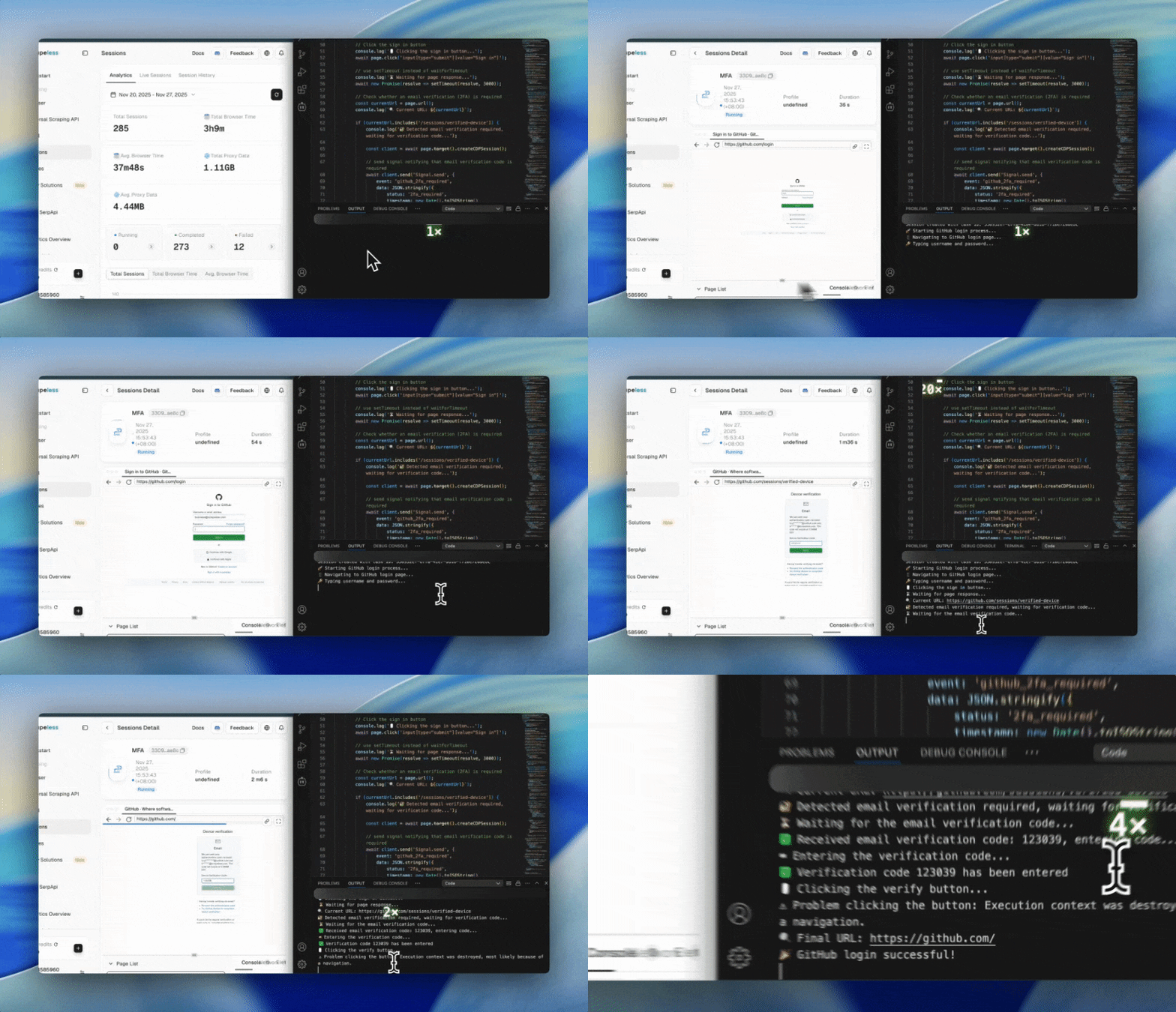
Loại 2FA phổ biến nhất trong môi trường doanh nghiệp là xác thực đa yếu tố (MFA) qua Email OTP.
Áp dụng cho:
- GitHub đã bật MFA và liên kết xác thực qua email
- Chính sách bảo mật của GitHub yêu cầu xác thực qua Email
Video
Bước 1: Kết nối tới Scrapeless Browser
import puppeteer from 'puppeteer-core';

const query = new URLSearchParams({
  token: "",
  proxyCountry: "ANY",
  sessionRecording: true,
  sessionTTL: 900,
  sessionName: "Data Scraping",
});

const connectionURL = `wss://browser.scrapeless.com/api/v2/browser?${query.toString()}`;
const browserWSEndpoint = connectionURL;
Ưu điểm:
- Thực thi trình duyệt từ xa, không tiêu tốn tài nguyên cục bộ
sessionRecordingtạo điều kiện cho việc phát lại và kiểm toán- Hỗ trợ giao tiếp hai chiều theo thời gian thực với Signal
Bước 2: Mở GitHub và nhập thông tin đăng nhập
const githubCredentials = {
    username: "1040111453@qq.com",
    password: "shijee1218",
    twoFactorCode: null
};

const browser = await puppeteer.connect({ browserWSEndpoint });
const pages = await browser.pages();
const page = pages.length > 0 ? pages[0] : await browser.newPage();

page.setDefaultTimeout(30000);
page.setDefaultNavigationTimeout(30000);

await page.goto('https://github.com/login', { waitUntil: 'networkidle2' });
await page.waitForSelector('#login_field', { timeout: 10000 });
Ưu điểm:
- Mô phỏng chính xác thao tác nhập liệu của người dùng thực để tránh kích hoạt bảo mật của GitHub
- Tự động chờ trang được kết xuất, cải thiện độ ổn định của script
- Hỗ trợ thiết lập thời gian chờ dài để xử lý các biến động mạng
Bước 3: Phát hiện xem trang Email 2FA đã được tải hay chưa
const currentUrl = page.url();

if (currentUrl.includes('/sessions/verified-device')) {
    const client = await page.target().createCDPSession();

    // Send Signal notification to email listener to prepare for OTP
    await client.send('Signal.send', {
        event: 'github_2fa_required',
        data: JSON.stringify({ status: '2fa_required', timestamp: new Date().toISOString() })
    });

    // Wait for email listener to return OTP
    const twoFactorResult = await client.send('Signal.wait', {
        event: 'github_2fa_code',
        timeout: 120000
    });
Ưu điểm:
- Nhận diện chính xác trang
/sessions/verified-device - Chủ động thông báo cho trình lắng nghe email chuẩn bị nhận OTP
- Hỗ trợ chờ OTP email theo thời gian thực, cải thiện tỷ lệ thành công của tự động hóa
Bước 4: Trình lắng nghe email gửi OTP
Ví dụ Signal:
{
  "event": "github_2fa_code",
  "data": { "code": "123456" }
}
Ưu điểm:
- Tự động đọc email
- Tự động trích xuất GitHub OTP (mã 6 chữ số)
- Gửi Signal tới Scrapeless Browser theo thời gian thực, không cần thao tác thủ công
Bước 5: Nhập OTP và gửi đi
if (twoFactorResult.status === 200 && twoFactorResult.data) {
    const twoFactorData = JSON.parse(twoFactorResult.data);
    githubCredentials.twoFactorCode = twoFactorData.code;

    if (!page.url().includes('/sessions/verified-device')) return;

    await page.$eval('#otp', (input) => { input.value = ''; });
    await page.type('#otp', githubCredentials.twoFactorCode);

    await page.evaluate(() => {
        const button = document.querySelector('button[type="submit"]');
        if (button) button.click();
    });
    await new Promise(resolve => setTimeout(resolve, 5000));
}
Ưu điểm:
- Tự động điền OTP, cải thiện hiệu quả tự động hóa
- Đảm bảo trang vẫn đang ở trạng thái 2FA, ngăn ngừa lỗi điều hướng
- Mô phỏng thao tác nhấp chuột thực, giảm nguy cơ kích hoạt các kiểm tra bảo mật
Bước 6: Kiểm tra kết quả đăng nhập cuối cùng và gửi Signal
const finalUrl = page.url();
const isLoggedIn =
    !finalUrl.includes('/sessions/verified-device') &&
    !finalUrl.includes('/login') &&
    (finalUrl.includes('github.com') || finalUrl === 'https://github.com/');

await client.send('Signal.send', {
    event: 'github_login_result',
    data: JSON.stringify({
        success: isLoggedIn,
        username: githubCredentials.username,
        url: finalUrl,
        twoFactorCode: githubCredentials.twoFactorCode,
        timestamp: new Date().toISOString()
    })
});

if (isLoggedIn) await page.goto('https://github.com/', { waitUntil: 'networkidle2' });
Ưu điểm:
- Tránh nhận định sai, đảm bảo trang đã đăng nhập thành công
- Tự động điều hướng tới trang chủ GitHub để xác minh, cải thiện độ tin cậy
- Kết quả đăng nhập có thể được báo cáo theo thời gian thực tới hệ thống CI/CD hoặc bot
Bước 7: Duy trì phiên và đóng trình duyệt
await new Promise(resolve => setTimeout(resolve, 5000));
await browser.close();
Ưu điểm:
- Đảm bảo tất cả các sự kiện Signal đã được gửi
- Giữ phiên hoạt động đủ lâu cho các thao tác tiếp theo
- Đóng trình duyệt để ngăn rò rỉ tài nguyên
Mã hoàn chỉnh
- Trước tiên, bạn cần dùng script này để thực hiện việc điền tên người dùng và mật khẩu ở trang đăng nhập GitHub cùng logic đăng nhập, và chờ nhập OTP trên cửa sổ xác thực Email.
Bạn sẽ nhận được một taskId khi tác vụ phiên trình duyệt được tạo, hãy ghi nhớ nó vì bạn sẽ cần đến nó ở bước tiếp theo.
import puppeteer from 'puppeteer-core';

const token = "api-key";

const query = new URLSearchParams({
    token,
    proxyCountry: "ANY",
    sessionRecording: true,
    sessionTTL: 900,
    sessionName: "Data Scraping",
});

const createBrowserSessionURL = `https://browser.scrapeless.com/api/v2/browser?${query.toString()}`;

// Get session taskId via HTTP API
const sessionResponse = await fetch(createBrowserSessionURL);
const {taskId} = await sessionResponse.json();
console.log('Session created with task ID:', taskId);

const browserWSEndpoint = `wss://api.scrapeless.com/browser/${taskId}?x-api-key=${token}`;

async function githubLoginWith2FA() {
    const browser = await puppeteer.connect({browserWSEndpoint});
    let page;

    try {
        console.log("🚀 Starting GitHub login process...");
        const githubCredentials = {
            username: "****@gmail.com",
            password: "******",
            twoFactorCode: null
        };

        const pages = await browser.pages();
        page = pages.length > 0 ? pages[0] : await browser.newPage();

        page.setDefaultTimeout(30000);
        page.setDefaultNavigationTimeout(30000);

        console.log('📱 Navigating to GitHub login page...');
        await page.goto('https://github.com/login', {waitUntil: 'networkidle2'});

        // Wait for the login form to load
        await page.waitForSelector('#login_field', {timeout: 10000});

        console.log('🔑 Typing username and password...');
        await page.type('#login_field', githubCredentials.username);
        await page.type('#password', githubCredentials.password);

        // Click the sign in button
        console.log('🖱️ Clicking the sign in button...');
        await page.click('input[type="submit"][value="Sign in"]');

        // use setTimeout instead of waitForTimeout
        console.log('⏳ Waiting for page response...');
        await new Promise(resolve => setTimeout(resolve, 3000));

        // Check whether an email verification (2FA) is required
        const currentUrl = page.url();
        console.log(`🔍 Current URL: ${currentUrl}`);

        if (currentUrl.includes('/sessions/verified-device')) {
            console.log('🔐 Detected email verification required, waiting for verification code...');

            const client = await page.target().createCDPSession();

            // send signal notifying that email verification code is required
            await client.send('Signal.send', {
                event: 'github_2fa_required',
                data: JSON.stringify({
                    status: '2fa_required',
                    timestamp: new Date().toISOString()
                })
            });

            // Wait to receive the email verification code
            console.log('⏳ Waiting for the email verification code...');
            const twoFactorResult = await client.send('Signal.wait', {
                event: 'github_2fa_code',
                timeout: 120000
            });

            if (twoFactorResult.status === 200 && twoFactorResult.data) {
                const twoFactorData = JSON.parse(twoFactorResult.data);
                githubCredentials.twoFactorCode = twoFactorData.code;

                console.log(`✅ Received email verification code: ${githubCredentials.twoFactorCode}, entering code...`);

                // Ensure we are still on the verification page
                if (!page.url().includes('/sessions/verified-device')) {
                    console.log('⚠️ The page has navigated away, verification may no longer be required');
                    return;
                }

                // Enter the verification code
                console.log('⌨️ Entering the verification code...');
                await page.$eval('#otp', (input, code) => {
                    input.value = '';
                }, githubCredentials.twoFactorCode);

                await page.type('#otp', githubCredentials.twoFactorCode);
                console.log(`✅ Verification code ${githubCredentials.twoFactorCode} has been entered`);

                // Click the verify button
                console.log('🖱️ Clicking the verify button...');
                try {
                    await page.evaluate(() => {
                        const button = document.querySelector('button[type="submit"]');
                        if (button) button.click();
                    });

                    console.log('✅ Verify button clicked, waiting for page response...');
                    await new Promise(resolve => setTimeout(resolve, 5000));

                } catch (clickError) {
                    console.log('⚠️ Problem clicking the button:', clickError.message);
                }

                // Check login result
                await new Promise(resolve => setTimeout(resolve, 3000));
                const finalUrl = page.url();
                console.log(`🔍 Final URL: ${finalUrl}`);

                const isLoggedIn = !finalUrl.includes('/sessions/verified-device') &&
                    !finalUrl.includes('/login') &&
                    (finalUrl.includes('github.com') || finalUrl === 'https://github.com/');

                // send login result signal
                if (client) {
                    await client.send('Signal.send', {
                        event: 'github_login_result',
                        data: JSON.stringify({
                            success: isLoggedIn,
                            username: githubCredentials.username,
                            url: finalUrl,
                            twoFactorCode: githubCredentials.twoFactorCode,
                            timestamp: new Date().toISOString()
                        })
                    });
                }

                if (isLoggedIn) {
                    console.log('🎉 GitHub login successful!');
                    try {
                        await page.goto('https://github.com/', {
                            waitUntil: 'networkidle2',
                            timeout: 10000
                        });
                        console.log('✅ Successfully accessed GitHub homepage');
                    } catch (profileError) {
                        console.log('⚠️ Problem accessing homepage:', profileError.message);
                    }
                } else {
                    console.log('❌ Email verification failed, login unsuccessful');
                    console.log('🔍 Current page title:', await page.title());
                }

            } else {
                console.log('❌ Timed out waiting for the email verification code');
            }

        } else if (currentUrl.includes('github.com') && !currentUrl.includes('/login')) {
            // No email verification required
            console.log('✅ Login successful (no email verification required)');

            const client = await page.target().createCDPSession();
            await client.send('Signal.send', {
                event: 'github_login_result',
                data: JSON.stringify({
                    success: true,
                    username: githubCredentials.username,
                    url: currentUrl,
                    timestamp: new Date().toISOString()
                })
            });
        } else {
            console.log('❌ Login failed, still on the login page');
            console.log('🔍 Current page title:', await page.title());
        }

        // Keep the session for a short time
        console.log('⏳ Keeping connection for 5 seconds...');
        await new Promise(resolve => setTimeout(resolve, 5000));

    } catch (error) {
        console.error('❌ GitHub login process failed:', error);

        try {
            const pages = await browser.pages();
            const currentPage = pages.length > 0 ? pages[0] : page;
            if (currentPage) {
                const errorClient = await currentPage.target().createCDPSession();
                await errorClient.send('Signal.send', {
                    event: 'github_login_error',
                    data: JSON.stringify({
                        error: error.message,
                        timestamp: new Date().toISOString()
                    })
                });
            }
        } catch (signalError) {
            console.error('❌ Failed to send error signal as well:', signalError);
        }

    } finally {
        if (browser) await browser.close();
        console.log('🔚 GitHub login script finished');
    }
}

// Run the script
githubLoginWith2FA().catch(console.error);
- Khi script trên đến trang chờ mã xác thực, hãy chạy ngay script lắng nghe email này, nó sẽ gửi mã mới nhất tới script chính để hoàn tất việc xác thực.
import Imap from 'imap';
import {simpleParser} from 'mailparser';

const CONFIG = {
    imap: {
        user: "****@gmail.com",
        password: "****",
        host: "mail.privateemail.com",
        port: 993,
        tls: true,
        tlsOptions: {rejectUnauthorized: false}
    },

    signal: {
        baseUrl: "https://browser.scrapeless.com",
        apiKey: "api-key"
    },

    checkInterval: 5000,
    maxWaitTime: 120000
};

class EmailListener {
    constructor() {
        this.imap = null;
        this.isListening = false;
        this.sessionId = null;
    }

    async start(sessionId) {
        console.log('Starting email listener...');
        this.sessionId = sessionId;

        try {
            await this.connectIMAP();
            const code = await this.listenForCode();

            if (code) {
                console.log(`Found code: ${code}`);
                await this.sendSignal('github_2fa_code', {code});
                console.log('Code sent to browser');
            } else {
                console.log('No code found (timeout)');
                await this.sendSignal('email_listener_timeout', {status: 'timeout'});
            }
        } catch (error) {
            console.error('Listener error:', error.message || error);
        } finally {
            await this.cleanup();
        }
    }

    connectIMAP() {
        return new Promise((resolve, reject) => {
            this.imap = new Imap(CONFIG.imap);

            this.imap.once('ready', () => {
                console.log('IMAP connected');
                resolve();
            });

            this.imap.once('error', reject);
            this.imap.connect();
        });
    }

    async listenForCode() {
        console.log('Listening for GitHub verification code...');
        this.isListening = true;
        const startTime = Date.now();

        while (this.isListening && (Date.now() - startTime) < CONFIG.maxWaitTime) {
            try {
                const code = await this.checkEmails();
                if (code) return code;
                await new Promise(resolve => setTimeout(resolve, CONFIG.checkInterval));
            } catch (error) {
                console.error('checkEmails failed:', error.message || error);
                await new Promise(resolve => setTimeout(resolve, 10000));
            }
        }
        return null;
    }

    checkEmails() {
        return new Promise((resolve, reject) => {
            this.imap.openBox('INBOX', false, (err, box) => {
                if (err) return reject(err);

                const criteria = ['UNSEEN', ['FROM', '****@github.com']];

                this.imap.search(criteria, (err, results) => {
                    if (err) return reject(err);
                    if (!results || results.length === 0) return resolve(null);

                    this.processEmails(results, resolve, reject);
                });
            });
        });
    }

    processEmails(results, resolve, reject) {
        const fetcher = this.imap.fetch(results, {
            bodies: ['TEXT'],
            markSeen: true
        });

        let processed = 0;
        let foundCode = null;

        fetcher.on('message', (msg) => {
            let buffer = '';

            msg.on('body', (stream) => {
                stream.on('data', (chunk) => buffer += chunk.toString('utf8'));
            });

            msg.once('end', async () => {
                try {
                    const mail = await simpleParser(buffer);
                    const code = this.extractCode(mail.text || '');
                    if (code) foundCode = code;
                } catch (error) {
                    console.error('Failed to parse mail:', error);
                }

                processed++;
                if (processed === results.length) resolve(foundCode);
            });
        });

        fetcher.once('error', reject);
    }

    extractCode(text) {
        const patterns = [
            /verification code:?\s*(\d{6})/i,
            /verification code:?\s*(\d{6})/i,
            /code:?\s*(\d{6})/i,
            /GitHub verification code:?\s*(\d{6})/i
        ];

        for (const pattern of patterns) {
            const match = text.match(pattern);
            if (match) return match[1];
        }

        const digitMatch = text.match(/\b\d{6}\b/);
        return digitMatch ? digitMatch[0] : null;
    }

    // Send signal via HTTP, sessionId as parameter
    async sendSignal(event, data, sessionId = this.sessionId) {
        if (!sessionId) throw new Error('Session ID not available');

        try {
            const url = `${CONFIG.signal.baseUrl}/browser/${sessionId}/signal/send`;
            const response = await fetch(url, {
                method: 'POST',
                headers: {
                    'content-type': 'application/json',
                    'token': CONFIG.signal.apiKey
                },
                body: JSON.stringify({event, data})
            });

            if (!response.ok) {
                throw new Error(`HTTP ${response.status}: ${response.statusText}`);
            }

            const result = await response.json();
            console.log('Signal sent successfully:', result);
            return result;
        } catch (err) {
            console.error('Failed to send signal via HTTP:', err);
            throw err;
        }
    }

    async cleanup() {
        this.isListening = false;
        if (this.imap) {
            try {
                this.imap.end();
                console.log('IMAP connection closed');
            } catch (e) {
                console.error('Error closing IMAP:', e);
            }
        }
        this.sessionId = null;
    }
}

const listener = new EmailListener();
listener.start({taskId}).then(); // Replace with taskId from the first step
Qua hai ví dụ đăng nhập GitHub ở trên, chúng tôi đã minh họa cách đạt được các luồng đăng nhập tự động hiệu quả và ổn định trong môi trường doanh nghiệp, bao gồm hai chế độ 2FA phổ biến: TOTP và mã xác thực qua Email. Bằng cách sử dụng Scrapeless Browser + Signal CDP, bạn có thể thực hiện các thao tác trình duyệt thực, mô phỏng chính xác hành vi người dùng và tương tác theo thời gian thực với các hệ thống MFA cùng trình lắng nghe email để tự động lấy và gửi mã xác thực. Dù là để phát triển các quy trình đăng nhập tự động, tích hợp với hệ thống CI/CD, hay quản lý các tài khoản nội bộ của doanh nghiệp, giải pháp này có thể tăng đáng kể tỷ lệ đăng nhập thành công, giảm sự can thiệp thủ công, và cung cấp khả năng kiểm toán cùng giám sát vận hành đầy đủ.