JS Render
Web Unlocker API là một dịch vụ truy xuất nội dung web mạnh mẽ, hỗ trợ các tình huống kết xuất và tương tác trang web phức tạp.
Tham khảo tài liệu API của chúng tôi để biết nội dung chi tiết.
Cấu trúc yêu cầu
{
  "actor": "unlocker.webunlocker",
  "proxy": {
    "country": "ANY",
    "url": ""
  },
  "input": {
    "url": "string",
    "jsRender": {
      "enabled": true,
      "headless": true,
      "waitUntil": "domcontentloaded",
      "instructions": [],
      "block": {
        "resources": [],
        "urls": []
      },
      "response": {
        "type": "html",
        "options": {}
      }
    }
  }
}
Tính năng cốt lõi
Kết xuất JavaScript
Kết xuất JavaScript cho phép xử lý nội dung được tải động và SPA (Single Page Application). Kích hoạt một môi trường trình duyệt hoàn chỉnh, hỗ trợ các yêu cầu tương tác và kết xuất trang phức tạp hơn.
input.jsRender.enabled=true, chúng tôi sẽ sử dụng trình duyệt để gửi yêu cầu.
{
  "actor": "unlocker.webunlocker",
  "proxy": {
    "country": "ANY"
  },
  "input": {
    "url": "https://example.com/",
    "jsRender": {
      "enabled": true
    }
  }
}
Lệnh JavaScript
Cung cấp một bộ chỉ thị JavaScript phong phú cho phép bạn tương tác động với các trang web.
Các chỉ thị này cho phép bạn nhấp vào phần tử, điền biểu mẫu, gửi biểu mẫu, hoặc chờ các phần tử cụ thể xuất hiện, mang lại sự linh hoạt cho các tác vụ như nhấp vào nút “read more” hoặc gửi một biểu mẫu.
{
  "actor": "unlocker.webunlocker",
  "input": {
    "url": "https://example.com",
    "jsRender": {
      "enabled": true,
      "instructions": [
        {
          "waitFor": [
            ".dynamic-content",
            30000
          ]
          // Wait for element
        },
        {
          "click": [
            "#load-more",
            1000
          ]
          // Click element
        },
        {
          "fill": [
            "#search-input",
            "search term"
          ]
          // Fill form
        },
        {
          "keyboard": [
            "press",
            "Enter"
          ]
          // Simulate key press
        },
        {
          "evaluate": "window.scrollTo(0, document.body.scrollHeight)"
          // Execute custom JS
        }
      ]
    }
  }
}
Dưới đây là một số thao tác phổ biến mà bạn có thể thực hiện với Lệnh JavaScript:
Tham chiếu Lệnh JavaScript
| Lệnh | Cú pháp | Mô tả | Ví dụ |
|---|---|---|---|
waitFor | [selector, timeout] | Chờ phần tử xuất hiện | {"waitFor": [".content", 30000]} |
click | [selector, delay] | Nhấp vào phần tử | {"click": [".button", 1000]} |
fill | [selector, value] | Điền biểu mẫu | {"fill": ["#input", "text"]} |
wait | milliseconds | Thời gian chờ cố định | {"wait": 2000} |
evaluate | javascript code | Thực thi mã JS | {"evaluate": "console.log('test')"} |
keyboard | [action, value, delay?] | Thao tác bàn phím | Xem bảng thao tác bàn phím bên dưới |
Thao tác bàn phím
| Thao tác | Cú pháp | Mô tả | Ví dụ |
|---|---|---|---|
| Nhấn phím | ["press", keyInput] | Nhấn một keyInput cụ thể | {"keyboard": ["press", "Enter"]} |
| Gõ văn bản | ["type", text, delay?] | Gõ văn bản với độ trễ tùy chọn | {"keyboard": ["type", "Hello", 20]} |
| Nhấn xuống | ["down", key] | Giữ một phím | {"keyboard": ["down", "Shift"]} |
| Thả phím | ["up", key] | Thả một phím | {"keyboard": ["up", "Shift"]} |
Các loại KeyInput đặc biệt được hỗ trợ: https://pptr.dev/api/puppeteer.keyinput
Loại phản hồi
Bạn có thể chỉ định loại phản hồi bằng tham số input.jsRender.response.type, các giá trị tùy chọn là:
html | plaintext | markdown | png | jpeg | network | content, với giá trị mặc định là html:
| type | mô tả |
|---|---|
| html | chuỗi HTML thô đã được escape của trang, hỗ trợ CSS selector |
| plaintext | chuỗi văn bản thuần của trang, hỗ trợ CSS selector |
| markdown | chuỗi Markdown đã được escape của trang, hỗ trợ CSS selector |
| png | chuỗi mã hóa base64 của trang với định dạng png, hỗ trợ CSS selector |
| jpeg | chuỗi mã hóa base64 của trang với định dạng jpeg, hỗ trợ CSS selector |
| network | bật chức năng thu thập yêu cầu mạng, nó sẽ thu thập tất cả yêu cầu XHR và fetch được thực hiện trong quá trình tải trang và trả về chi tiết của chúng dưới dạng chuỗi JSON đã được escape, không hỗ trợ CSS selector |
| content | lọc dữ liệu từ nội dung trang, trả về kết quả dưới dạng chuỗi JSON đã được escape |
Chi tiết như sau
HTML
Được dùng để trích xuất nội dung HTML của một trang, hoạt động tốt nhất với các trang thuần tĩnh, và trả về nội dung dưới dạng chuỗi HTML đã được escape.
Thêm input.jsRender.response.type=html vào yêu cầu:
const axios = require('axios');
const fs = require('fs');

(async () => {
    const payload = {
        actor: "unlocker.webunlocker",
        proxy: {
            country: "ANY"
        },
        input: {
            url: "https://www.example.com",
            jsRender: {
                enabled: true,
                response: {
                    type: "html"
                }
            }
        }
    };

    const response = await axios.post("https://api.scrapeless.com/api/v2/unlocker/request", payload, {
        headers: {
            "x-api-token": "API Key",
            "Content-Type": "application/json"
        },
        timeout: 60000
    });

    if (response.data?.code === 200) {
        fs.writeFileSync('response.html', response.data.data, 'utf8');
    }
})();Trả về nội dung văn bản ở định dạng HTML.
{
    "code": 200,
    "data": "<!DOCTYPE html><html><head>\n    <title>Example Domain</title>\n\n    <meta charset=\"utf-8\">\n    <meta http-equiv=\"Content-type\" content=\"text/html; charset=utf-8\">\n    <meta name=\"viewport\" content=\"width=device-width, initial-scale=1\">\n    <style type=\"text/css\">\n    body {\n        background-color: #f0f0f2;\n        margin: 0;\n        padding: 0;\n        font-family: -apple-system, system-ui, BlinkMacSystemFont, \"Segoe UI\", \"Open Sans\", \"Helvetica Neue\", Helvetica, Arial, sans-serif;\n        \n    }\n    div {\n        width: 600px;\n        margin: 5em auto;\n        padding: 2em;\n        background-color: #fdfdff;\n        border-radius: 0.5em;\n        box-shadow: 2px 3px 7px 2px rgba(0,0,0,0.02);\n    }\n    a:link, a:visited {\n        color: #38488f;\n        text-decoration: none;\n    }\n    @media (max-width: 700px) {\n        div {\n            margin: 0 auto;\n            width: auto;\n        }\n    }\n    </style>    \n</head>\n\n<body>\n<div>\n    <h1>Example Domain</h1>\n    <p>This domain is for use in illustrative examples in documents. You may use this\n    domain in literature without prior coordination or asking for permission.</p>\n    <p><a href=\"https://www.iana.org/domains/example\">More information...</a></p>\n</div>\n\n\n</body></html>"
}
Nội dung ví dụ của tệp HTML sau khi lưu:
<!DOCTYPE html><html><head>
    <title>Example Domain</title>

    <meta charset="utf-8">
    <meta http-equiv="Content-type" content="text/html; charset=utf-8">
    <meta name="viewport" content="width=device-width, initial-scale=1">
    <style type="text/css">
    body {
        background-color: #f0f0f2;
        margin: 0;
        padding: 0;
        font-family: -apple-system, system-ui, BlinkMacSystemFont, "Segoe UI", "Open Sans", "Helvetica Neue", Helvetica, Arial, sans-serif;

    }
    div {
        width: 600px;
        margin: 5em auto;
        padding: 2em;
        background-color: #fdfdff;
        border-radius: 0.5em;
        box-shadow: 2px 3px 7px 2px rgba(0,0,0,0.02);
    }
    a:link, a:visited {
        color: #38488f;
        text-decoration: none;
    }
    @media (max-width: 700px) {
        div {
            margin: 0 auto;
            width: auto;
        }
    }
    </style>
</head>

<body>
<div>
    <h1>Example Domain</h1>
    <p>This domain is for use in illustrative examples in documents. You may use this
    domain in literature without prior coordination or asking for permission.</p>
    <p><a href="https://www.iana.org/domains/example">More information...</a></p>
</div>

</body></html>
Plaintext
Tính năng văn bản thuần là một tùy chọn đầu ra trả về nội dung đã thu thập ở định dạng văn bản thuần thay vì HTML hoặc Markdown. Tính năng này rất thiết thực khi cần một phiên bản nội dung sạch, không định dạng (không có bất kỳ thẻ HTML hay định dạng Markdown nào). Nó đơn giản hóa quá trình trích xuất nội dung, giúp việc xử lý hoặc phân tích văn bản trở nên thuận tiện hơn.
Thêm input.jsRender.response.type=plaintext vào yêu cầu:
const axios = require('axios');
const fs = require('fs');

(async () => {
    const payload = {
        actor: "unlocker.webunlocker",
        proxy: {
            country: "ANY"
        },
        input: {
            url: "https://www.example.com",
            jsRender: {
                enabled: true,
                response: {
                    type: "plaintext"
                }
            }
        }
    };

    const response = await axios.post("https://api.scrapeless.com/api/v2/unlocker/request", payload, {
        headers: {
            "x-api-token": "API Key",
            "Content-Type": "application/json"
        },
        timeout: 60000
    });

    if (response.data?.code === 200) {
        fs.writeFileSync('response.txt', response.data.data, 'utf8');
    }
})();Trả về nội dung văn bản thuần của trang dưới dạng chuỗi. Xem ví dụ bên dưới.
{
    "code": 200,
    "data": "Example Domain\n\nThis domain is for use in illustrative examples in documents. You may use this domain in literature without prior coordination or asking for permission.\n\nMore information..."
}
Nội dung ví dụ của tệp txt sau khi lưu:
Example Domain

This domain is for use in illustrative examples in documents. You may use this domain in literature without prior coordination or asking for permission.

More information...
Markdown
Để trích xuất nội dung trang ở định dạng Markdown, các trang Markdown thuần tĩnh hoạt động tốt nhất, Web Unlocker API sẽ trả về nội dung ở định dạng Markdown, giúp nội dung dễ đọc và dễ xử lý hơn.
Thêm input.jsRender.response.type=markdown vào yêu cầu:
const axios = require('axios');
const fs = require('fs');

(async () => {
    const payload = {
        actor: "unlocker.webunlocker",
        proxy: {
            country: "ANY"
        },
        input: {
            url: "https://www.example.com",
            jsRender: {
                enabled: true,
                response: {
                    type: "markdown"
                }
            }
        }
    };

    const response = await axios.post("https://api.scrapeless.com/api/v2/unlocker/request", payload, {
        headers: {
            "x-api-token": "API Key",
            "Content-Type": "application/json"
        },
        timeout: 60000
    });

    if (response.data?.code === 200) {
        fs.writeFileSync('response.md', response.data.data, 'utf8');
    }
})();Trả về nội dung văn bản ở định dạng Markdown.
{
    "code": 200,
    "data": "# Example Domain\n\nThis domain is for use in illustrative examples in documents. You may use this domain in literature without prior coordination or asking for permission.\n\n[More information...](https://www.iana.org/domains/example)"
}
Nội dung ví dụ sau khi lưu tệp Markdown:
# Example Domain

This domain is for use in illustrative examples in documents. You may use this domain in literature without prior coordination or asking for permission.

[More information...](https://www.iana.org/domains/example)
PNG/JPEG
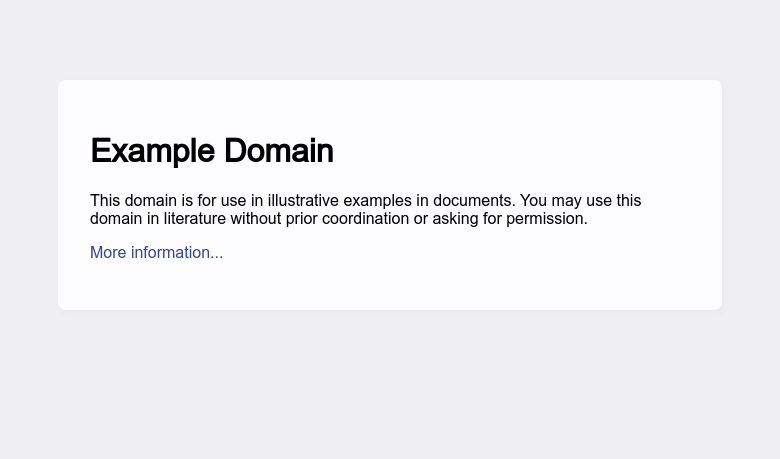
Bạn có thể chụp ảnh màn hình của trang mục tiêu và trả về
một hình ảnh ở định dạng PNG
hoặc JPEG. Khi kết quả phản hồi được đặt thành PNG hoặc JPEG, bạn có thể sử dụng tham số
input.jsRender.response.options.fullPage=true
để chỉ định liệu kết quả trả về có phải là ảnh chụp toàn trang hay không.
Bằng cách thêm input.jsRender.response.type=png or jpeg vào yêu cầu:
const axios = require('axios');
const fs = require('fs');

(async () => {
    const payload = {
        actor: "unlocker.webunlocker",
        proxy: {
            country: "ANY"
        },
        input: {
            url: "https://www.example.com",
            jsRender: {
                enabled: true,
                response: {
                    type: "png" // png or jpeg
                }
            }
        }
    };

    const response = await axios.post("https://api.scrapeless.com/api/v2/unlocker/request", payload, {
        headers: {
            "x-api-token": "API Key",
            "Content-Type": "application/json"
        },
        timeout: 60000
    });

    if (response.data?.code === 200) {
        fs.writeFileSync('response.png', Buffer.from(response.data.data, 'base64'));
    }
})();Trả về một chuỗi mã hóa base64 ở định dạng PNG hoặc JPEG.
{
    "code": 200,
    "data": "JVBERi0xLjQKJdPr6eEKM..."
}
Tệp ví dụ sau khi lưu ở định dạng png/jpeg:
Network
Khi input.jsRender.response.type=network, tất cả các yêu cầu mạng thuộc loại XHR và fetch sẽ được thu thập trong
quá trình tải trang. Dữ liệu yêu cầu
mạng sau đó được trả về dưới dạng chuỗi JSON đã được escape. Dữ liệu phản hồi này bao gồm URL, phương thức
yêu cầu, mã trạng thái phản hồi, headers, response body, v.v.
Nếu request hoặc response body chứa nội dung nhị phân, response body quá lớn, hoặc dữ liệu không phải văn bản, nội dung
gốc sẽ không được trả về trực tiếp. Thay vào đó, nó được đánh dấu bằng chuỗi giữ chỗ [Preview not available ...]
. Bạn có thể lọc kết quả theo các điều kiện URL, phương thức yêu cầu và mã trạng thái bằng tham số
input.jsRender.response.options.
const axios = require('axios');
const fs = require('fs');

(async () => {
    const payload = {
        actor: "unlocker.webunlocker",
        proxy: {
            country: "ANY"
        },
        input: {
            url: "https://www.example.com",
            jsRender: {
                enabled: true,
                response: {
                    type: "network",
                    options: {
                        "urls": [
                            "/example"
                        ],
                        "status": [
                            200
                        ],
                        "methods": [
                            "get"
                        ]
                    }
                }
            }
        }
    };

    const response = await axios.post("https://api.scrapeless.com/api/v2/unlocker/request", payload, {
        headers: {
            "x-api-token": "API Key",
            "Content-Type": "application/json"
        },
        timeout: 60000
    });

    if (response.data?.code === 200) {
        fs.writeFileSync('response.json', response.data.data, 'utf8');
    }
})();Trả về dữ liệu với chuỗi JSON đã được escape:
{
    "code": 200,
    "data": "[{\"url\":\"https://www.tiktok.com/api/explore/item_list/...]"
}
Kết quả JSON ví dụ sẽ như sau:
[
{
"url": "https://www.tiktok.com/api/explore/item_list/?WebIdLastTime=1752724401&aid=1988&app_language=en&app_name=tiktok_web&browser_language=en&browser_name=Mozilla&browser_online=true&browser_platform=Win32&browser_version=5.0%20%28Windows%20NT%2010.0%3B%20Win64%3B%20x64%29%20AppleWebKit%2F537.36%20%28KHTML%2C%20like%20Gecko%29%20Chrome%2F135.0.0.0%20Safari%2F537.36&categoryType=120&channel=tiktok_web&clientABVersions=70508271%2C73485602%2C73547759%2C73720540%2C73810951%2C73814854%2C73848867%2C73866686%2C73944035%2C73969557%2C73990102%2C74048200%2C74129613%2C74148345%2C74157215%2C74163128%2C74176097%2C74195789%2C74213192%2C74241848%2C70405643%2C71057832%2C71200802%2C72361743%2C73171280%2C73208420&cookie_enabled=true&count=8&data_collection_enabled=false&device_id=7527893946556515853&device_platform=web_pc&enable_cache=true&focus_state=true&history_len=2&is_fullscreen=false&is_page_visible=true&language=en&odinId=7527893969448764429&os=windows&priority_region=&referer=®ion=US&screen_height=1440&screen_width=3440&tz_name=America%2FNew_York&user_is_login=false&webcast_language=en",
"method": "GET",
"resourceType": "fetch",
"status": 200,
"timestamp": 1752724403206,
"payload": null,
"requestReaders": {
"sec-ch-ua-platform": "\"Windows\"",
"referer": "https://www.tiktok.com/explore",
"user-agent": "Mozilla/5.0 (Windows NT 10.0; Win64; x64) AppleWebKit/537.36 (KHTML, like Gecko) Chrome/135.0.0.0 Safari/537.36",
"sec-ch-ua": "\"Google Chrome\";v=\"135\", \"Not-A.Brand\";v=\"8\", \"Chromium\";v=\"135\"",
"sec-ch-ua-mobile": "?0",
"accept": "*/*",
"cookie": "tt_csrf_token=KO5LUsj8-r2G0Lcbmx_RqngSiFd_VRcPiaeY; ttwid=1%7CQapzXhCnEqiLXypjvNK3iX65g9iXPk_Jpj4GGLdqNRY%7C1752724401%7Cfb5daf3940529652ba613376c011e990b0afede828ad52c4e0c14f1c422bea61; tt_chain_token=jIGTF0ppLEuXKFGayjhpyg=="
},
"responseHeaders": {
"access-control-expose-headers": "x-tt-traceflag,x-tt-logid",
"bd-tt-error-code": "0",
"cache-control": "max-age=1800, must-revalidate",
"content-encoding": "br",
"content-length": "30900",
"content-type": "application/json; charset=utf-8",
"date": "Thu, 17 Jul 2025 03:53:23 GMT",
"expires": "Thu, 17 Jul 2025 03:53:23 GMT",
"pragma": "no-cache",
"server": "nginx",
"server-timing": "cdn-cache; desc=HIT, edge; dur=0, origin; dur=0\ninner; dur=387",
"tt_stable": "1",
"x-akamai-request-id": "42a8e99d",
"x-cache": "TCP_MEM_HIT from a23-47-221-69.deploy.akamaitechnologies.com (AkamaiGHost/22.2.0-c471f2b4819e3aa253dfcc21bfdfd452) (-)",
"x-ms-token": "YAOuylbpReZ5gTM1PP8mwsmWMCxWprQ4oHRNuZQgKsADY7HTftSBu6W9raVm6PKyp-1mXt9Q6CIs0BHLRxozI_uNNEOWSvkaxFyunXX-54aBUvkuHBe2id6bY0cB",
"x-tt-logid": "20250717035100C13E2314287BF101E7D9",
"x-tt-trace-host": "0102b37aa413a15dcf9191a3f676ab4b78d5ba03a6d109c921ad21a607e80d7a40dbc340eb8c009458e52488a06a1b874047a91b63eb21ce08d01175dca60742a8bdf12f766710e93ed82ca68be07bf95a053639c5cedca212d37246317d611b65",
"x-tt-trace-id": "00-250717035100C13E2314287BF101E7D9-729F56051B790290-00",
"x-tt-trace-tag": "id=16;cdn-cache=hit;type=static"
},
"responseBody": {
"data": "omitted"
},
"responseSize": 249297,
"error": null
}
]Content
Khi input.jsRender.response.type=content, nó sẽ lọc dữ liệu định dạng JSON từ nội dung trang, phản hồi sẽ được
cố định ở định dạng chuỗi
JSON. Tham số input.jsRender.response.options.outputs cho phép bạn xác định chính xác những loại dữ liệu
cần trích xuất từ nội dung trang đã thu thập, giúp truy xuất hiệu quả chỉ những thông tin cần thiết.
Bằng cách này, bạn có thể giảm thời gian xử lý và tập trung vào dữ liệu
liên quan nhất cho trường hợp sử dụng của mình.
Tất cả các outputs sẽ được trả về nếu input.jsRender.response.options.outputs để trống, các outputs tùy chọn bao gồm:
phone_numbers, headings, images, audios, videos, links, menus, hashtags, emails, metadata, tables,
favicon.
Để biết cách sử dụng chi tiết, hãy xem mã bên dưới.
const axios = require('axios');
const fs = require('fs');

(async () => {
    // Configuration
    const url = "https://api.scrapeless.com/api/v2/unlocker/request";
    const token = "API Key";

    const headers = {"x-api-token": token, "Content-Type": "application/json"};

    const payload = {
        actor: "unlocker.webunlocker",
        proxy: {
            country: "ANY"
        },
        input: {
            url: "https://www.example.com",
            jsRender: {
                enabled: true,
                response: {
                    type: "content",
                    options: {
                        outputs: [
                            "phone_numbers",
                            "headings",
                            "images",
                            "audios",
                            "videos",
                            "links",
                            "menus",
                            "hashtags",
                            "emails",
                            "metadata",
                            "tables",
                            "favicon"
                        ]
                    }
                }
            }
        }
    };

    try {
        const response = await axios.post(url, payload, {headers, timeout: 60000});

        if (response.status !== 200) {
            throw newError(`HTTP Error: ${response.status}`);
        }

        const data = response.data;
        if (data.code !== 200) {
            throw newError(`API Error: ${data}`);
        }

        const content = data.data || '';

        // Save and return result
        fs.writeFileSync('response.json', content, 'utf8');
        console.log('✅ Success! Content saved as response.json');

        returnJSON.parse(content);

    } catch (error) {
        console.error('❌ Error:', error.message);
        throw error;
    }
})()Dưới đây là một số ví dụ:
Emails
Sử dụng CSS selector và biểu thức chính quy để trích xuất các địa chỉ email định dạng chuẩn, chẳng hạn như example@example.com.
{
    "code": 200,
    "data": "{\"emails\":[\"market@scrapeless.com\"]}"
}
Phone Numbers
Sử dụng CSS selector và biểu thức chính quy để trích xuất số điện thoại, tập trung vào các liên kết chứa giao thức tel:.
ví dụ:outputs=phone_numbers
{
    "code": 200,
    "data": "{ \"phone_numbers\": [ \"+1-111-111-111\" ] }"
}
Headings
Trích xuất văn bản tiêu đề từ H1 đến H6 trong HTML.
ví dụ:outputs=headings
{
    "code": 200,
    "data": "{\"headings\":[\"Example Domain\"]}"
}
Images
Trích xuất nguồn hình ảnh từ các thẻ img. Chỉ trả về thuộc tính src.
ví dụ:outputs=images
{
    "code": 200,
    "data": "{\"images\":[\"https://www.scrapeless.com/_next/image?url=%2Fassets%2Fimages%2Ftoolkit%2Flight%2Fimg-2.png&w=750&q=100\"]}"
}
Audios
Trích xuất nguồn âm thanh từ các phần tử source bên trong thẻ audio. Chỉ trả về thuộc tính src.
ví dụ:outputs=audios
{
    "code": 200,
    "data": "{\"audios\":[\"https://example.com/audio.mp3\"]}"
}
Videos
Trích xuất nguồn video từ các phần tử source bên trong thẻ video. Chỉ trả về thuộc tính src.
ví dụ:outputs=videos
{
    "code": 200,
    "data": "{\"videos\":[\"https://example.com/video.mp4\"]}"
}
Links
Trích xuất URL từ các thẻ a. Chỉ trả về thuộc tính href.
ví dụ:outputs=links
{
    "code": 200,
    "data": "{\"links\":[\"https://app.scrapeless.com/landing/guide\",\"https://www.scrapeless.com/en\",\"https://www.scrapeless.com/en/pricing\",\"https://docs.scrapeless.com/\",\"https://backend.scrapeless.com/app/api\",\"https://www.producthunt.com/posts/scrapeless-deep-serpapi\",\"https://www.g2.com/products/scrapeless/reviews\",\"https://www.trustpilot.com/review/scrapeless.com\",\"https://slashdot.org/software/p/Scrapeless/\",\"https://tekpon.com/software/scrapeless/reviews/\",\"https://www.scrapeless.com/en/product/deep-serp-api\",\"https://www.scrapeless.com/en/product/scraping-browser\",\"https://www.scrapeless.com/en/product/scraping-api\",\"https://www.scrapeless.com/en/product/universal-scraping-api\",\"https://www.scrapeless.com/en/solutions/e-commerce\",\"https://www.scrapeless.com/en/solutions/seo\",\"https://www.scrapeless.com/en/solutions/real-estate\",\"https://www.scrapeless.com/en/solutions/travel-hotel-airline\",\"https://www.scrapeless.com/en/solutions/social-media\",\"https://www.scrapeless.com/en/solutions/market-research\",\"https://www.scrapeless.com/en/blog\",\"https://www.scrapeless.com/en/blog/deep-serp-api-online\",\"https://www.scrapeless.com/en/blog/scrapeless-web-scraping-toolkit\",\"https://www.scrapeless.com/en/blog/google-shopping-scrape\",\"https://backend.scrapeless.com/app/api/v1/public/links/github\",\"https://backend.scrapeless.com/app/api/v1/public/links/youtube\",\"mailto:market@scrapeless.com\",\"https://www.scrapeless.com/en/ai-agent\",\"https://browserless.scrapeless.com/\",\"https://www.scrapeless.com/en/solutions/temu\",\"https://www.scrapeless.com/en/solutions/walmart\",\"https://www.scrapeless.com/en/solutions/shopee\",\"https://www.scrapeless.com/en/solutions/lazada\",\"https://www.scrapeless.com/en/solutions/amazon\",\"https://www.scrapeless.com/en/solutions/google-trends\",\"https://www.scrapeless.com/en/solutions/google-search\",\"https://www.scrapeless.com/en/solutions/airbnb\",\"https://www.scrapeless.com/en/solutions/scoot\",\"https://www.scrapeless.com/en/solutions/latam\",\"https://www.scrapeless.com/en/solutions/localiza\",\"https://www.scrapeless.com/en/solutions/tiktok\",\"https://www.scrapeless.com/en/solutions/instagram\",\"https://www.scrapeless.com/en/integration\",\"https://www.scrapeless.com/en/faq\",\"https://www.scrapeless.com/en/glossary\",\"https://www.scrapeless.com/en/legal/privacy-policy\",\"https://www.scrapeless.com/en/legal/terms\",\"https://www.scrapeless.com/en/legal/terms#refund-policy\",\"https://www.scrapeless.com/en/legal/check-your-data\",\"https://backend.scrapeless.com/app/api/v1/public/links/discord\"]}"
}
Menus
Trích xuất các mục menu từ các phần tử li bên trong thẻ menu.
ví dụ:outputs=menus
{
    "code": 200,
    "data": "{\"links\":[ \"Coffee\", \"Tea\", \"Milk\" ]}"
}
Hashtags
Trích xuất các định dạng hashtag bằng biểu thức chính quy để khớp với các mẫu hashtag điển hình, chẳng hạn như #example.
ví dụ:outputs = hashtags
{
    "code": 200,
    "data": "{\"hashtags\":[\"#docsearch\",\"#search\"]}"
}
Metadata
Trích xuất thông tin meta từ các thẻ meta trong phần head, trả về các thuộc tính name và content theo
định dạng name: content.
ví dụ:outputs=metadata
{
    "code": 200,
    "data": "{\"metadata\":[\"viewport: width=device-width, initial-scale=1\",\"description: Scrapeless is the best full-stack web scraping toolkit offering Scraping API, Agent Browser\"]}"
}
Tables
Trích xuất dữ liệu từ các phần tử bảng và trả về dữ liệu bảng ở định dạng JSON, bao gồm kích thước, tiêu đề và nội dung.
ví dụ:outputs=tables
{
    "code": 200,
    "data": "{\"tables\":[{\"dimensions\":{\"rows\":7,\"columns\":3,\"heading\":true},\"heading\":[\"Company\",\"Contact\",\"Country\"],\"content\":[{\"Company\":\"Alfreds Futterkiste\",\"Contact\":\"Maria Anders\",\"Country\":\"Germany\"},{\"Company\":\"Centro comercial Moctezuma\",\"Contact\":\"Francisco Chang\",\"Country\":\"Mexico\"},{\"Company\":\"Ernst Handel\",\"Contact\":\"Roland Mendel\",\"Country\":\"Austria\"},{\"Company\":\"Island Trading\",\"Contact\":\"Helen Bennett\",\"Country\":\"UK\"},{\"Company\":\"Laughing Bacchus Winecellars\",\"Contact\":\"Yoshi Tannamuri\",\"Country\":\"Canada\"},{\"Company\":\"Magazzini Alimentari Riuniti\",\"Contact\":\"Giovanni Rovelli\",\"Country\":\"Italy\"}]},{\"dimensions\":{\"rows\":11,\"columns\":2,\"heading\":true},\"heading\":[\"Tag\",\"Description\"],\"content\":[{\"Tag\":\"<table>\",\"Description\":\"Defines a table\"},{\"Tag\":\"<th>\",\"Description\":\"Defines a header cell in a table\"},{\"Tag\":\"<tr>\",\"Description\":\"Defines a row in a table\"},{\"Tag\":\"<td>\",\"Description\":\"Defines a cell in a table\"},{\"Tag\":\"<caption>\",\"Description\":\"Defines a table caption\"},{\"Tag\":\"<colgroup>\",\"Description\":\"Specifies a group of one or more columns in a table for formatting\"},{\"Tag\":\"<col>\",\"Description\":\"Specifies column properties for each column within a <colgroup> element\"},{\"Tag\":\"<thead>\",\"Description\":\"Groups the header content in a table\"},{\"Tag\":\"<tbody>\",\"Description\":\"Groups the body content in a table\"},{\"Tag\":\"<tfoot>\",\"Description\":\"Groups the footer content in a table\"}]}]}"
}
Favicon
Trích xuất URL favicon từ phần tử link trong phần head của HTML.
ví dụ:outputs=favicon
{
    "code": 200,
    "data": "{\"favicon\":\"https://www.scrapeless.com/favicon.ico\"}"
}
Kiểm soát tài nguyên
Hệ thống kiểm soát tải tài nguyên để tối ưu hóa hiệu suất và mức sử dụng băng thông.
{
  "actor": "unlocker.webunlocker",
  "proxy": {
    "country": "ANY",
    "url": ""
  },
  "input": {
    "url": "string",
    "jsRender": {
      "enabled": true,
      "block": {
        "resources": [
          "Image",
          "Font",
          "Stylesheet",
          "Script"
        ],
        "urls": [
          // Optional, URL pattern-based blocking
          "*.analytics.com/*",
          "*/ads/*"
        ]
      }
    }
  }
}
Tham chiếu đầy đủ các loại tài nguyên:
| Loại tài nguyên | Mô tả | Tác động |
|---|---|---|
Document | Tài liệu chính và iframe | Nội dung trang cốt lõi |
Stylesheet | Tệp CSS | Kiểu dáng và bố cục trang |
Image | Hình ảnh và biểu tượng | Nội dung hình ảnh |
Media | Tài nguyên âm thanh và video | Nội dung đa phương tiện |
Font | Web font | Kết xuất văn bản |
Script | Tệp JavaScript | Chức năng trang |
TextTrack | Phụ đề video | Khả năng tiếp cận media |
XHR | Lệnh gọi XMLHttpRequest | Yêu cầu bất đồng bộ cũ |
Fetch | Yêu cầu Fetch API | Yêu cầu bất đồng bộ hiện đại |
Prefetch | Tài nguyên được prefetch | Tối ưu hóa hiệu suất |
EventSource | Server-sent events | Cập nhật thời gian thực |
WebSocket | Kết nối WebSocket | Giao tiếp hai chiều |
Manifest | Web app manifest | Cấu hình PWA |
SignedExchange | Signed HTTP exchange | Tính xác thực nội dung |
Ping | Yêu cầu ping | Phân tích và theo dõi |
CSPViolationReport | Báo cáo vi phạm CSP | Giám sát bảo mật |
Preflight | Yêu cầu preflight CORS | Bảo mật cross-origin |
Other | Tài nguyên chưa phân loại | Khác |
Ví dụ sử dụng:
{
  "actor": "unlocker.webunlocker",
  "proxy": {
    "country": "ANY",
    "url": ""
  },
  "input": {
    "url": "string",
    "jsRender": {
      "enabled": true,
      "block": {
        "resources": [
          "Image",
          "Font",
          "Stylesheet",
          "Script",
          "Media",
          "Ping",
          "Prefetch"
        ]
      }
    }
  }
}
Thực hành tốt nhất cho việc chặn tài nguyên:
-
Tối ưu hóa hiệu suất
- Sử dụng chức năng chặn tài nguyên một cách khôn ngoan, chặn các tài nguyên không thiết yếu để tải nhanh hơn
- Cân nhắc chặn
PrefetchvàPingđể giảm mức sử dụng mạng - Giữ cho các tài nguyên
DocumentvàScriptquan trọng không bị chặn
-
Quản lý băng thông
- Chặn
ImagevàMediacho các trang tiêu tốn nhiều băng thông - Cân nhắc chặn
Fontđể sử dụng font hệ thống thay thế
- Chặn
-
Tăng cường độ ổn định
- Triển khai cơ chế thử lại yêu cầu
- Thêm logic xử lý lỗi
- Sử dụng
waitForthay vìwaitcố định
-
Hiệu quả tài nguyên
- Tải tài nguyên theo nhu cầu
- Đóng các kết nối không cần thiết kịp thời
Lưu ý: Chuỗi loại tài nguyên phân biệt chữ hoa chữ thường. Sử dụng đúng khớp như trong bảng tham chiếu.